You've got R open, a page full of prices or listings in your browser, and a script that just returned an empty tibble. The status was 200 OK, the selector looked right in DevTools, and yet every column is blank. That isn't bad luck, that's the normal failure mode for Web Scraping Using R, and you should plan for it from the first request.
The fix isn't a bigger package list. It's deciding where the data comes from before you choose a tool, then validating rows as if silence is the expected error. Get that order right and most scrapers become short, boring, and reliable.
Pick the Right R Package for Each Job
Start with rvest for any page whose data appears in the HTML after load. Move to a heavier tool only when that first request fails. The rvest package description on CRAN covers downloading, parsing, and extracting elements from HTML and XML, which is exactly the static case.
Don't install eight packages hoping one sticks. Each one owns a layer, and most jobs need only three.
| Package | Role | Best for | Main limit |
|---|---|---|---|
| rvest | Reads, selects and extracts HTML and XML | Static pages, tables, lists of items | Cannot run JavaScript; wraps xml2 and httr |
| httr2 | Builds and sends HTTP requests | Headers, cookies, JSON POST bodies, retries | You write the parsing yourself |
| httr | Older HTTP client | Legacy scripts you inherit | Superseded by httr2 for new code |
| xml2 | Parses XML and HTML trees with XPath | RSS feeds, namespaced XML, broken markup | Lower-level API; rvest covers most HTML work |
| jsonlite | Parses JSON into lists and data frames | Public APIs and embedded JSON | Deeply nested responses need flattening |
| RSelenium | Drives a real browser through Selenium | Clicks, logins, infinite scroll | Slow; needs a Selenium server and matching driver |
| V8 | Runs JavaScript inside R | Evaluating JS object literals from script tags | No DOM and no browser APIs |
| polite | Wraps sessions with robots checks and delays | Repeated crawls of one host | Delays add time you may not need on an open API |
How the layers fit
rvest sits on xml2 for parsing and httr for requests, so most scrapers never call xml2 directly. You drop down a layer only for namespaced XML, odd feeds, or markup that rvest defaults mangle. httr2 is separate deliberately, it's how you control the request itself before any parsing starts.
Practical rule: If you can't name the layer that's failing, request, parse, or render, you don't yet know which package to add.
Run a three-question test that takes two minutes. Does the data show with JavaScript turned off? Does the page call a JSON endpoint? Does it need a click or scroll before the data appears? The first yes points to rvest, the second to httr2 plus jsonlite, the third to a browser.
For most projects, install rvest plus httr2 plus jsonlite. Add polite for repeated crawls of one host, V8 for script tag literals, and one browser package only when the test says so.
How to Scrape a Static Page in Six Steps
Take a category page listing 40 products across three pages. It's a small job, but it contains every failure that breaks larger ones. Work it in order and don't skip ahead to selectors.
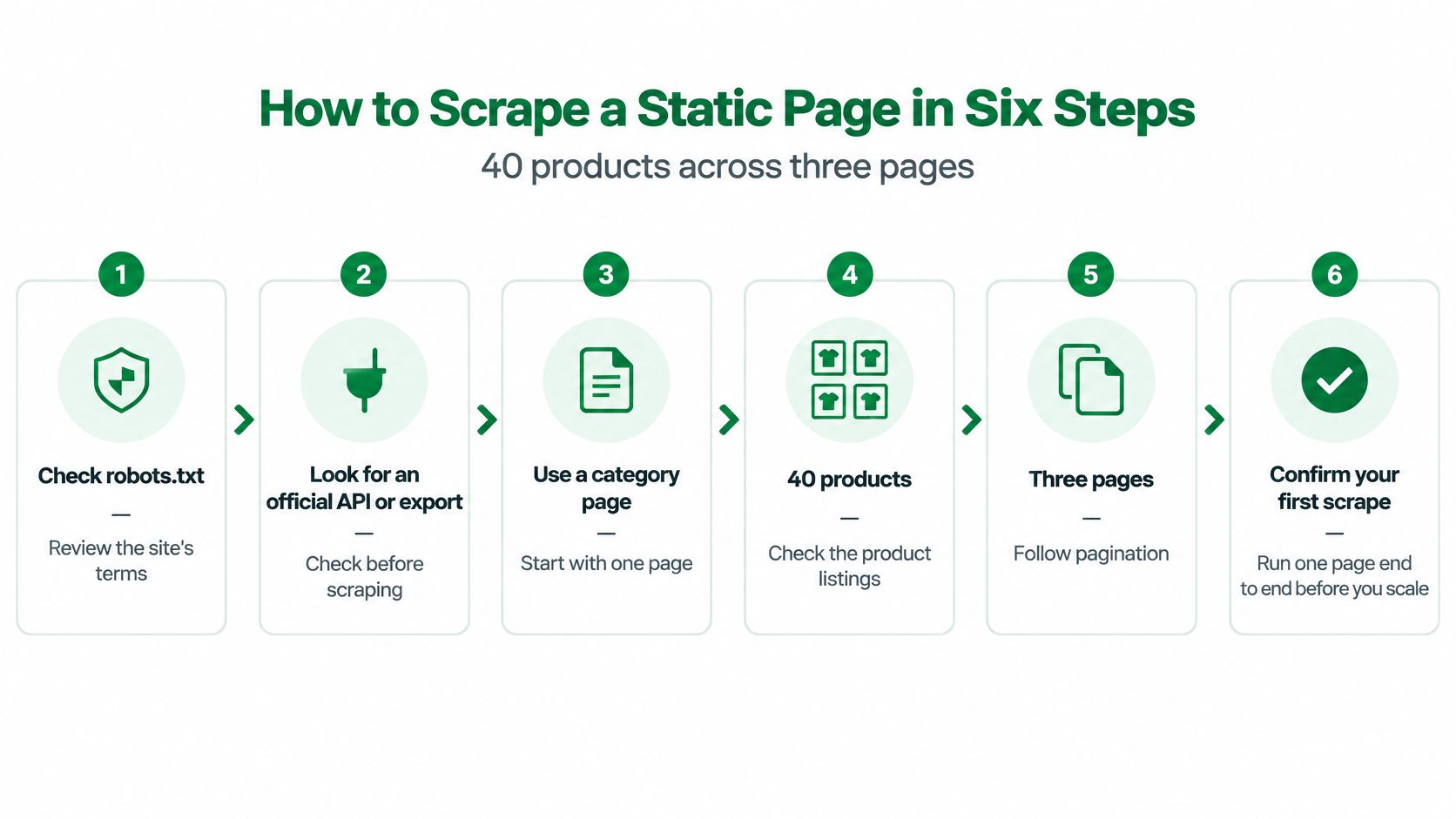
1. Check permission and look for an easier source. Inspect robots.txt and the site's terms, then look for an official API or export before writing code, because the cheapest scrape is the one you never run. Staged guidance on checking terms and robots.txt before scraping puts this identification step ahead of any request design.
2. Identify yourself and set a pace. Set an identifiable User-Agent and a delay of about one second with httr2, since read_html() on its own sends no custom headers. Enforce a stated Crawl-delay when one exists, and treat one request per second as the conservative starting point when it doesn't.
Save first, parse second
3. Cache every response. Save each response to disk with its URL and a timestamp, then parse the saved file with read_html(path), so a parser bug never forces a re-download. rvest::read_html() performs the HTTP request and parses through xml2, while polite can preserve a session and apply delays, which is why separating fetch from parse keeps both steps debuggable.
4. Select one container per record. Select cards with html_elements() and a selector such as div.product-card, then use html_element() for one node per card so fields stay aligned. Fall back to XPath such as //td[contains(., 'Price')] when markup has no useful classes. Keep a CSS selector cheat sheet nearby while you test selectors against the saved file, not against the live site.
This is the step that breaks without warning. If you select all prices in one call and one card has no price, you get one node fewer. Every later price shifts onto the wrong product, and no error is raised.
Extract, clean, and count
5. Extract by type. Pull text with html_text2(), attributes with html_attr('href'), and whole tables with html_table(). Check the column count and a few values against the browser before trusting the result.
6. Clean and record provenance. Tidy fields with trimws(), readr::parse_number() for prices, and as.Date() for dates. Write a CSV or Parquet file with source URL, timestamp, and page number columns attached to every row.
40 rows for 40 products is right. 40 rows with 39 prices means your selector is misaligned, even if the script ran clean.
Don't treat robots.txt as complete legal permission either. It expresses crawler preferences, while terms of service, copyright, and personal data obligations stay separate checks. That distinction matters before you scale past one category.
Find Where the Data Really Lives Before You Parse
Run the 30-second check first. Turn off JavaScript in your browser and reload. If the data's still there, it's in the initial HTML and rvest will work.
If it disappears, open the network panel, filter to Fetch/XHR, and reload. The data is often in a JSON response you can request directly, which is cheaper and more stable than rendering. Technical guidance distinguishing static HTML from dynamic sites needing browser automation frames this as a decision about data origin, not a choice between rival packages.
| Source | How to spot it | R route | Main pitfall |
|---|---|---|---|
| Initial HTML | Data appears with JavaScript turned off | rvest read_html() and html_elements() | Breaks when the page renders client-side |
| Embedded JSON | Script tag with NEXT_DATA or window.INITIAL_STATE | rvest to grab the script, then jsonlite or V8 | JS literals are not always valid JSON |
| Network JSON endpoint | Fetch/XHR response in the browser network panel | httr2 request with copied headers, then jsonlite | Needs the same cookie, referer or token |
| Rendered DOM only | Element appears only after scripts run | RSelenium, then rvest on page_source | Slow, fragile and costly to maintain |
Copy the request the browser actually made
A JSON endpoint often needs the same cookie, referer, or token the page sends. Copy the request as cURL from DevTools and convert it with httr2::curl_translate() before writing the R call by hand. Guessing headers one at a time wastes an afternoon.
For embedded data, look for a script tag with an id like NEXT_DATA or a window.INITIAL_STATE assignment. Extract the script text with rvest and parse it with jsonlite::fromJSON(). When strict parsing fails on unquoted keys or trailing commas, V8 can evaluate the literal in place.
Consider a job board showing 25 listings per page where listings come from a JSON endpoint with an offset parameter. One endpoint call replaces 25 card parses per page, and pagination becomes arithmetic. If you're weighing whether to scrape at all, the ProfessionLens guide to professional data sources is useful context for when a licensed source beats maintaining an endpoint someone else controls. For the rendering side, this explainer on dynamic web pages covers why client-side pages return empty nodes to static parsers.
Use a public endpoint when one exists. Render the page only when neither the HTML nor the endpoint holds the field.
Browsers, Sessions and Headers When Pages Fight Back
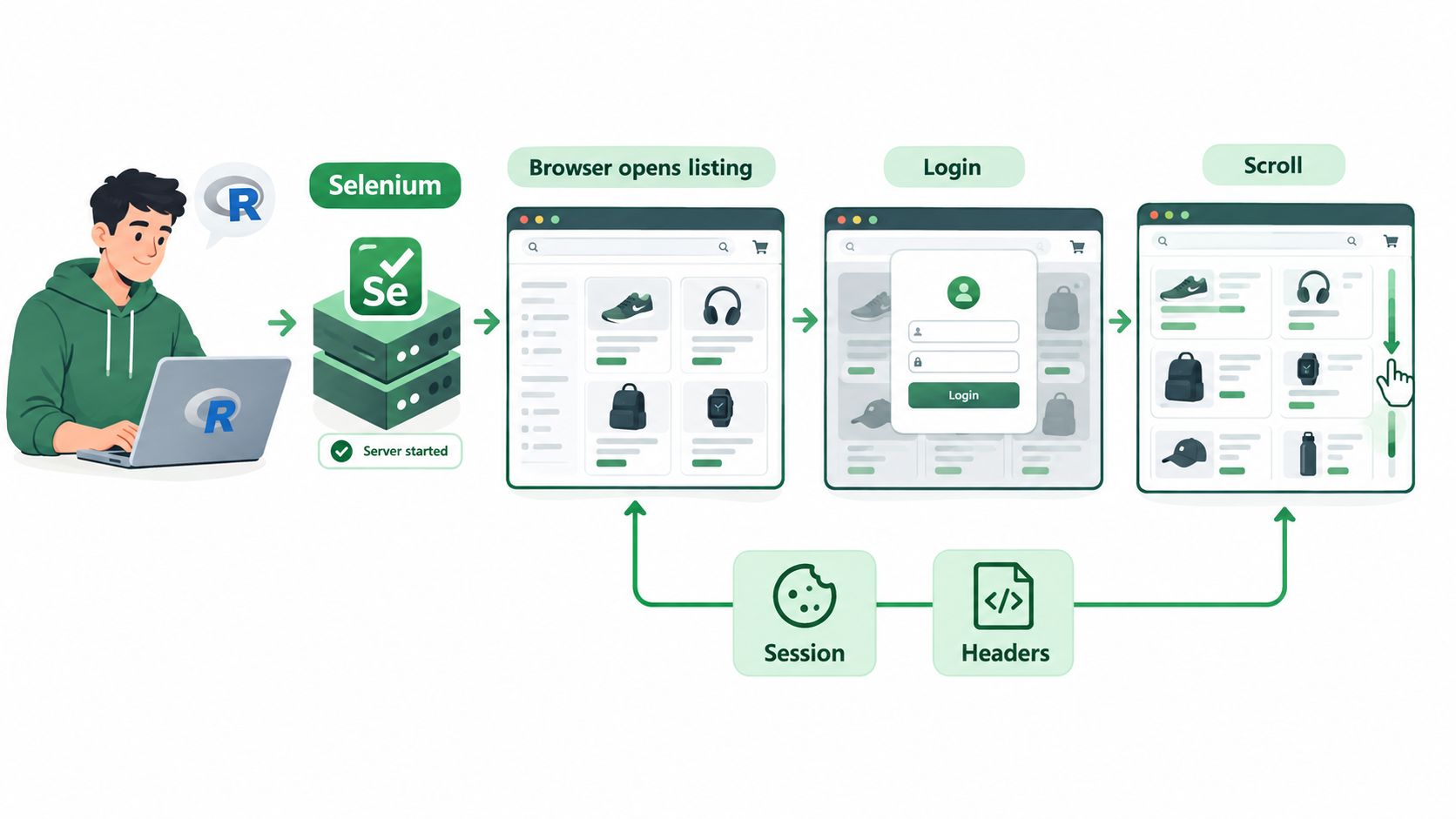
A listing page loads items as you scroll and shows prices only after a login. That single case breaks most first attempts, because the initial HTML holds neither the full list nor the prices.
When neither the HTML nor an endpoint holds the field, a real browser is the fallback.
Drive a real browser, parse the same way
Run a Selenium server in Docker using the selenium/standalone-chrome image, connect with RSelenium, and open pages with the remote driver. Pinning the browser and driver together in one image removes the version mismatch that ruins local installs.
Wait properly. Loop over findElements() every half second and give up after about 15 seconds, then scroll with executeScript() until the item count stops growing. A fixed Sys.sleep() is either too short on a slow load or wasted time on a fast one.
Pass page_source to rvest when you're done scrolling. Your parsing code stays identical to the static route, which means one set of selectors to maintain. Browser automation with RSelenium is established enough to support research-scale collection, a use case covered in this paper on web scraping as a research tool. The route holds up. It's just expensive per page, so reserve it for the pages that need it.
This walkthrough shows the browser automation pattern in action before you wire up your own driver.
Watch the video on YouTubeKeep the session the site gave you
rvest::session() keeps cookies across page jumps, and httr2 cookie handling does the same for API calls. Log in once, reuse that session, and don't rebuild requests from scratch on every page.
Match your headers to the browser you claim to be, including User-Agent and Accept-Language. A Chrome user agent paired with headers no Chrome sends is an easy block. For proxies, pass them through httr2::req_proxy() and rotate only after a block rather than on every request, since constant rotation looks worse than a stable address.
Treat anti-bot challenges as a signal to slow down or stop, not a puzzle to beat. If you don't want to host Selenium yourself, we support full Chrome/Firefox automation through a headless browser, so the rendered HTML comes back to R without a driver to maintain.
Pagination, Rate Limits and Fixing Failed Scrapes
The failure that wastes the most hours returns 200 OK with empty columns. No error, no warning, just a tidy file of nothing. Reliability on large crawls depends more on request control and failure handling than on selector syntax, a point the CRAN crawlee guidance on scaling and politeness makes through its focus on robots.txt, Crawl-delay, max_requests, max_depth, and retries with backoff.
Paginate until empty, not until a number
Loop until a page returns zero results rather than stopping at a fixed page count. Paginate by cursor or stable ID where the site offers one, and deduplicate on URL, because offset pagination shifts when new items appear mid-run.
Start sequentially. Once the server behaves, httr2::req_perform_parallel() with two to four connections is a sensible step, and you raise it only if error rates stay flat. Keep the baseline at about one request per second when the site gives no Crawl-delay. When a 429 arrives, honor Retry-After and back off exponentially from about 2 seconds, the same discipline covered in this guide to API throttling and handling it.
| Symptom | Likely cause | Fix |
|---|---|---|
| 403 Forbidden on the first request | Missing or bot-like User-Agent, or an IP block | Send an identifiable User-Agent and browser-like Accept headers; test from another network before adding proxies |
| 429 Too Many Requests after some pages | Rate limit exceeded | Honor Retry-After, back off exponentially from about 2 seconds, and drop to one request per second |
| Redirect to a login page partway through | Session expired | Reuse one cookie-carrying session and log in again before the expiry |
| Duplicate rows across pages | Offset pagination shifted by new items | Paginate by cursor or stable ID, and deduplicate on URL |
| Page count changes between runs | Loop stopped at a fixed page number | Stop on an empty result page instead of a fixed count |
| Malformed or truncated HTML | Broken markup or a partial response | Check status and byte size, then re-fetch the quarantined URL |
Record HTTP status, URL, timestamp, response hash, and parser version for every page. Validate expected fields before writing outputs, with assertions such as a minimum row count and a non-null key field check, then quarantine failed pages for reprocessing instead of letting them into the dataset.
Report retrieval, parse, and validation success as three separate numbers, never one undifferentiated scrape rate. Set a stop threshold too, for example halting when more than 5% of pages fail validation. A run you stop early is cheaper than a dataset you discover is rotten next month.
Legal, Ethical and Storage Rules for R Scrapers
A clean robots.txt doesn't make a scrape lawful. It states crawler preferences, while terms of service, copyright, and personal data rules are separate checks you still have to pass.
European guidance, including the CNIL sheet on legitimate interest and web scraping measures, sets the practical test, publicly visible personal data still needs a lawful basis, a stated purpose, and data minimization. For a broader jurisdictional overview, the HarvestMyData guide to scraping legality is a sensible companion read before a project leaves your laptop.
In your R script, that means dropping fields you don't need before saving, such as names, profile photos, or contact details. Hash or pseudonymise identifiers you need for joins. Flag any column that looks sensitive so a human reviews it before reuse.
Keep the record set that makes it auditable
- Provenance per record: source URL, timestamp, HTTP status, query parameters, and a hash of the raw response
- Parser version: the code version that produced each output row, so changes are traceable
- Immutable raw store: raw responses in a folder you never edit, with the clean dataset built from it
- Purpose on file: the reason for collection, recorded with the data itself
Build the deletion path before anyone asks for it. Keep a list of excluded domains and individuals checked before each run, plus a script that removes records and raw snapshots on request.
Scraped data often gets reused later for AI training, marketing, or resale, which changes the risk profile after collection. Record the purpose with the data so a later reuse triggers a fresh decision, not an accident.
Honor a site's technical refusal even when the data looks public, and don't work around login walls. We state that we fetch publicly accessible content and do not circumvent authentication walls, and that users must follow applicable laws and site terms. Hold your own scripts to the same line.
Confirm Your First Scrape Before You Scale
Run one page end to end before you scale. Add rate control, pagination, and concurrency only after that page passes.
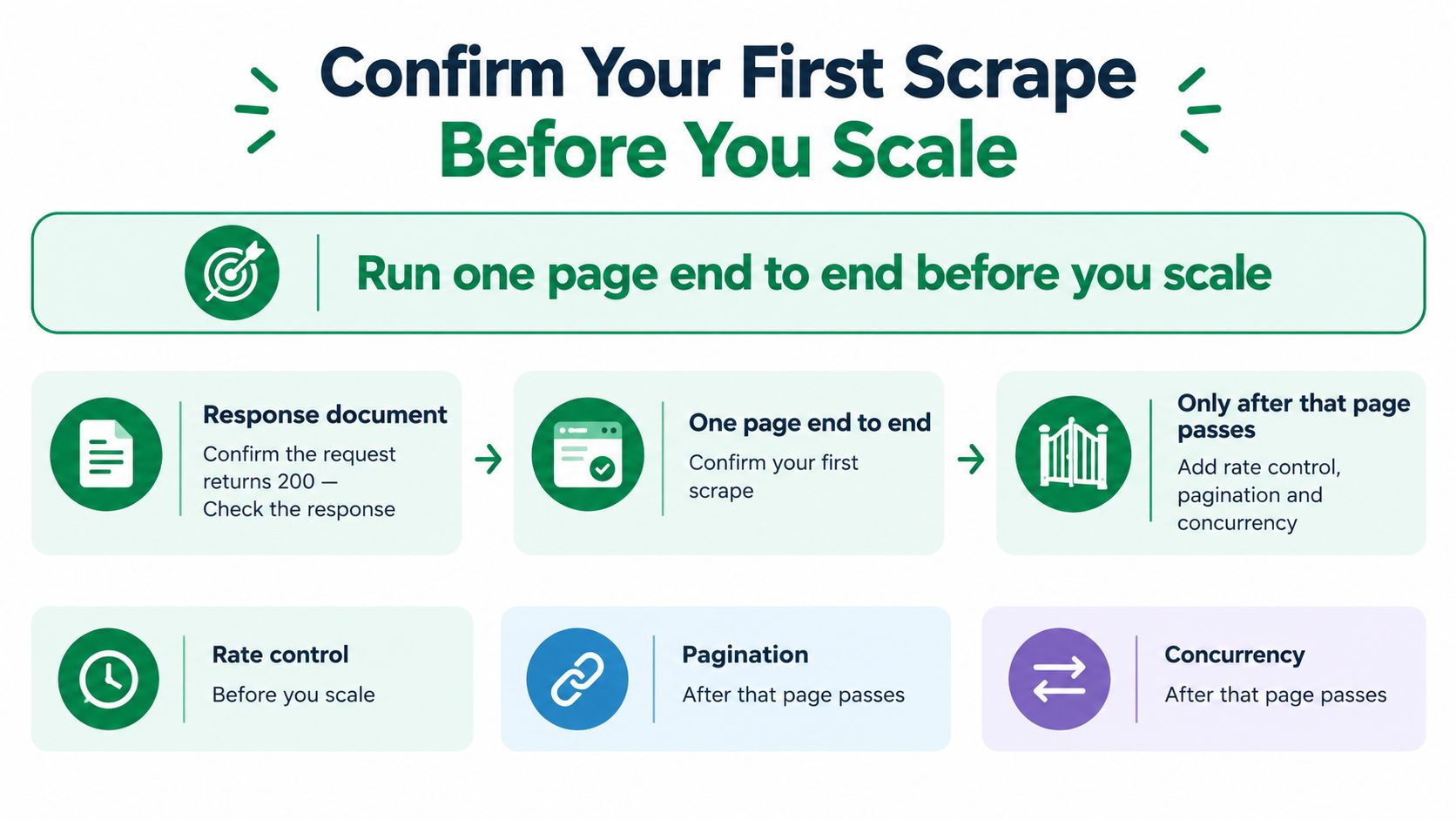
- Response check: confirm the request returns 200 and the expected byte size
- Field check: confirm key fields are non-null in at least 98% of rows
- Eyeball check: compare three random rows against the browser
- Repeat check: run the same page twice and confirm output matches apart from timestamps
- Snapshot check: save the raw HTML so later parser changes can be tested against it
Keep the scraper in-house when you cover one or two sites, the data is static or comes from an open JSON endpoint, and you can keep selectors current. That's the cheap, fully controlled route.
Move to a hosted API when you need many JavaScript-heavy sites with proxies, or when maintenance is eating your week. Our endpoint accepts a key and a JSON payload over plain HTTP, so it works with any language that can make a request, and httr2 can call it without a dedicated SDK. We offer 150 free scrapes to start, so you can run the same page through both routes and compare outputs before committing.
Pick one page from your project and run the checklist today. Write down three numbers, rows, non-null key fields, and retrieval rate. Those numbers, not a clean console, tell you whether you're ready to scale.
When a page defeats rvest and you'd rather not run Selenium, proxies, and a headless browser yourself, Scrappey returns the rendered HTML from one HTTP request that httr2 can send today. Run your checklist page through it, compare the three numbers against your local script, and keep whichever route passes.