Automated traffic reached 51% of all web traffic in 2024, overtaking human traffic for the first time in a decade, Thales reported when it announced the 2025 Imperva Bad Bot Report. More than half of the requests arriving at a typical site now come from something other than a person clicking a link.
That changes the design question. Bot defenses aren't a moat around a castle. They're a gate making thousands of decisions a minute about which clients deserve an answer, and every one of those decisions lands on real customers as well as on scrapers.
Most writing on anti bot protection treats a block as a win and never counts what the block costs on the other side of the gate. The more useful framing treats friction as a line item, the way you'd treat latency or bandwidth: something you budget, measure and justify.
The Five Anti Bot Protection Layers at a Glance
Imperva's 2024 Bad Bot Report, built from traffic across its global network during 2023, recorded bots at 49.6% of all internet traffic, the highest level since its monitoring began in 2013. Malicious bots alone accounted for 32%, up from 30.2% in 2022 and 20.4% in 2018, five consecutive years of growth, per the Thales summary of the Imperva 2024 Bad Bot Report. Exposure isn't evenly spread: bad bots made up 71% of traffic in Ireland and 35.4% in the United States, and gaming carried the highest sector share at 57.2%.
Think of a protected site as an airport. A traveler passes an ID check at the curb, then a bag scanner, then a body scanner, then a gate agent, then passport control on arrival. No single checkpoint is trusted with the whole judgment, and each one catches a different kind of failure. Someone who clears the ID check can still be carrying something the X-ray will find.
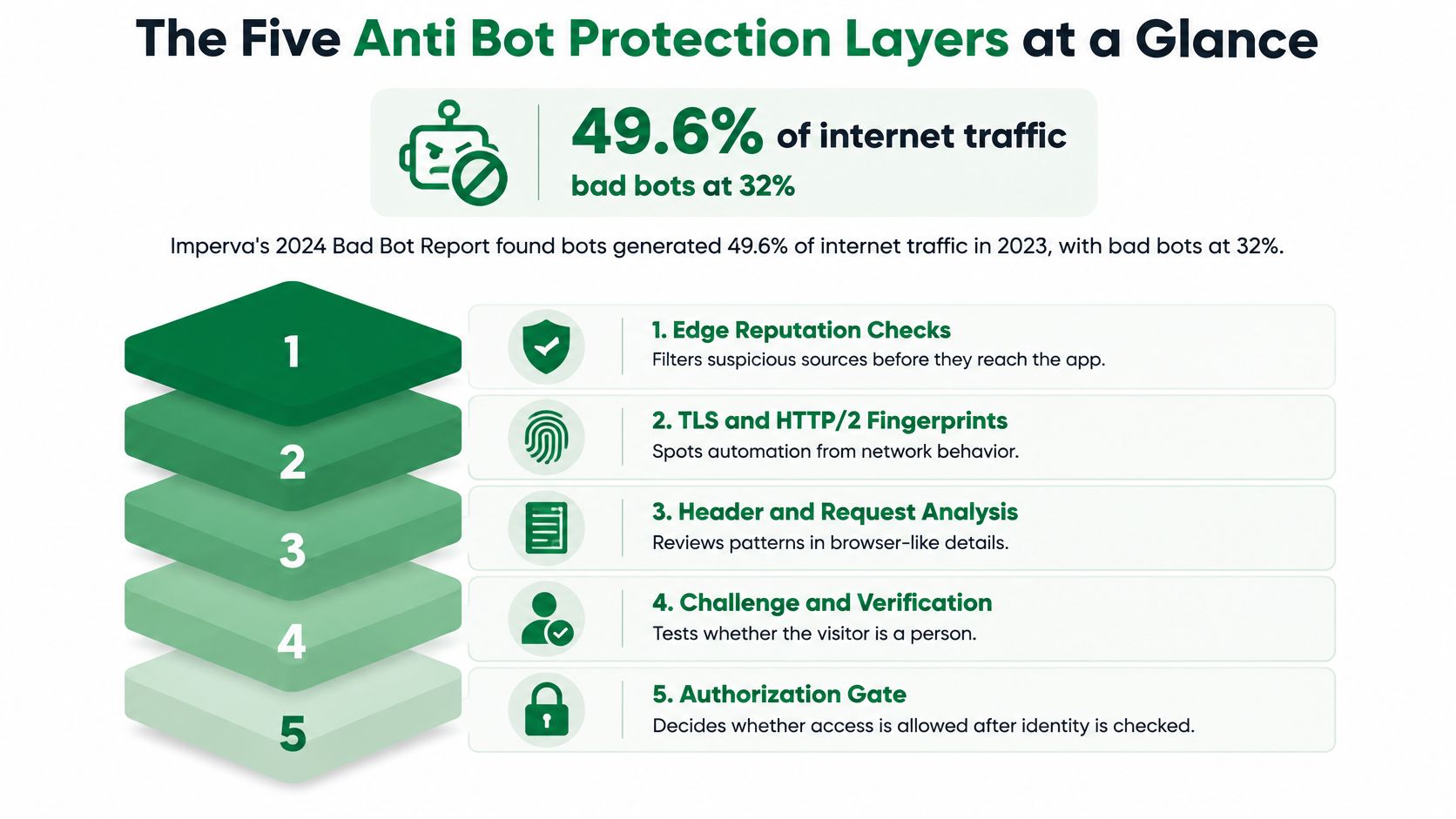
Request rate alone shows why one control can't carry the job. A search crawler fetching a page every second and a credential-stuffing script trying a login every second produce the same number. Only context separates them. Site owners and the developers crawling them end up tuning the same stack from opposite sides, and a guide to firewalls and proxies for successful web scraping covers the proxy half of that equation.
| Defense | What It Checks | Friction for Real Users | Main Weakness |
|---|---|---|---|
| CAPTCHA | Whether a human solves a visual or interactive puzzle | High, adds seconds per visit and can fail for some users | Solver services and automated tools pass many puzzles |
| Rate limits | Request counts per IP, session or key within a time window | Low for normal browsing, but can catch shared IPs behind one network | Residential proxies spread requests across many IPs |
| Device and browser fingerprinting | TLS, HTTP/2, browser APIs, fonts and hardware signals | None visible to the user | Automation can imitate common browser fingerprints |
| Behavioral analytics | Mouse movement, timing, scroll depth and navigation order | None unless the session is flagged | Slow, patient bots can look close to real visitors |
| WAF rules | Known attack signatures, malicious payloads and route-specific policies | Low when tuned, high when rules are too broad | Only as good as the rules; new patterns pass unnoticed |
Take inventory before you add anything. Write down which of the five layers your site runs today, and be honest about how each one is tuned. If the list has a single entry, that one control is your entire exposure, and you've just found the cheapest place to start.
How Detection Tells Bots From People
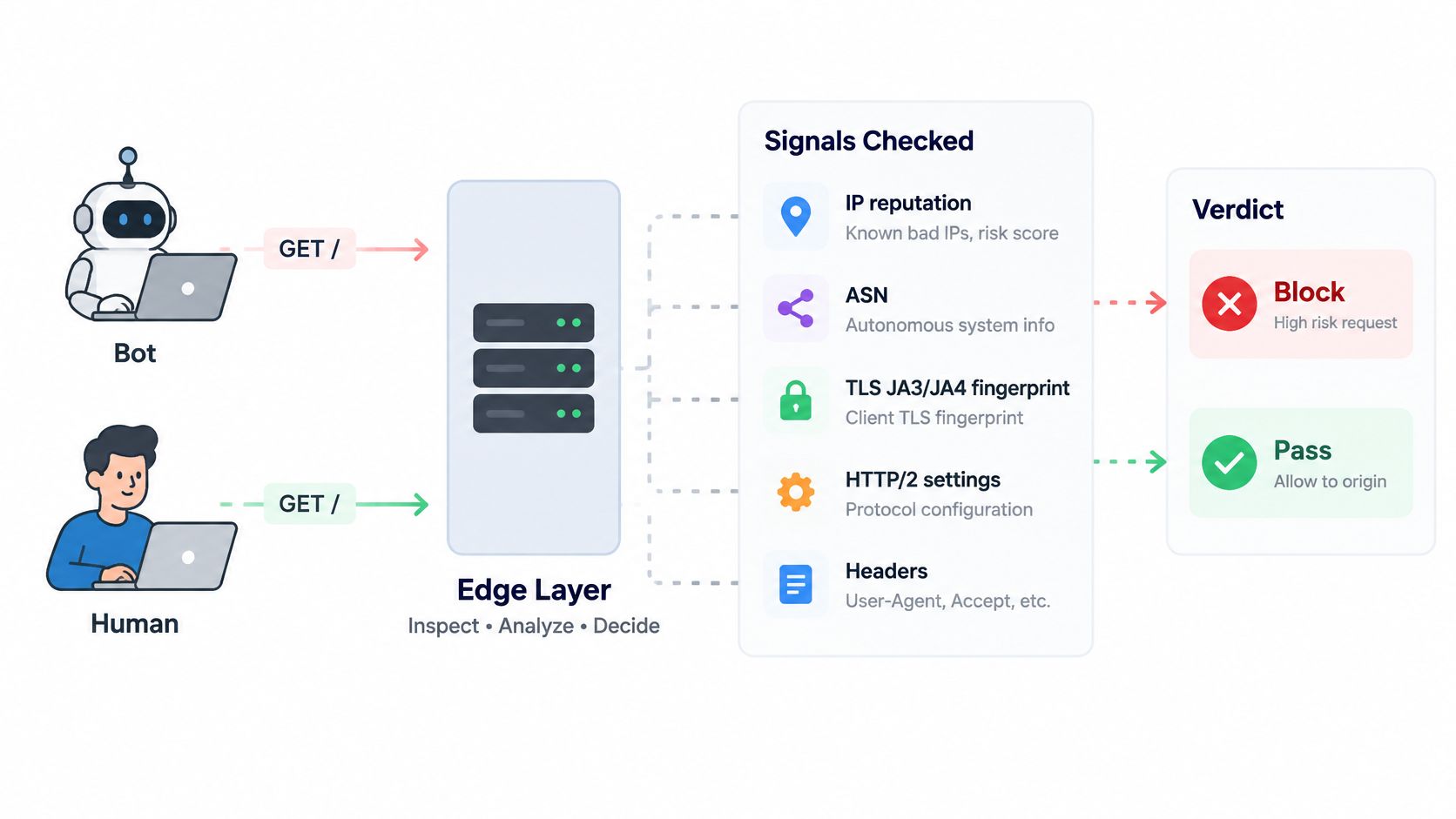
A request announces a great deal about itself before your application code runs. The edge reads the source IP and its autonomous system number, then the TLS handshake fingerprint, then the HTTP/2 settings and header order, then cookies and session history, then whatever JavaScript execution reveals about the browser. Each step narrows the guess, and none of them is conclusive on its own.
A score, not a verdict
Cloudflare documents a 1 to 99 bot score built from exactly these features: headers, session characteristics and browser signals. Lower values mean a higher likelihood of automation, and scores below 30 are commonly associated with bot traffic, according to Cloudflare's bot management reference architecture. Its detection model analyzes an average of more than 46 million HTTP requests per second in real time, which is the point of the score: patterns that are invisible to one site's local rules show up across a large, diverse sample.
A bank teller works the same way. They don't hand your account over because one document looks right. They weigh the card, the signature, the photo, the account history and the way you answer a question, then decide how much verification the transaction deserves.
The score matters most against automation that borrows home connections. A deny list built on IP reputation can't separate a scraped listing from a genuine shopper when both arrive from residential ranges, while a multi-signal score degrades gracefully instead of failing at the first lookalike.
| Bot Score Range | What It Signals | Typical Action |
|---|---|---|
| Below 30 | Commonly associated with bot traffic | Challenge or block on high-value endpoints only |
| 30 to 99 | Lower likelihood of automation | Allow; monitor or rate-limit middle scores |
Here's the mechanics of that mapping in practice, including the graduated actions that keep a low score from being treated as proof.
Watch the video on YouTubeThe operational half is logging. Retain the score, the score source, the detection tags, the route and the response action for every decision, then measure challenge-pass rates, false positives and endpoint-specific conversion before you move a threshold. Treat the number as a risk signal for policy, never as proof that a given request is malicious, because some of the traffic you most want to keep will score badly on a bad day.
Practical rule: if you can't reconstruct why a request was challenged three weeks later, you can't defend the decision to the customer it blocked.
Rate Limits and Challenges Escalate by Risk
Friction should increase based on evidence, not the calendar. The table below shows the structure that teams typically use: four levels, each with a trigger, an action, and a condition for moving up.
| Risk Level | Trigger Example | Response | Move Up When |
|---|---|---|---|
| Low | Normal browsing within all limits | Allow and log the session | Requests repeat across many routes in a short period |
| Moderate | Short burst above the token-bucket rate on search or listing pages | Rate-limit with delay or a 429 response | The same session exceeds the limit for several consecutive windows |
| High | Login or checkout attempts with a repeated failure pattern | Step-up verification or a CAPTCHA | Challenge pass rates drop or failures repeat for one account |
| Confirmed abuse | Known bad ASN, repeated failed challenges or credential stuffing | Block at the edge for the affected key | Human review finds a false positive, then the rule is relaxed |
Choose the algorithm before the number
OWASP's guidance is to use token-bucket or sliding-window algorithms rather than fixed windows, because a fixed window lets a client send a full quota at the end of one window and another at the start of the next, producing a burst no threshold intended, as set out in the OWASP Bot Management and Anti-Automation Cheat Sheet. The algorithm choice changes the shape of what you allow, so make it deliberately and write down why.
Key each limit to something expensive to rotate
Key limits independently by IP, session or cookie, authenticated identity, endpoint, ASN and geography. IP-only controls are weak against distributed residential traffic, while identity-bound limits hold up after login because creating a new account costs the attacker something. That distinction matters most on auth and API routes: 44% of account-takeover attacks targeted API endpoints in 2023, up from 35% in 2022, and automated threats made up 30% of API attacks, according to the Imperva 2024 Bad Bot Report.
Give sensitive routes several independent buckets. A search route might allow a set number of requests per minute per session, while login attempts get a much tighter cap per account per hour. If you're tuning those numbers by hand, this walkthrough of API throttling and how to handle it covers the practical mechanics.
Keep the puzzle as the last rung
A CAPTCHA belongs at the top of the ladder, not the bottom. OWASP warns that overly difficult client puzzles can deny service to legitimate users, which is the definition of a defense that costs more than it earns. Reserve interactive challenges for sessions that have already failed something cheaper.
Review cadence: every rung should be re-checked against logged challenge-pass rates before any threshold changes, and no threshold should move in the same week as a product launch.
The Hidden Trade-offs of Stronger Detection
A defense can block more automated requests and still make a site worse for the people it serves. Measure both outcomes: how much harmful activity it stops and how much friction it imposes on legitimate visitors.
In 2025, 61.2% of high-traffic websites were completely unprotected against simple automated attacks, while the share classified as fully protected fell from 8.4% in 2024 to 2.8%. Dark Reading reported these figures in its coverage of AI agents and site readiness. The gap points to a measurement problem as well as a protection problem: without tracking both blocked abuse and user impact, a site cannot tell whether a stricter rule is working.
The mix of automated traffic matters, too. Training-related crawlers now make up most AI-bot activity, but their purpose differs from crawlers testing whether a checkout flow works. The first may be collecting pages; the second may be probing a sensitive business process. Those requests can look similar at the network layer, yet call for different responses.
What friction actually costs
Suppose a retailer adds a puzzle to every product page after a pricing scraper appears. Mobile conversion drops in two markets, the internal QA suite that captures page screenshots starts failing, an accessibility audit flags the challenge widget, and a university research group abandons a public dataset. Meanwhile, the scraper continues reading prices through a headless browser. F5 measured scraper traffic at 53.23% of all web traffic in fashion and 49.32% in hospitality, according to its 2025 analysis of scraper bots. A blanket challenge does not necessarily remove the traffic. It can shift the cost to shoppers and other legitimate visitors.
Automation can spend money on retries, solvers, and residential bandwidth. A shopper on a train with a weak signal has no equivalent workaround. That imbalance is easy to miss if a security dashboard counts blocks but not abandoned purchases, failed tests, or inaccessible pages.
The outcomes worth tracking
Choose measures before changing a rule, then review them together:
- Challenge rate by geography and device, to catch rules that impose more friction on visitors with slower connections.
- Abandonment and conversion by route, to see whether a challenge or the surrounding page experience is driving users away.
- Accessibility complaints and support tickets, which can reveal problems that security logs do not capture.
- False-positive review volume, including reports from people who cannot use the site as expected.
- Added latency per request, measured at the edge rather than on a developer's laptop.
- Data-center versus residential traffic mix, to see whether a block changes the traffic reaching the site.
A useful defense balances those measures. If a rule reduces suspicious activity but also raises abandonment or blocks legitimate tools, adjust it rather than treating every additional challenge as a win.
A Layered Defense Checklist for Site Owners
Cheap checks belong where the volume is, which is the edge. Expensive ones belong where the value is, which is login, checkout, search and anything that returns data.
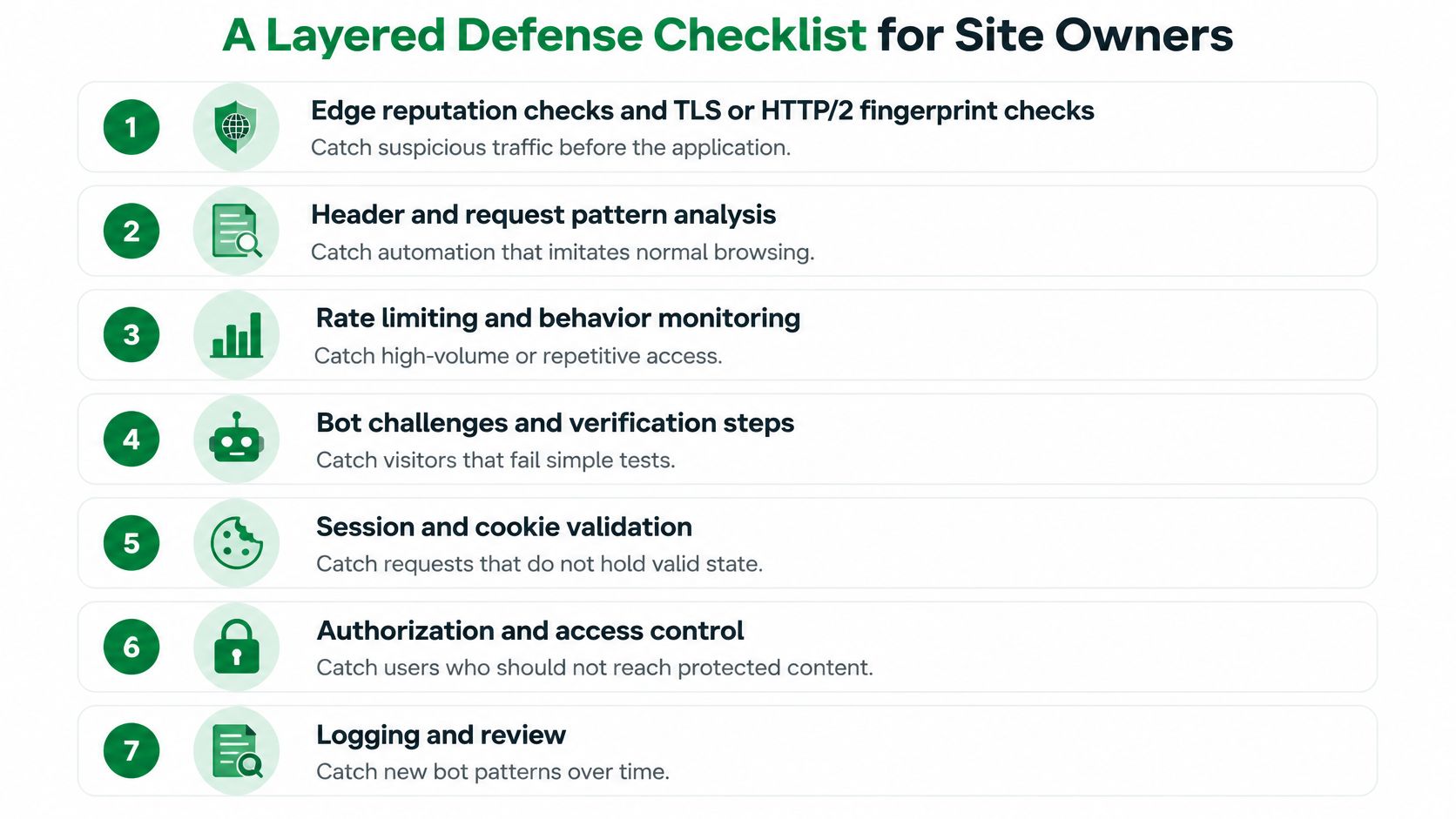
- Edge reputation and fingerprints. Put IP and ASN reputation plus TLS and HTTP/2 fingerprint checks in front of the application, so obvious data-center automation never reaches your code.
- Two tiers of limiting. Coarse limits at the edge, finer quotas per session and authenticated identity inside the application.
- Independent buckets per route. Authentication, checkout, search and API operations each get their own counters, so a burst on one can't hide abuse on another.
- Honeypot fields and endpoints. A hidden input or a link no human can click costs nothing to add, and any request that touches it is automated.
- Challenges triggered by scores. Selective verification from risk scores beats a universal puzzle, because most visitors never see one.
- Full decision logging. Timestamp, route, status, IP, ASN, country, TLS and HTTP/2 fingerprints, user agent, session hash and identity, for every decision, not just the blocks.
- Threshold review at every release. Compare against false-positive reports, abandonment and challenge pass rates before changing a number.
The sequence matters because each layer removes volume before the next one spends effort. Edge checks discard the obvious automation, fingerprinting catches the clients that spoofed their way past reputation, limits absorb the rest of the volume, and only the residue earns a challenge.
Practical note: a honeypot that fires on a logged-in customer is a broken layout, not a bot. Check the field is hidden on every template before you alert on it.
Finally, decide what a blocked visitor sees. Return a clear status code such as 429 with a Retry-After header, write a message a person can read, and give them a route to appeal. A silent blank page generates support load, and the people who complain are the ones you wanted to keep.
Authorize Before You Scrape
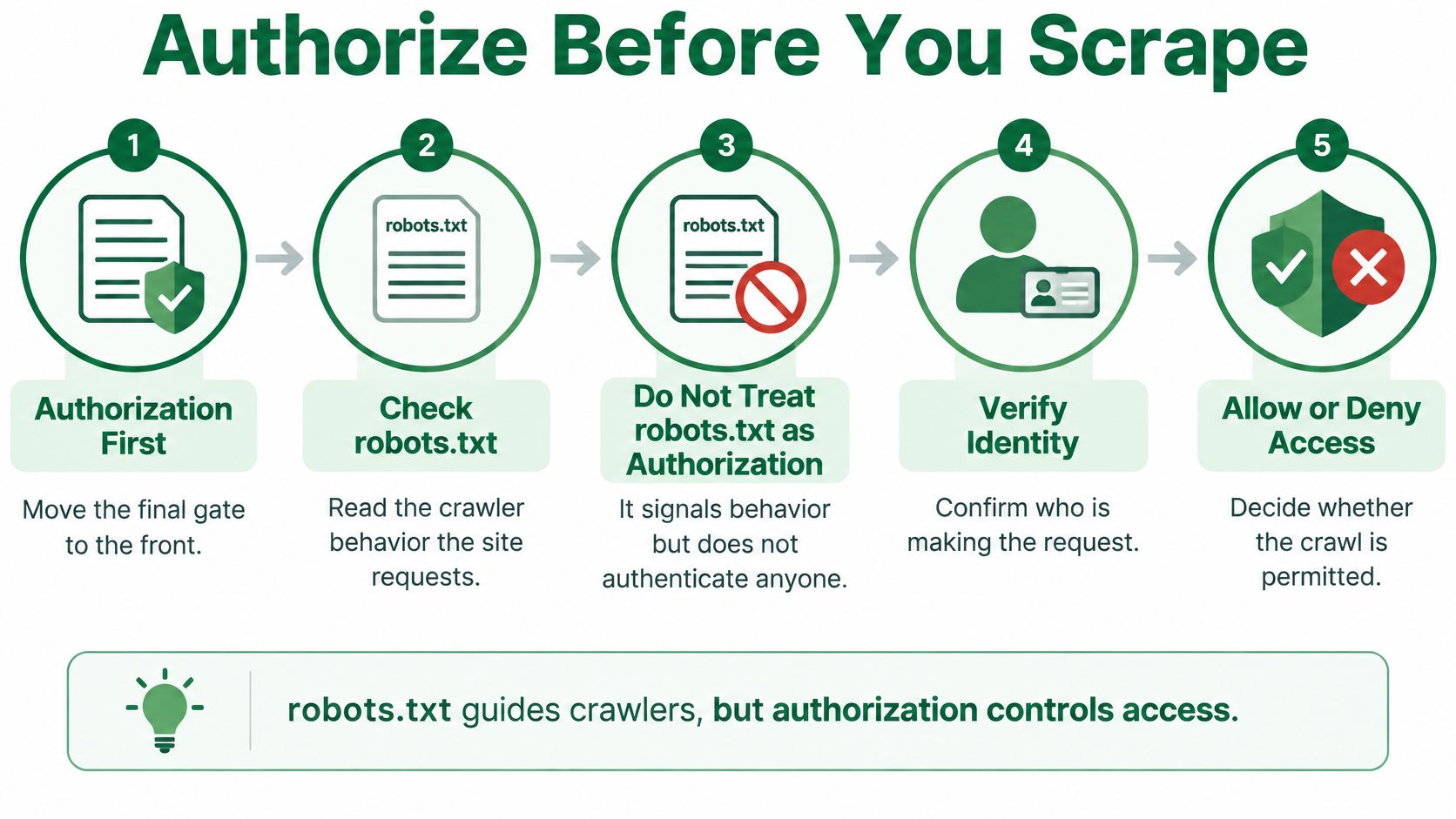
A 403 is a site's access decision, not a technical puzzle to solve with more retries. Before sending requests, check whether the site permits the content and activity you have in mind.
Roughly 30% of global web traffic is bot-generated, according to Cloudflare's analysis of who is crawling your site in 2025. The same analysis found that AI and search crawling together rose 18% from May 2024 to May 2025. Site owners must distinguish not only people from automated requests, but also different purposes for crawling.
robots.txt asks, it doesn't authorize
A robots.txt file communicates which crawler behavior a site requests. It does not authenticate a crawler or grant permission to access a page. Check the file, then review the terms that apply to the bot and URL you intend to use. Scrappey's free Robots.txt Validator lets you test rules against any bot and URL.
Separate search indexing, AI input, AI training, and user-authorized agents in your policy. Permission for one purpose does not automatically cover another. A researcher collecting public pages and an agent acting on a person's behalf may need different rules.
Pace the crawl like a guest
- Set a per-host concurrency limit and request delay. Start slowly, then increase the pace only while responses remain healthy.
- Honor 429 and 503 responses and Retry-After headers. Use exponential backoff rather than sending requests at the same pace.
- Reuse sessions and cookies consistently. Rotating identities to get around limits can look like evasion.
- Pause when a challenge appears. Confirm that the content is public, and do not bypass a login or authentication wall.
- Log status codes, delays, and challenge outcomes. Stop if errors rise instead of treating every failure as a reason to retry.
For practical guidance on pacing and stop conditions, see this guide to web scraping for research. If the information is available through a data feed, using that feed can avoid page-level requests. For example, the Solana Data API provides structured token and pool information.
Then choose a path. If access is clearly permitted, proceed within the site's rules. If permission is unclear, ask the site owner or use an official feed. If access is prohibited, stop rather than working around the block.
Responsibility sits with the scraper: You must obtain proper authorization and permission before scraping any URL or website. Scrappey provides a technical service; it does not grant permission to scrape a particular site. The service is designed to fetch publicly accessible content, not circumvent authentication walls.
Scrappey handles web access infrastructure, while you remain responsible for permission and pacing. Its free Bot Detector helps gauge a target site's complexity before a request. Scrappey's request tiers include proxies, challenge handling, and reliable web access handling in each request. Start with the free trial at Scrappey to assess access to a target you are authorized to query.