The popular advice sounds simple. IPv6 addresses are plentiful, so switch your scraper to an IPv6 pool and scale. That's the advice to reject until you've tested it. A bigger address space doesn't guarantee your target publishes an IPv6 address, routes your provider's prefix, or trusts that range. An IPv6 proxy service can be useful, but only inside a dual-stack design with per-target tests and a working IPv4 fallback.
IPv6 Proxy Service vs IPv4 Proxies at a Glance
An IPv6 proxy service sends requests through IPv6 addresses while the web still runs on both address families. Your target, not your proxy pool, decides which path can complete.
APNIC IPv6 allocation measurements record address blocks assigned to the region. They do not measure whether a visitor, a target, or a proxy prefix speaks IPv6. A large and growing share of users reach the web over IPv6, and IPv4 remains necessary for broad reach. IPv6 increasingly affects reachability, regional coverage, and address scale.
What changes between the two families
| Factor | IPv4 proxy | IPv6 proxy service |
|---|---|---|
| Address supply | Smaller pool, usually priced per address | Very large space, but only routed prefixes count |
| Destination reach | Works with nearly every site | Depends on the target publishing IPv6 and on fallback |
| Protocol translation | Not needed for IPv4 targets | Often needs NAT64 with DNS64 for IPv4-only targets |
| Reputation signals | Long-established ranges with mature scoring | Newer ranges; ASN and prefix checks matter more |
| Typical use | Broad scraping and safe default | Large-scale rotation and IPv6-capable targets, with per-target testing |
Address supply is where IPv6 looks strongest. IPv4 pools are constrained, so providers usually price them per address, while IPv6 offers a far larger space for rotation.
Destination reach cuts the other way. An IPv4 egress can reach almost any public site, but an IPv6 egress depends on the destination publishing an IPv6 address or on a translation layer handling the gap.
Protocol translation adds moving parts. When IPv6 traffic needs to reach an IPv4-only destination, some component must translate addresses and keep session state. That component can become your failure point.
Reputation signals are less settled on IPv6. Targets may score a whole prefix or ASN rather than one address, so rotating to a neighbouring address won't always reset trust.
If you are comparing address families with other proxy types, this guide to the essential proxy types for web scraping explains the trade-offs. In practice, IPv6 is a dual-stack option to test per target, not a universal replacement for IPv4.
How Traffic Moves Through an IPv6 Proxy Service
Think of the proxy as a border post. Your request arrives with one passport, changes documents to cross into the IPv4 world, and the translator keeps a ledger so the reply finds its way back to you.
The diagram below follows that crossing from request to response.
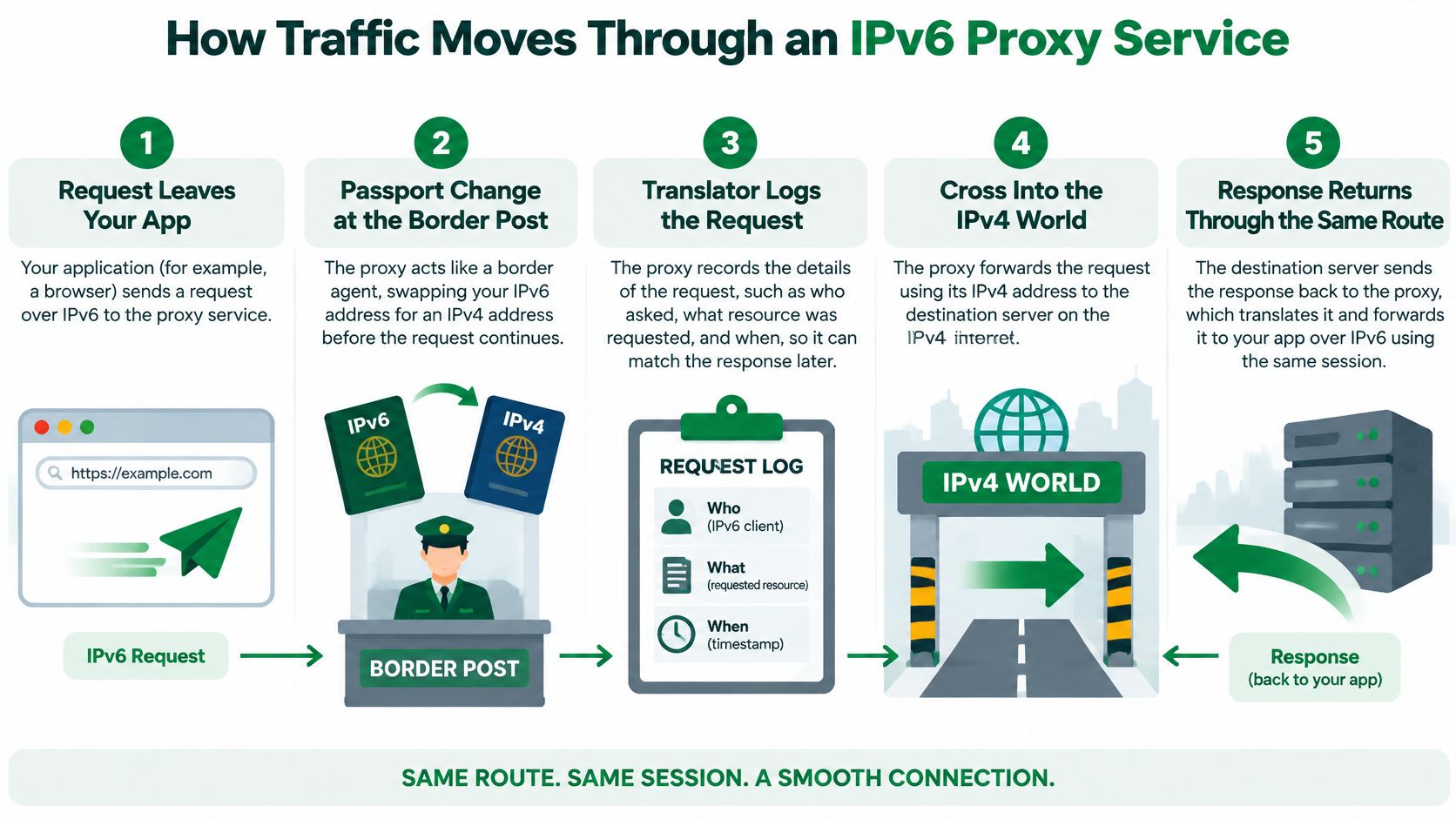
A request in five steps
- Your client sends the request to the proxy over IPv6. Your scraper opens a connection to the proxy endpoint and asks it to fetch the target URL. At this point, nothing has reached the target yet.
- DNS64 synthesizes an IPv6 address for an IPv4-only target. If the destination only publishes an IPv4 address, DNS64 builds a temporary IPv6 address that points your traffic toward the translator instead.
- The NAT64 gateway translates the packets to IPv4. It rewrites the source to a shared public IPv4 address and port, then records that mapping in its session table. This is how multiple IPv6 clients can share one public IPv4 address.
- The target answers over IPv4. From the target's point of view, the request came from that shared IPv4 address, not from your IPv6 egress.
- The gateway reverses the translation. It looks up the ledger entry, rewrites the response packets back to IPv6, and returns them to your client.
Where the translation breaks down
The stateful NAT64 specification supports only TCP, UDP, and ICMP. If your application depends on another IP protocol, unusual transport behaviour, or true end-to-end address semantics, the standard mechanism can't carry it. You'll need a different gateway or a native path.
NAT64 also maintains translation state for every active session. That state has limits. Source ports run out, long-lived connections can be dropped when entries expire, and high concurrency through one shared IPv4 address can fail even when low-volume tests pass.
Don't test whether the proxy handed you an IPv6 address. Test whether a real request completes the full path, at your real concurrency, against your real target.
So validate the whole journey. Check DNS resolution, HTTPS and TCP connectivity, redirects, and long-lived sessions. Ask for clear IPv4 and IPv6 egress labelling in your logs, and measure success by target, protocol, and concurrency. A large IPv6 pool alone guarantees none of that.
IPv6 Proxy Pros, Cons and Best-Fit Use Cases
IPv6 proxies earn their place when address supply is your bottleneck. You aren't competing for scarce IPv4 addresses, so building a large rotation pool is easier. Pricing can reflect that abundance. RapidSeedbox listed IPv6 datacenter proxies at approximately USD 0.20 per IP per month in 2025, so treat that figure as one vendor's listing, not a market rate.
Translation can also stretch IPv4 further. When many IPv6 clients share one public IPv4 address through NAT64, you need fewer scarce addresses to serve a large fleet of workers.
What counts against IPv6
The main disadvantage is uneven target support. Many popular sites still don't publish an IPv6 address, so an IPv6-only setup can't reach them natively. You're forced into translation or fallback, and both need testing.
Reputation is the second problem. Newer IPv6 ranges give anti-bot systems less history to work with, and some targets scrutinize unfamiliar prefixes more closely. Your results will depend heavily on your provider's specific prefixes, routing, and ASN reputation rather than on IPv6 itself.
Translation limits matter too. Traffic outside TCP, UDP, and ICMP can fail through NAT64, and shared egress means other clients' behaviour can affect the address you appear to come from.
Where IPv6 fits well
- Technology and search targets. These categories publish IPv6 addresses far more often, so native IPv6 requests usually connect without translation.
- Geo-targeting in high-adoption markets. Where regional IPv6 capability matches your audience, an IPv6 exit looks like ordinary local traffic, and an IPv4-only pool would look mismatched.
- Large-scale rotation against IPv6-capable APIs. APIs that publish IPv6 endpoints let you spread load across many addresses without NAT64 in the path.
Where it fits poorly
Online shopping sites are a weak fit because few publish IPv6 addresses, so you'll fall back to IPv4 for most marketplace work anyway. IPv6-only clients that need protocols beyond TCP are another poor fit, since translation won't carry them. Workloads that need one stable IPv4 identity, such as account flows a target ties to a fixed address, should stay on IPv4.
Choose IPv6 when your own test shows its gains outweigh the cost of the fallback you'll still need to run.
Where IPv6 Proxies Work, Break and How to Fix Them
Start with the question developers face. Will my target accept an IPv6 connection, and what happens when it doesn't?
Recent independent testing of IPv6 support on popular websites found that only 60 of 130 popular websites, 46%, published an IPv6 address. Support varied sharply by category, with technology sites at 83%, search and AI tools at 75%, and online shopping at only 24%.
That's the core correction to common advice. IPv6 adoption among end users doesn't mean IPv6-only proxy access works broadly for web automation. Your users may be IPv6-capable while your targets are not.
Published is not the same as working
Even when a target publishes an IPv6 address, your egress still has to be reachable. The RIPE NCC IPv6 statistics and tools page notes that receiving an IPv6 allocation does not guarantee that the address space will be globally routable. Address inventory and usable egress are different things.
A prefix only counts when it's globally advertised, keeps consistent BGP reachability, and carries stable reverse DNS and geolocation signals where you need them. If any of those fail, you own addresses that targets can't reliably answer. Test endpoints individually too, because a homepage resolving over IPv6 doesn't prove the API host, image CDN, or checkout subdomain does.
Decision rules for attempting and abandoning IPv6
Try IPv6 first only for targets that publish an IPv6 address and pass a live connection test. Test DNS resolution, the TLS handshake, and a full page fetch per target, because each stage can fail independently.
Move a target to IPv4 after repeated failures rather than retrying IPv6 on every run. Record that decision per target so your crawler doesn't rediscover the same dead end daily. Then measure how fallback changes latency, success rate, and cost, because a cheap IPv6 attempt that always fails over to IPv4 may cost more in wasted time than going straight to IPv4.
This is also where measurement tooling outside the scraper helps. SEO teams tracking whether localized pages appear correctly can pair a rank tracker from Keyword Kick with their proxy tests, so they see both ranking movement and whether the network path itself distorted the result.
Symptoms, causes and fixes
| Symptom | Likely cause | Fix |
|---|---|---|
| DNS resolves but connections time out | Target has no working IPv6 path, or the prefix is not routed | Check route visibility and switch that target to IPv4 |
| Works for minutes, then drops | NAT64 state is exhausted or long sessions reset | Reuse connections and lower concurrency per egress address |
| Failures only after redirects | Redirect target is IPv4-only or resolves differently | Test each redirect hop separately with DNS64 resolution |
| Repeated CAPTCHAs or 403 responses | Prefix reputation is weak or flagged for the destination | Quarantine the range and compare against the IPv4 pool |
| Country or city mismatch | GeoIP databases classify the prefix differently | Verify country, city and ASN with separate sources |
| Success varies sharply by country | Low regional IPv6 capability or weak routing | Send low-capability regions through the IPv4 pool |
Monitoring that catches trouble early
Track route visibility, packet loss, latency, and block rates at the prefix and ASN level, not just per address. When a range shows increased block rates, quarantine it instead of rotating harder within it. Aggressive per-request rotation inside a flagged prefix still triggers controls based on ASN, TLS fingerprint, cookies, or behaviour.
Separate your fixes by speed. Switching one failing target to IPv4 is a one-day fix you can ship immediately. Moving a whole region's traffic to another pool, or replacing a poorly routed prefix, is a week-long fix that needs provider coordination and fresh testing. Don't let the slow fix delay the fast one.
Adoption statistics tell you the ecosystem is ready in some places. They don't tell you your targets work. Only an end-to-end benchmark against your own target list answers that.
Rotation, Sessions and Code Integration
A large IPv6 pool isn't automatically better for anonymity or geographic targeting. That's the second myth to drop. IPv6 addresses can expose structured network information, and different geolocation databases can disagree about where the same prefix sits, so one exit may look ordinary in a high-adoption market and unusual in a low-adoption one. Fraud scoring, localization, and CAPTCHA frequency can all shift as a result.
The rotation diagram below shows why session control matters as much as pool size.
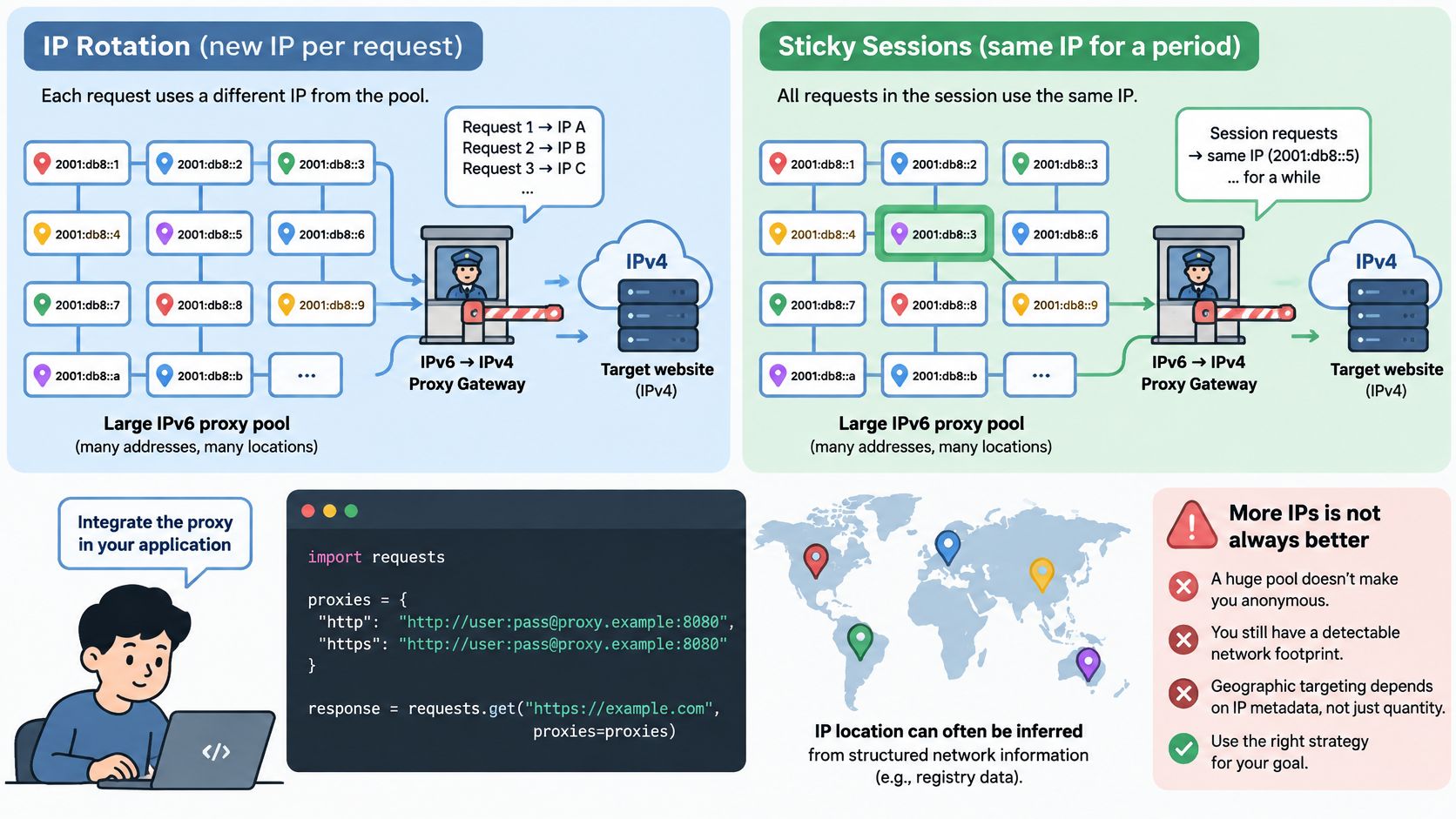
Regional differences make this concrete. An APNIC look at GeoIP and location inference highlights that mapping users to locations through IP-derived metadata can create privacy risks when collection and analysis occur without informed consent. APNIC also measured IPv6 capability at 50% across Asia-Pacific, compared with 39% in the LACNIC region, 28% in RIPE NCC countries, and 4% in AFRINIC, so an exit that blends in one region can stand out in another.
The better question isn't whether IPv6 proxies are anonymous. It's how prefixes, GeoIP databases, ISP classification, reverse DNS, and your rotation pattern combine to produce a trust signal on each destination.
Rotation rules that protect trust
- Hold one egress for stateful work. Keep the same address through a login, cart, or multi-step flow, and rotate only when failure or risk thresholds are crossed.
- Don't rotate rapidly inside one prefix. Targets scoring at prefix level will see churn as one suspicious actor, not many innocent ones.
- Validate location independently. Check country, city, ASN, and carrier against separate sources before you trust geo-targeted results.
- Treat residential and datacenter reputation as different signals. They carry different histories, and targets score them differently.
- Record challenge rates by destination. A range that's clean on one site may be burned on another, and only per-target logs reveal that.
For a deeper look at rotation mechanics, see this guide to IP rotation for scalable web scraping.
Wiring it into your code
The walkthrough below demonstrates session handling and rotation in practice.
Watch the video on YouTube- Create one HTTP session object and reuse it. Set the proxy once on that session so related requests share connection state and cookies.
- Set the proxy URL for the egress you tested. Don't point production traffic at an untested pool just because it's larger.
- Send the request and log the outcome. Capture status code and egress family for every call, so you can compare IPv6 and IPv4.
- Store cookies per session identifier. Keep the same egress through a login or cart flow, since an address change mid-flow looks like a hijacked session.
- Retry with backoff, then rotate. Rotate after a block or timeout, not on every request, and wait between attempts.
- Fall back to IPv4 by rule. Apply the fallback rule your testing produced for that target instead of improvising on each failure.
Our own tiers map onto this flow directly. The direct HTTP tier routes requests through a residential proxy with rotating IPs, custom headers, cookies, and a TLS fingerprint, but it doesn't execute JavaScript. The full-browser tier runs a real browser with JavaScript and a consistent session, and our residential pool supports sticky sessions. We also offer Sticky Rotating Proxies, and you can set your own proxies, which lets you test an IPv6 egress before committing to it.
Finally, log the fields that make debugging possible. Keep target, egress family, status, latency, and a challenge flag on every request. Pair that with responsible use. Obtain consent where location inference touches real people, minimize what you collect, and document your purpose. Geolocation work isn't risk-free just because the tooling makes it easy.
Choose a Provider Only After Testing Your Targets
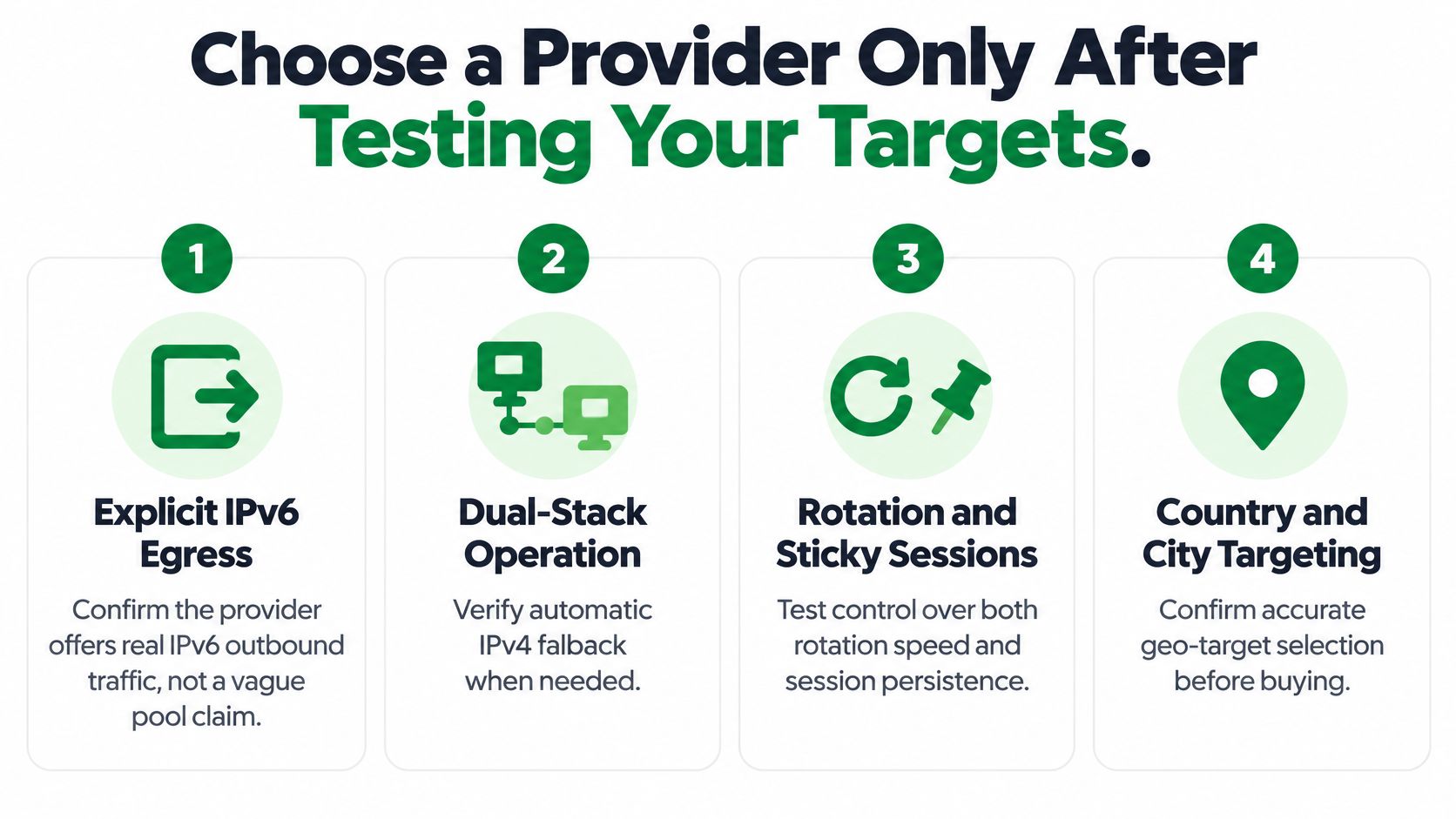
Judge a provider against a short checklist. You want explicit IPv6 egress rather than a vague pool claim, dual-stack operation with automatic IPv4 fallback, and real control over rotation and sticky sessions. You also want country and city targeting you can verify yourself, egress family labels in your logs, and a published availability policy you can plan around.
The checklist below turns those criteria into a purchase decision.
A one-week test plan
- List your real targets. Pick ten to twenty sites you scrape, grouped by category, since results vary so much by category.
- Run both families at equal load. Send each target through IPv6 and IPv4 at the same concurrency so the comparison is fair.
- Record the numbers that matter. Capture success rate, latency, and challenge rate by target and country.
- Write the fallback rule. Decide in advance how many IPv6 failures move a target to IPv4 permanently.
- Set rotation from evidence. Choose your rotation and stickiness policy from those results, not from the provider's defaults.
Understanding how rotating pools hand you a fresh egress helps here, and this explanation of backconnect residential proxies covers that gateway model.
For a provider like Scrappey, the relevant facts are straightforward. Our residential proxies are included in both the direct and full-browser tiers with no separate proxy billing and no hidden fees, and they cover 120+ countries. We also don't guarantee that the service will be available, uninterrupted, error-free, or secure at all times, so your test plan still needs failure handling and retries.
Practical rule: choose the provider whose results hold on your own targets, not the one advertising the largest pool.
Run your ten most important targets through a dual-stack test before you buy more IPv6 addresses. With Scrappey, you can send those tests through the direct HTTP or full-browser tier with residential proxies, sticky sessions, and your own proxy option included, then keep only the egress family that succeeds per target. Start with your hardest shopping or login target today, log the result by address family, and let that evidence set your fallback rule.