The usual advice is simple: buy the largest residential pool you can afford and rotate as often as possible. That's a poor engineering rule. A bigger pool and faster rotation don't prove that your requests will succeed, and they can make sessions harder to debug. Judge backconnect residential proxies by the quality and consent behind their exits, the continuity your workflow needs, and measured results at the target.
How a Backconnect Residential Proxy Routes Your Request
A backconnect proxy keeps the client's endpoint stable while the residential exit can change. The client connects to a provider gateway, which applies the job's routing and rotation rules and forwards the request to an available exit.
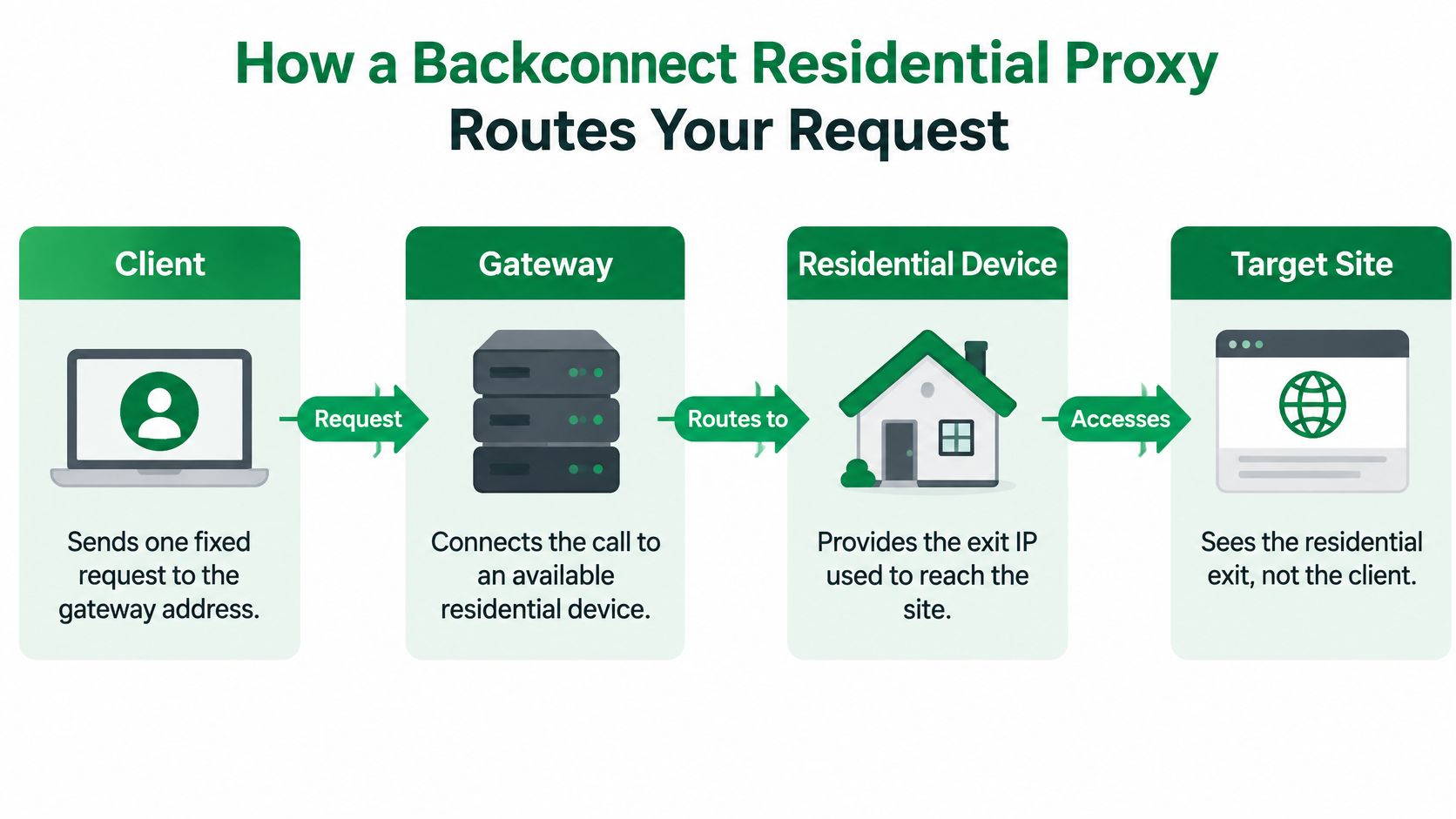
For a public product-page request, the path is client to gateway, gateway to residential exit, then exit to target. The target sees the exit IP as the source of the connection. Its response returns through the exit and gateway to the client.
The gateway abstracts pool management from the client. It can assign or replace an exit between requests, while the client continues using the same gateway address. Nodes may maintain persistent TCP connections to service gateways and run as ordinary, unprivileged programs.
Research on residential proxy networks shows that these systems can expose broad pools of consumer-network exits (a Stanford CS244C project on residential proxy networks). Pool size alone, however, does not establish that a route will be fast or available. Each added network hop can increase latency, and the residential device may disconnect. A stable gateway simplifies client configuration; it cannot ensure consistent performance across exits.
Log the route, not just the result. Record the assigned exit IP, ASN, country, and session ID for each request. These fields help distinguish target-side failures from issues tied to a particular node, network, location, or session.
A large pool also says little about how its exits were sourced. A 2019 IEEE study examined residential IP proxy services and raised concerns about sourcing practices and potentially compromised devices (the Shifter summary of the study's findings). Provenance and abuse controls therefore belong in the architecture review, alongside routing behavior and session requirements.
Residential, Datacenter and ISP Proxies Side by Side
| Criterion | Backconnect residential | Datacenter | ISP (static residential) |
|---|---|---|---|
| IP source | Consumer devices reached through a gateway | Cloud and hosting ranges | Residential ISP ranges on fixed IPs |
| Typical latency | 200–2,000 ms | 10–100 ms | Unknown |
| Block resistance on protected sites | Higher | Lower | Higher |
| Geographic targeting | Country, with finer region options on some providers | Limited to where hosting exists | Limited to ISP footprints |
| Session control | Rotating or sticky | Usually fixed IPs | Fixed IP for the whole job |
| Relative cost | Highest | Lowest | Middle |
The latency ranges in the table are reported benchmarks, not a guarantee for any particular provider or destination. A technical comparison places residential routes around 200–2,000 ms and datacenter routes around 10–100 ms; it doesn't establish a typical ISP-proxy latency range, so that cell is best treated as unknown (the proxy latency comparison).
The source of an address shapes what a target may infer about it. Residential pools use consumer connections across many networks, while datacenter proxies use cloud or hosting ranges. ISP proxies offer fixed IPs associated with residential ISP ranges, combining a more stable identity with a different sourcing model.
Geographic targeting is useful only when it matches the data question. A country-level request can support localization checks, while a city or regional target is useful only if the provider can offer it and the target serves different content there. Don't treat a location selector as proof that a request will be accepted.
For a workflow comparing regional file-access conditions, a concrete reference can help scope the requirement: this guide to British residential IPs for download workflows describes the country-specific use case. For a broader overview of proxy categories and trade-offs, see the essential types of proxy servers for web scraping.
A practical rule follows from the trade-offs: choose datacenter proxies when speed matters and the target tolerates hosting ranges. Choose residential proxies when consumer-network geography is relevant or hosting ranges are frequently rejected. Choose an ISP proxy when a workflow needs a stable identity associated with a residential ISP range. No single type wins every criterion, and a route that performs well for one target may be the wrong choice for another.
Latency, Rotation Modes and Whether Rotation Fixes Blocks
More residential IPs and more frequent rotation do not, by themselves, make a scraping pipeline faster or more reliable. Residential requests often take 200–2,000 ms, compared with 10–100 ms for datacenter requests; treat these as typical ranges, not service guarantees. Track P50, P95 and P99 latency, timeout rate, and successful responses per minute separately. The tail matters: a small number of slow requests can delay workers and trigger retries even when the average looks acceptable.
Benchmark by target and country as well as proxy type. Aggregating destinations can conceal a slow route behind faster results elsewhere.
| Rotation mode | How it behaves | Best for | Main risk |
|---|---|---|---|
| Per-request rotation | New exit IP on every request | Independent public pages at volume | Lost cookies and state, plus a new handshake on every call |
| Sticky session | Same exit IP for a set window | Pagination, carts, logins and multi-step flows | One slow or blocked node stalls the whole session |
| Fixed exit | Same exit IP for the whole job | Long-running account-based workflows | One IP accumulates reputation and block risk |
Rotation is a continuity trade-off. Per-request rotation can reduce repeated exposure from one IP, but a new connection may add handshake overhead and discard cookies. A sticky session preserves browser state and connection identity, while leaving the workflow dependent on one exit. A fixed exit makes requests easier to correlate and gives the target a consistent source to evaluate.
Rotation changes one signal, not the whole request
Residential addresses do not guarantee access. Imperva reported that residential proxies accounted for 21% of bot attacks routed through internet service providers in 2024, down from 26% in 2023, and described attackers using rotation to obscure origin and mimic legitimate users (Imperva's 2025 Bad Bot Report). The practical point is that IP reputation and rotation alone cannot establish reliable access.
Frequent rotation may suit independent public-page requests. A checkout, login, pagination sequence, or JavaScript-driven flow usually depends on consistent identity and browser state, as well as appropriate pacing and handling of any challenge the target presents. Changing exits midway through a flow can break continuity or change the apparent location, making failures harder to diagnose.
For a closer look at how rotation fits into an extraction system, see this guide to IP rotation for scalable web scraping. Judge the setup by whether requests complete and failures remain debuggable, not by how many addresses the provider can cycle through.
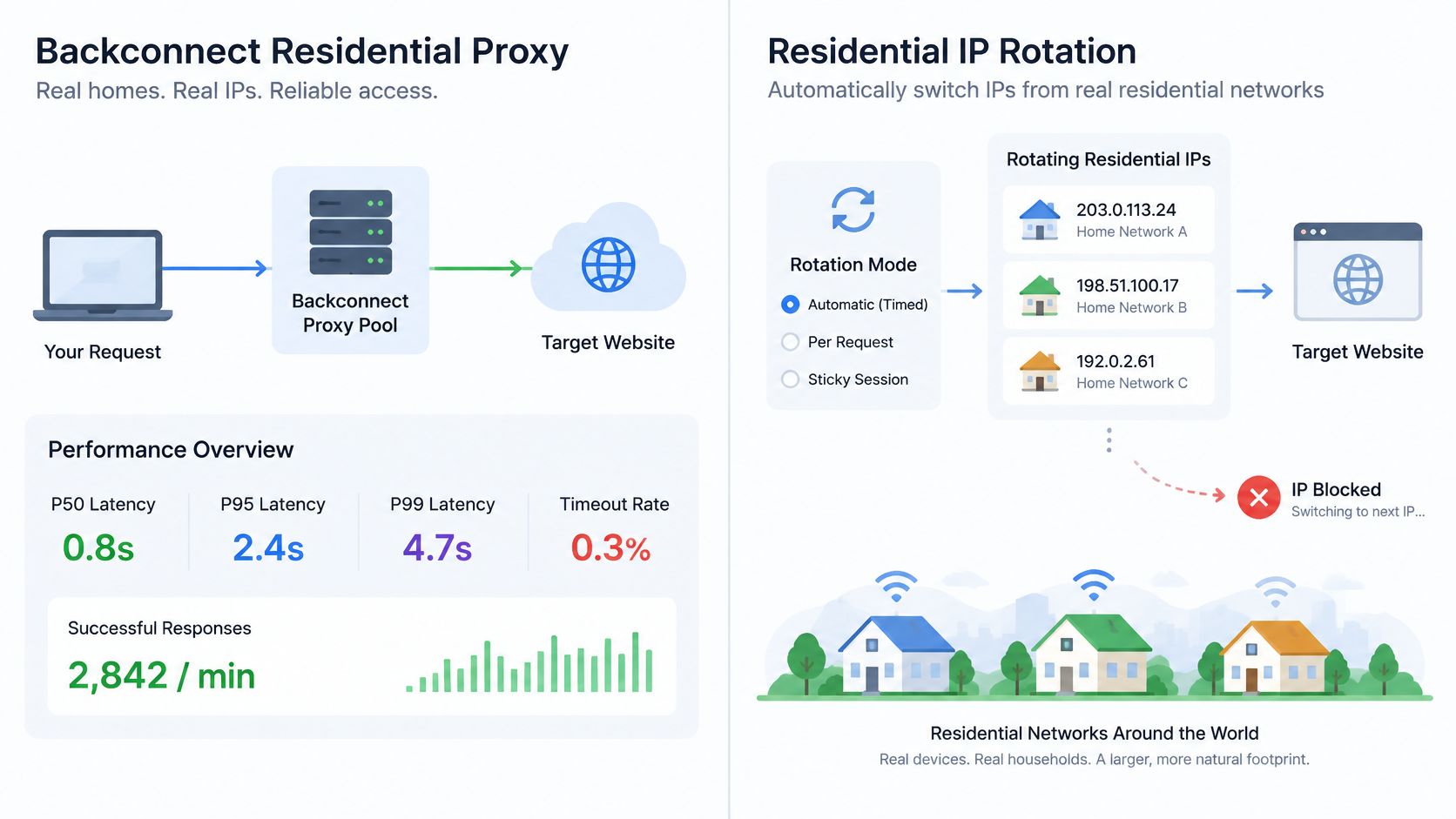
Measure success by target, status code, challenge rate, latency, session continuity, and data completeness. If retries change geography or exit device, it becomes harder to attribute a change in success rate to a specific cause. Target-side rate limits and blocks remain outside the proxy provider's control, so rotation cannot guarantee acceptance.
Provenance, Consent and Abuse Controls to Check
A larger pool is not automatically a better pool. For a production system, provenance matters more than a headline IP count because the way an exit was obtained affects the risk of routing traffic through a device whose owner didn't knowingly agree to participate.
The 2019 IEEE study found that some observed proxy hosts appeared to be potentially compromised, including IoT devices, and linked some hosts with illicit activity. That history makes due diligence concrete: a provider should be able to explain where residential exits come from, how permission is obtained, and how it responds when an owner or network operator raises a complaint. Guidance on scraping compliance likewise emphasizes clear, explicit consent for residential IP sourcing (Zyte's guidance on scraping legality and residential proxy consent).
Use this checklist when assessing a provider:
- Consent evidence: Can it document consent at the IP-source level?
- Device participation: Does traffic come from SDK-installed devices, and how is explicit opt-in recorded?
- Owner control: Is there an opt-out or revocation process for device owners?
- Endpoint security: What standards protect devices that participate in the network?
- Abuse enforcement: How does the provider apply acceptable-use rules and investigate misuse?
- Complaint response: Who handles complaints, and what process does the provider follow?
- Traffic scope: Can customers restrict requests to specified countries or networks?
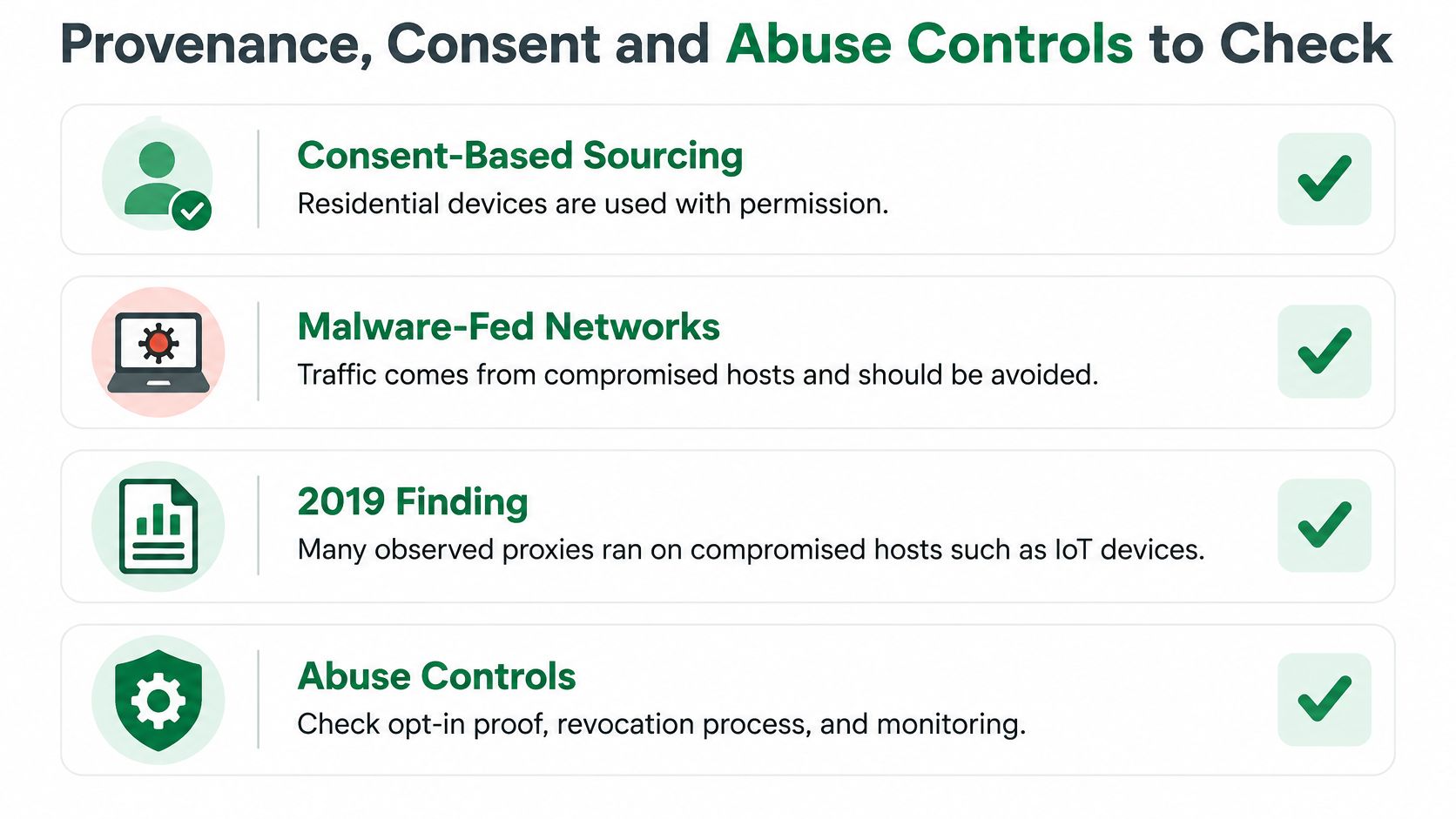
A provider's advertised pool size cannot answer these questions. Ask for auditable policies and evidence that the provider can distinguish consent-based supply from malware-fed or undisclosed networks. Scrappey is designed to fetch publicly accessible web content and doesn't circumvent authentication walls. That boundary should also guide your own use: don't treat proxy access as permission to bypass authentication.
Scraping rules can depend on the jurisdiction and the type of data involved. A sourcing checklist helps your team evaluate operational and ethical risk, but it doesn't replace a legal review of the specific collection plan.
Integrating a Backconnect Proxy Into a Scraping Pipeline
Start integration by making three decisions explicit:
- Keep the gateway stable. Configure the provider's gateway hostname and port once as an environment-specific setting. Your application should connect to that endpoint rather than selecting a residential exit directly.
- Choose rotation scope per job. Set whether independent requests can rotate, whether a multi-step flow needs a sticky session, or whether the full job requires one fixed exit. Don't let an undocumented provider default decide the workflow's identity.
- Log the selected exit for each request. Capture the exit IP, country, ASN, session ID, status code, and target. That record lets engineers group failures by route instead of treating the gateway as one opaque component.
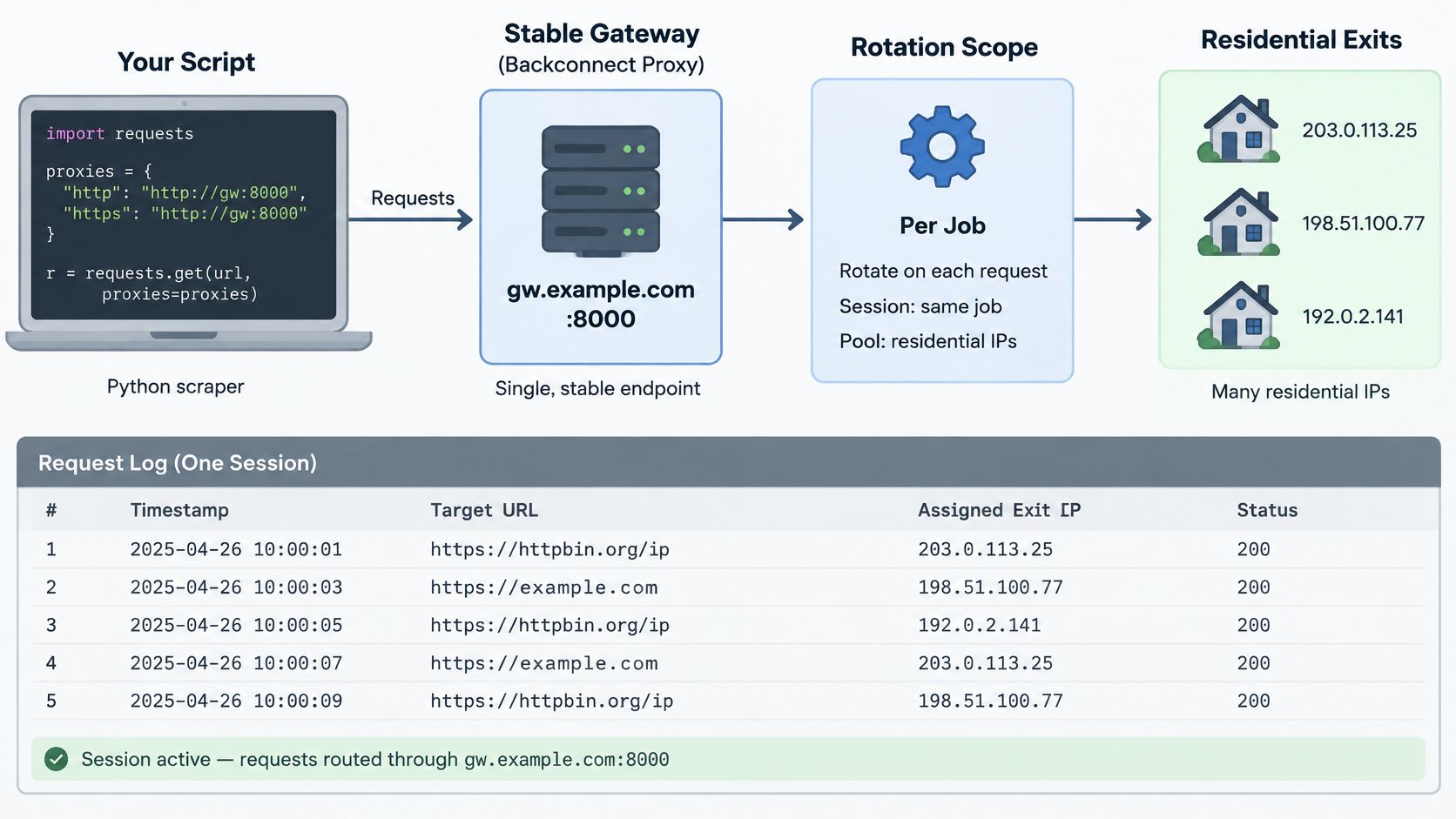
Keep proxy behavior in configuration
In Python, create one session object with the gateway proxy URL configured for both HTTP and HTTPS traffic. Set its connection and read timeouts from measured P95 latency, then send requests through that session so connection and cookie behavior remain predictable. Add a retry loop that changes the session ID only when the failure indicates a bad or unavailable proxy node, not when the target returns a block or challenge.
That distinction matters for diagnosis. If every failure triggers a new exit, your logs can hide a target-side rejection by changing the request's geography and network identity. Preserve the failing session context long enough to classify the cause, then rotate when the evidence points to a node error.
In Node.js, use the same design: pass the proxy and rotation scope into a shared client or request configuration rather than hardcoding different proxy settings into individual calls. Keep session IDs and retry decisions in job logic so they can be tested and observed.
A hosted API is another integration route. Scrappey works in three steps: send one request with a URL to a single endpoint, Scrappey runs a real browser through a residential IP, and returns one JSON response with status, full HTML, cookies, and LLM-ready Markdown. Its direct HTTP tier is for static pages or API endpoints, while its full-browser tier handles JavaScript pages; residential proxies are included in each request, so you don't manage a proxy pool yourself.
The choice is between operating the routing and retry layer yourself or delegating more of that work to a web access service. Either way, preserve enough request-level telemetry to connect an outcome to its route and session.
Watch the video on YouTubeAfter the first run, compare the exit, status, and session logs with your latency, timeout, and success metrics. A gateway is useful only if your team can explain which part of the request path is failing.
Troubleshooting Failed and Slow Requests
A timeout spike during busy periods often points to a slow residential exit or gateway congestion. Don't raise the timeout blindly: compare the affected requests with measured P95 latency first, then adjust the timeout and retry on a new exit when the failure appears node-specific.
| Symptom | Likely cause | Fix |
|---|---|---|
| Timeouts spike at peak hours | Slow residential node or gateway congestion | Measure P95 before raising timeouts, then retry on a new exit |
| Session breaks mid-flow | Rotation during a multi-step action | Use a sticky session for the whole flow |
| One exit IP keeps failing | Bad or unstable residential node | Retry on a fresh exit and log the failing node |
HTTP 407 is a proxy authentication or allowlisting problem, not evidence that the target site blocked you. Check the gateway credentials and the provider's source-IP allowlist before changing rotation behavior; this developer guide to fixing a 407 proxy authentication error covers the distinction.
Repeated 403 responses or challenges across exits may point to a header, TLS, or browser-fingerprint mismatch, or to a country the target flags. First make the request profile consistent with the browser you're using; if the workflow needs a different location, change the country deliberately rather than rotating more aggressively. A session that fails halfway through pagination or another multi-step action usually needs a sticky session for the full flow.
Changing credentials, stabilizing a session, or replacing a clearly failing exit can be tested with a focused run. Confirming that a country, request profile, or gateway performs reliably across varying conditions takes sustained measurement; assess a week of data before treating a small improvement as a stable result. Keep the same logs across that period so the comparison captures target, status, exit, and session rather than just an aggregate success count.
Pick Your Proxy Setup and Track Three Metrics
For independent public pages at volume, start with per-request rotation on a residential pool. For multi-step or stateful workflows, begin with sticky sessions and a fixed exit for the job. Use datacenter proxies when speed matters more than resistance to hosting-range blocks. These are starting configurations, not guarantees; the target and the state your workflow must preserve determine whether they hold up.
Track these signals before scaling:
- Success rate by target and country. Keep the groups separate. A single average can hide a target or location where requests consistently fail.
- P95 latency and timeout rate. Read the tail with the timeout count, so a tolerable average doesn't conceal slow requests that hold up workers.
- Challenge rate and session continuity. Track how often requests encounter challenges and whether the workflow retains the identity and state it requires.
- Data completeness. For extraction jobs, check that the expected fields or records are present. An HTTP 200 response can still contain an empty or incomplete page.
These measurements answer different questions. Success rate tells you whether the target returned an acceptable result, latency shows how long that result took, and continuity indicates whether the workflow stayed in a usable state. Completeness checks the output itself, so a technically successful response doesn't get mistaken for a useful record.
Run a two-week pilot on one target before widening the pool or increasing concurrency. Log the exit IP, status, and session for every request, then scale only when success, latency, continuity, and completeness remain steady across the pilot. If one measure slips, adjust the job's rotation scope or route before adding more traffic.
Scrappey combines residential routing with direct HTTP and full-browser requests, returning structured results without requiring you to manage a proxy pool. If you're evaluating a backconnect setup, visit Scrappey to see how its request workflow fits your pipeline and test it against a public-data use case.