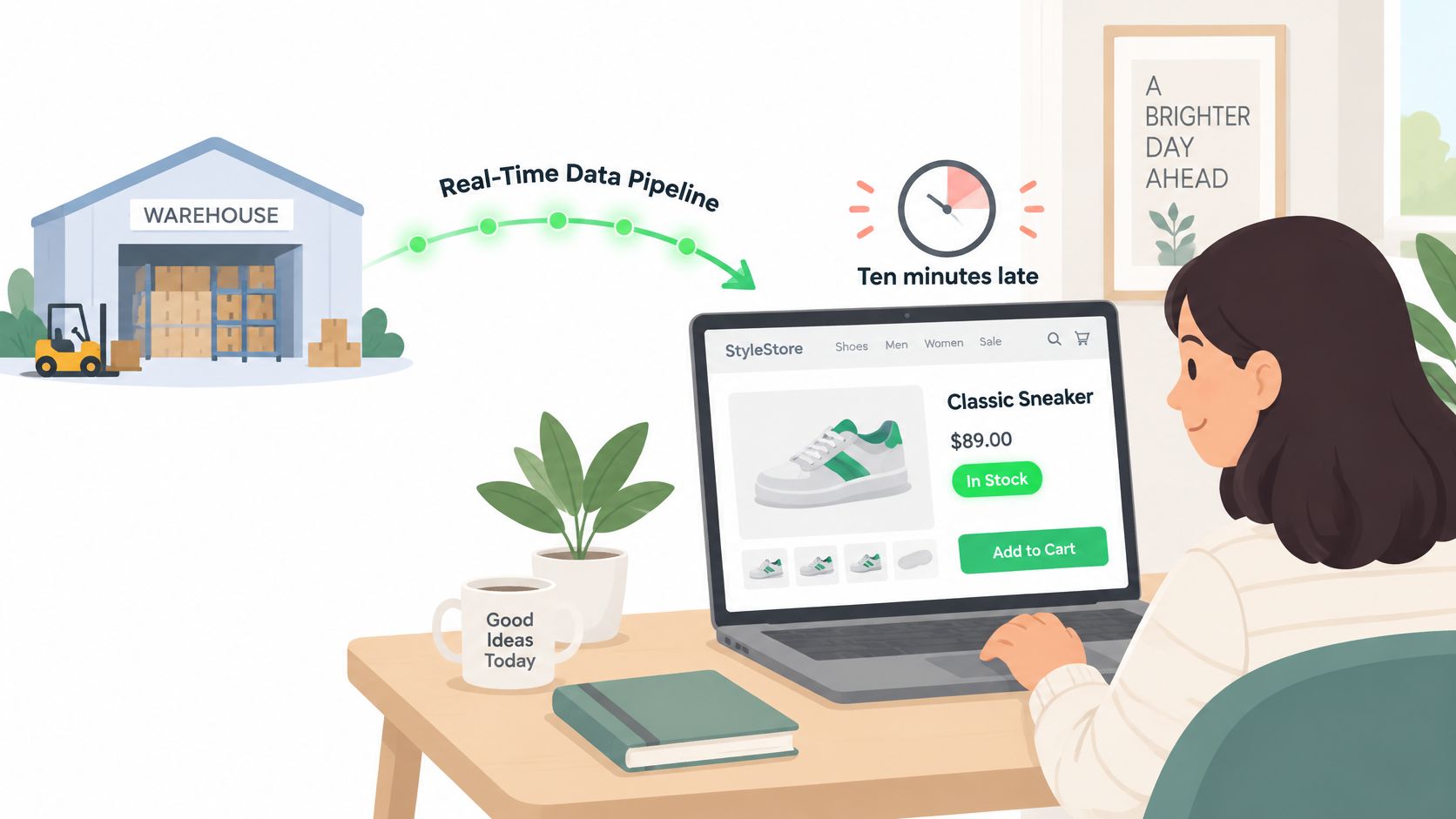
Your dashboard says the product is in stock, so a customer orders it, pays, and gets a confirmation email. Ten minutes later, someone on your team finds out the last unit sold before that order arrived. The batch job that updates inventory runs overnight, so every page, ad, and alert built on that data is wrong until morning.
That gap between an event happening and your systems knowing about it is the problem a real time data pipeline solves. You don't need one for every workload, and building one where a slower job would do costs real money and on-call time. The useful skill is setting a freshness target per decision, then picking the simplest pipeline that meets it.
What a Real-Time Data Pipeline Actually Does
A store sells its last jacket at 10:02. At 10:12, the website still shows it as available because inventory updates ride a nightly export from the warehouse system. Two more orders land, both need refunds, and support absorbs complaints that better timing would have prevented.
A real time data pipeline prevents that lag by keeping events moving. It takes each event from its source, processes it as it arrives instead of waiting for a pile to accumulate, and makes the result queryable within seconds. An event is just a small record of something that happened, like an order placed, a price changed, or a page fetched, stamped with the time it occurred.
The Water Main Analogy
A batch pipeline works like a delivery van that makes one run each night. Anything loaded after departure waits until tomorrow. A streaming pipeline works like a water main with pressure always on, so every tap responds the moment someone turns it.
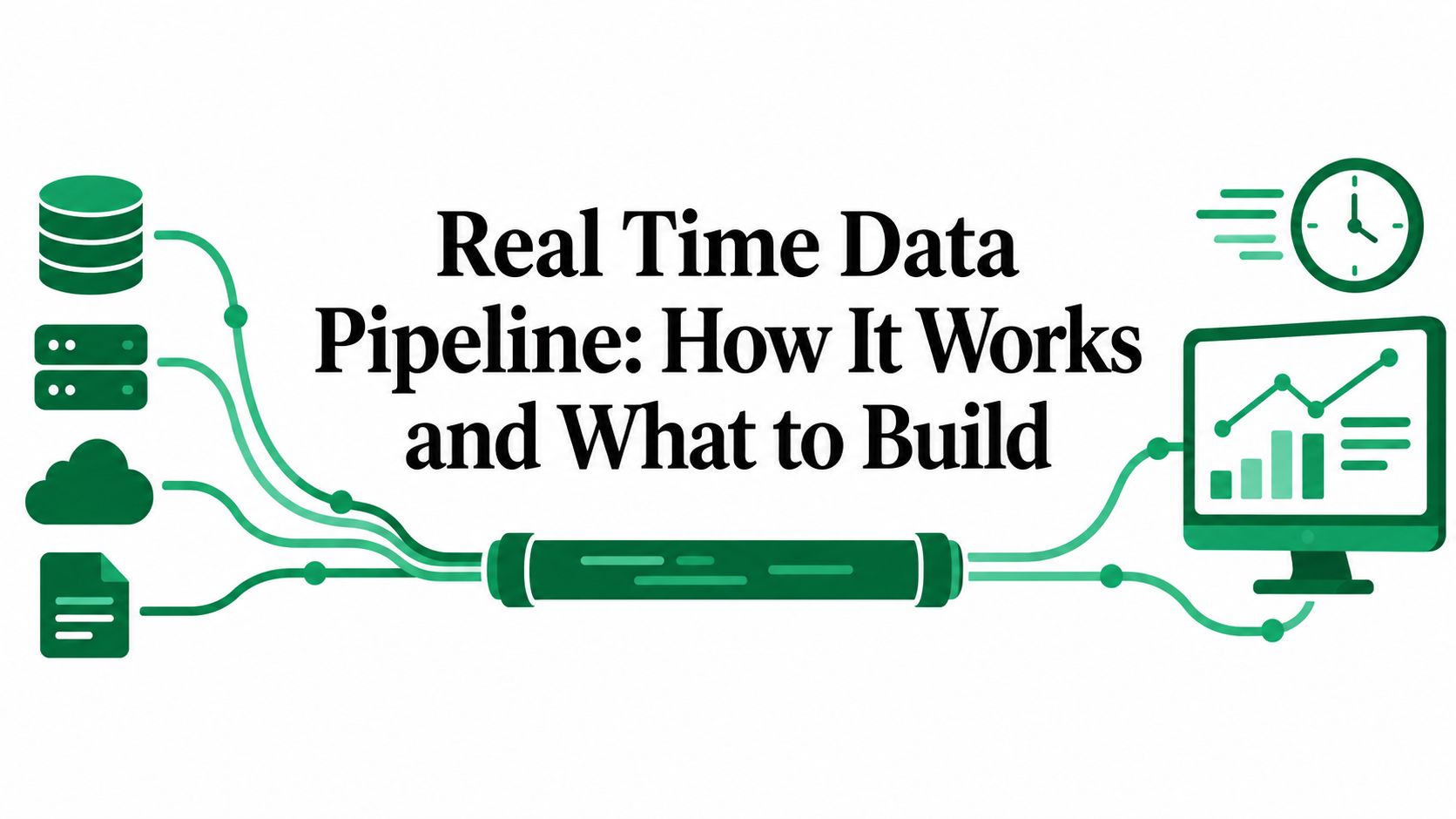
That constant pressure has five stages working in sequence: ingest, transport, process, store, deliver. A source produces events, a broker carries them safely, a processor transforms them, a store keeps current values ready, and a delivery layer pushes results to dashboards, APIs, or alerts. Each stage does one job, which lets you scale or fix one part without rebuilding the rest.
Businesses already lean on this pattern in daily work. In 2025, 48% of enterprises surveyed in the ISG Research streaming data buyers guide used streaming data in operational processes, while 44% used it in analytic processes. That split matters because operational use means the pipeline feeds decisions while they're still being made, not reports reviewed afterward.
Real time isn't a guarantee printed on a vendor page. It's a latency target you engineer for, measure, and sometimes miss under load.
So the honest definition is this: a system designed so data stays fresh enough that acting on it late rarely happens. How fresh is fresh enough depends entirely on the decision the data supports, and that's where teams usually overbuild.
Real-Time, Near-Real-Time and Batch Side by Side
Three modes cover most pipelines you'll meet. Real-time streaming handles each event as it arrives, one by one, with no waiting for a group to form. Near-real-time accepts a small delay, collecting events over seconds or a few minutes before processing them. Batch waits for accumulated data, then processes the whole pile on a schedule.
The difference sounds subtle until you price it. Streaming needs brokers running around the clock, processors holding state in memory, and someone answering alerts when a consumer falls behind at 3 a.m. Batch needs a scheduler and compute that exists only while the job runs. Every step faster adds moving parts you must operate forever.
| Mode | Typical latency | Triggered by | Typical use | Operational load |
|---|---|---|---|---|
| Real-time (streaming) | milliseconds to a few seconds | each event as it arrives | fraud checks, live pricing, stock changes | highest, always-on brokers, state and on-call |
| Near-real-time | seconds to a few minutes | short windows of events | operations dashboards, alerting | moderate |
| Micro-batch | 1 to 15 minutes | scheduled small batches | price snapshots, periodic ETL refreshes | low to moderate |
| Batch | hours to daily | scheduled full or incremental loads | finance reports, monthly analytics | lowest |
Read the table with one rule in mind: pick the slowest mode the decision still tolerates. Speed you don't use still costs brokers, state storage, monitoring, and an on-call rota. The question isn't which mode is best, it's which mode is fast enough that nobody's decision gets worse.
A Worked Example With Two Decisions
Say you run a rank tracker that checks search positions for client keywords. Rankings shift slowly, clients read reports in the morning, and an hourly refresh tells the same story as a per-second one. That workload sits comfortably in near-real-time or micro-batch territory, and a scheduled job keeps it cheap and boring.
Now say you check payments for fraud before money moves. The answer has to arrive before the transaction clears, or it's worthless. That decision needs true streaming, because a five minute delay isn't a slower version of the right answer, it's the wrong answer entirely.
Micro-batch is the grey zone between them. A job running every few minutes feels live to a dashboard user, because the numbers change while they watch. Technically it's still batch, just small and frequent, and that distinction matters when you promise stakeholders real time and deliver something that can't react to a single urgent event.
Two signs tell you a team chose too fast a mode. First, alerts fire constantly and nobody acts on them, because the business can't respond at the speed the pipeline reports. Second, dashboards refresh faster than the underlying process changes, so people watch numbers jitter without learning anything new. Both mean you're paying streaming prices for batch value.
Set a Freshness Target Before You Build
Freshness isn't the same as usefulness. A pipeline can deliver events in under a second and still mislead you if those events arrived late, got duplicated, fell out of order, or skipped validation. Faster wrong answers just reach more people before anyone notices the error.
Separate three properties before you pick any tooling. Freshness is how old the newest data is. Completeness is whether all expected events arrived. Correctness is whether values survived checks against rules you trust. The 2025 Conduktor data streaming survey report flags that teams also need consistent access controls, schema enforcement, and retention policies, since latency alone doesn't make data trustworthy.
Controls enforce each property. Event-time windows group records by when things happened, not when they arrived. Allowed lateness decides how long you wait for stragglers before publishing, replay rules say how you rebuild results after a fix, and fallback rules say what consumers see when live data stalls. Teams that track voter outreach in real time face the same discipline, since a fast count missing whole precincts misleads strategy faster than a slower complete one.
| Workload | Freshness target | Pattern | Why this target |
|---|---|---|---|
| Fraud or payment risk | under 1 second | streaming with Flink or Kinesis | the decision must land before the payment clears |
| Inventory availability | 30 seconds to 5 minutes | event-driven ingestion with validation | selling sold-out items costs orders and refunds |
| Price monitoring | 15 minutes to 1 hour | scheduled requests with webhook intake | prices change slowly and constant polling wastes spend |
| SERP tracking | hourly to daily | micro-batch | rankings move slowly, so consistent sampling matters more than speed |
| AI retrieval corpus | every few hours | micro-batch refresh with provenance tags | retrieval needs current, traceable content rather than the fastest copy |
Web-derived data adds its own trap, especially for pipelines like ours that are designed for accessing publicly available web data and powering automation workflows. Source pages change on their own schedule, and anti-bot challenges can delay collection, so latest available may not mean currently true. A timestamp showing when you fetched a page tells consumers exactly how much to trust it.
Running batch and streaming paths side by side roughly doubles much of the work. The bill covers message retention, replay storage, compute during spikes, observability, on-call time, backfills, and reconciling live outputs against historical ones when they disagree. Write a freshness target and a cost of delay for each workload first, use the slowest mode that meets it, and promote a workload to streaming only when a measured consequence justifies the second system.
Architecture Patterns and the Five Building Blocks
Two patterns dominate real-time architecture, and they differ mainly in how many code paths you maintain. The diagram below lays them out side by side.
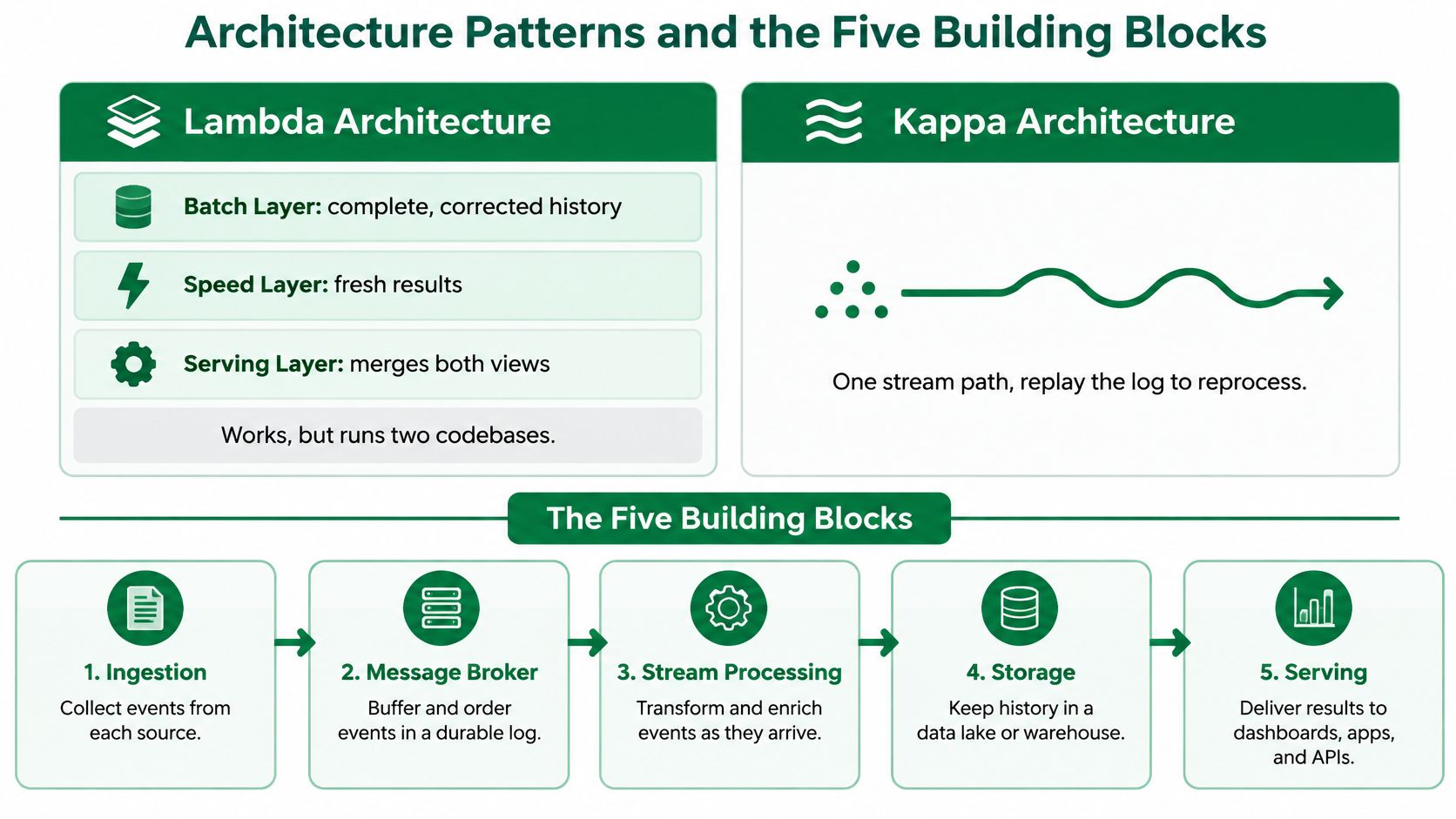
Lambda architecture runs a batch layer that produces complete, corrected history alongside a speed layer that produces fresh but approximate results. A serving layer merges both views when someone queries. It works well, but every transformation exists twice, once in batch code and once in streaming code, and the two copies drift apart over time.
Kappa architecture keeps one stream as the source of truth. When you need to rebuild history, you replay the retained log through the same streaming logic. That removes the second codebase, but it demands long retention and replay fast enough to rebuild within your recovery window. The event-driven style underpins both: producers emit facts, and consumers react independently without calling each other directly.
The Five Building Blocks in Flow Order
- Ingestion collects events where they're born. Webhooks receive pushes from external services, change data capture tools like Debezium stream database changes row by row, SDK producers emit events from your own apps, and scheduled API pulls cover sources that only offer polling.
- Messaging is a durable, partitioned log between producers and consumers. It holds events for a set retention period, absorbs bursts, and lets consumers replay from an earlier position after a bug fix. Without it, a slow consumer forces producers to wait or drop data.
- Stream processing transforms events in motion. Tumbling windows bucket data into fixed intervals, sliding windows overlap for moving averages, and session windows group activity separated by quiet gaps. Processors track event time, when something happened, separately from processing time, when it arrived, and they checkpoint state so a crash resumes instead of restarting.
- Storage splits into two jobs. A low-latency serving store like Redis, Cassandra, or ClickHouse answers current-value queries in milliseconds, while a lakehouse table format like Apache Iceberg keeps full history for analysis and backfills. Teams cleaning records before they land often combine this with practical data normalization techniques so fields arrive consistent across sources.
- Delivery puts results where decisions happen. WebSocket push feeds live dashboards, REST endpoints serve applications, and alert rules fire when a value crosses a threshold someone cares about.
The short walkthrough below shows how these blocks connect in a working stack.
Watch the video on YouTubeChoose Kappa when replaying the log can rebuild your history within an acceptable window and one codebase covers your logic. Choose Lambda when batch corrections genuinely differ from streaming approximations, for example when finance restates numbers weeks later. If you can't name that difference, you probably don't need two paths.
Choosing Kafka, Kinesis, Flink or Spark Streaming
Confusion starts when people compare tools that do different jobs. Messaging systems store and move events durably. Processing engines compute over those events, filtering, joining, and aggregating them. Kafka and Kinesis mostly belong to the first group, Flink and Spark Structured Streaming to the second, and mixing up the layers leads to buying a broker when you needed a processor.
| Technology | Role | Managed option | Strength | Watch-out |
|---|---|---|---|---|
| Apache Kafka | messaging log, plus processing via Kafka Streams | Confluent Cloud, Amazon MSK | high throughput, replay by offset, large ecosystem | you size partitions, brokers and retention unless managed |
| Amazon Kinesis Data Streams | managed messaging | native AWS service | no brokers to run, tight Lambda integration | capacity planned in shards with per-shard limits |
| Apache Flink | stateful stream processing | Amazon Managed Service for Apache Flink | event-time windows, exactly-once checkpoints | state and checkpoint tuning takes experience |
| Spark Structured Streaming | stream processing on the Spark engine | Databricks, Amazon EMR, Dataproc | one API for batch and streaming | usually seconds of latency, not milliseconds |
| Google Pub/Sub with Dataflow | managed messaging and processing | native Google Cloud services | auto-scaling, exactly-once default in Dataflow | Apache Beam programming model to learn |
A reference design shows how these pieces combine at scale. The 2024 SSRN architecture evaluation paired Kafka for ingestion, Flink for processing, and Cassandra for serving, and reported an average latency of approximately 300 milliseconds at 450,000 events per second. Treat that as proof a well-tuned stack handles serious volume, not as a number your first deployment will hit.
Partitioning in Plain Terms
Kafka splits a topic into partitions, ordered slices that consumers read in parallel. Partition by a stable key like product ID, and every event for one product stays in order within its slice. Consumer parallelism caps at the partition count, so adding consumers beyond that number leaves the extras idle, waiting for work that can't reach them.
Kinesis uses shards as its scaling unit instead. Each shard carries a fixed slice of throughput, so capacity planning means counting shards against your event rate rather than sizing broker machines. You trade operational control for a simpler scaling dial, which suits small teams that would rather not run infrastructure.
Sizing habit: match consumer count to partition count first, measure, then scale both together. Scaling one without the other buys nothing.
Follow a simple decision path. A small AWS-native team with simple transforms should start with Kinesis and Lambda, accepting less control for almost no operations. A team needing replay, strict ordering, and stateful windows should choose Kafka with Flink and budget time for tuning. A team with an existing Spark estate that tolerates seconds of latency should use Spark Structured Streaming and reuse its batch code. A Google Cloud team should compare Pub/Sub with Dataflow against that same workload before committing.
Latency, Throughput and Failure Trade-offs
Every streaming system sits on one uncomfortable curve. Batching events together raises throughput, because the system does less per-event overhead, but it adds latency, because early events wait for the batch to fill. Tuning batch size, linger time, and parallelism moves you along that curve. It never makes both better for free.
Benchmarks make the trade-off concrete. In the independent benchmark comparison of four streaming architectures, Google Pub/Sub with Dataflow achieved the lowest average latency at 85 milliseconds and the highest throughput at 49,000 events per second. Kinesis with Lambda recorded the highest average latency at 130 milliseconds and the lowest throughput at 44,000 events per second.
Look at the size of that gap before choosing a vendor over it. The latency difference is 45 milliseconds, and the throughput difference is 5,000 events per second, approximately 11.4% relative to the lower result. For most dashboards and price monitors, that spread disappears inside network jitter and source delays. Workload fit, team familiarity, and operating cost usually matter more than the ranking.
Why Failure Numbers Matter More Than Peak Numbers
Scale changes the picture but not the lesson. A high-volume Kafka, Flink, and Cassandra design held sub-second latency at hundreds of thousands of events per second and recovered from a failed node in roughly two seconds without losing data. That recovery figure deserves more attention than the peak rate, because users experience your pipeline during its worst minutes, not its best.
Failure tests show why. In one stream-processing evaluation, throughput fell from 160,000 to 20,000 events per second during failures while latency climbed from about 1.5 seconds to 25.5 seconds. A pipeline that looks fast on a spec sheet can spend a quarter minute behind during recovery, and that's exactly when alerts and prices matter most.
Averages hide this behavior completely. An average blends thousands of fast events with a tail of slow ones, and the slow ones trigger incidents, stale pages, and angry customers. Track p50, p95, and p99 latency instead, so you see what the unluckiest one percent of events really experienced.
Treat every benchmark as architecture-specific evidence, not a production promise, since event size, serialization, state, and sink behavior shift results. Before launch, write down two numbers: the p99 latency you'll accept, and the throughput the pipeline must sustain while recovering from a dead worker. If you can't state both, you don't have an SLO yet, you have a hope.
Monitoring, Testing and Securing the Pipeline
You can't run what you can't see, so start with the metrics that reveal trouble before users report it.
| Metric | What it reveals | Why it matters |
|---|---|---|
| Consumer lag | how far consumers trail the newest event | rising lag shows stale results before users notice |
| End-to-end latency at p50, p95, p99 | typical and tail delay from source to sink | averages hide the slow events that trigger incidents |
| Checkpoint duration and failures | health of recovery state | slow checkpoints lengthen recovery after a crash |
| Throughput against baseline | capacity compared with normal load | a drop during failure reveals degraded-mode behavior |
| Dead-letter rate | records failing parsing or validation | sudden rises signal an upstream format change |
| Data age | timestamp of the newest processed event | confirms whether the output is actually current |
Correctness needs its own guarantee. Exactly-once processing means one logical event affects downstream state one time, even when workers crash or retries fire, like a bank transfer that must post once though the app retried twice. The Google Cloud Dataflow exactly-once documentation describes it as the default for streaming pipelines, but the guarantee only holds end to end when you pair transactional source offsets and durable checkpoints with idempotent or transactional sinks. Enforce schemas at the broker boundary with a schema registry too, dead-lettering records that break the contract, and review field-level data validation methods before bad records reach consumers.
Test Like Production Will Break
Run a failure drill before go-live. Kill a worker mid-window, replay duplicate events, delay some events by several minutes, and time out the sink. Then recompute the same input in batch and compare outputs, because matching results prove your streaming logic handles the chaos correctly. Teams staffing this work often scan HiredBySkill's skills-based DevOps roles to see which streaming and observability skills the market expects on an on-call rota.
Security follows the data. Use TLS in transit, grant each service access only to its own topics, strip personal fields before records reach the broker, and set retention no longer than replay requires. Apply the same access and retention rules on every platform the data lands in, since a warehouse copy with looser rules undoes broker discipline.
On responsibility, we offer a signable Data Processing Agreement for customers who process personal data through our API. That agreement governs only account data, and it doesn't apply to data you scrape, collect, or process through the service, for which you remain the independent data controller.
Answer three questions before launch. What happens when a worker dies mid-window? How do you know the newest output is actually current? Who owns personal data at each hop? If any answer is a shrug, delay the launch.
Two End-to-End Flows With Scrappey and Streaming Ingestion
Web data enters a real time data pipeline through collection, and the collection method shapes everything downstream. The flow below shows a webhook-driven path and a scheduled variant built from the same blocks.
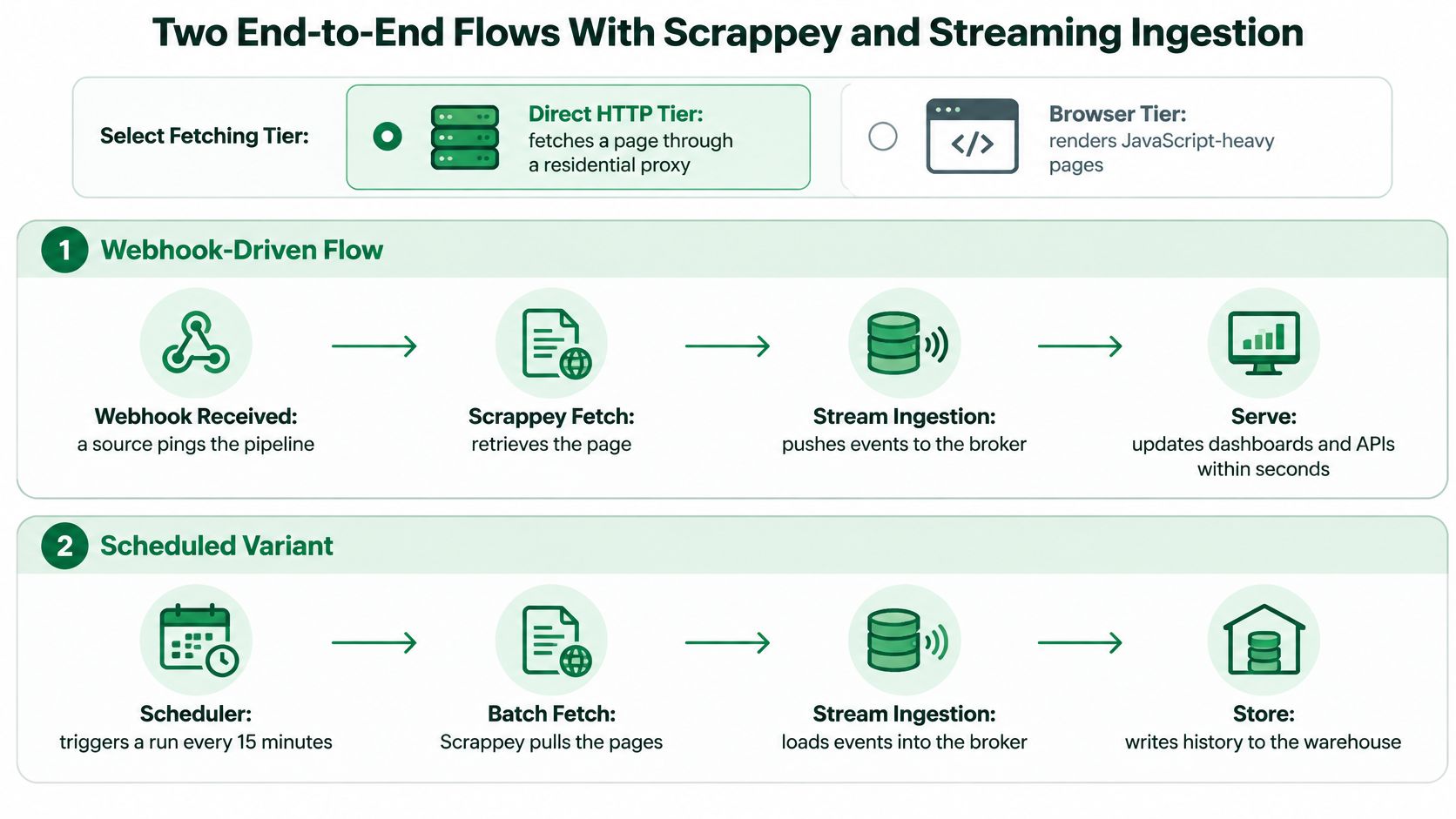
Start with the fetch tier, because it decides cost and success rate per page. Our direct HTTP tier routes requests through a residential proxy with rotating IPs, custom headers, cookies, and TLS fingerprint, but it doesn't execute JavaScript. That suits static pages and API endpoints. The full-browser tier renders JavaScript-heavy pages the way a visitor's browser would, which dynamic product pages usually require.
The Webhook-Driven Flow
- Send the request: your service calls the scraping API with a target URL and a webhook URL, so results push to you instead of forcing you to poll for completion.
- Fetch through the chosen tier: the API retrieves the page using direct HTTP or the full browser, matching effort to what the page requires.
- Receive the webhook: on completion, the API posts the result to your endpoint, since we support webhooks for real-time notifications.
- Verify and enqueue: your endpoint checks the request signature, writes the raw payload to a Kafka topic or Kinesis stream, and returns 200 immediately, keeping the webhook fast and retry-safe.
- Process the stream: a Flink or Spark job parses fields, deduplicates by request ID, and normalizes prices or stock flags into your canonical shape.
- Write current values: the job upserts results into a serving store like Redis or ClickHouse, where reads stay fast because they hit precomputed state, a pattern that pairs well with a dedicated price monitoring API feeding the same store.
- Deliver and alert: a dashboard reads the store, and an alert rule fires when a price drops below your threshold, turning raw HTML into a decision within minutes.
The Scheduled Variant
Not every source needs event-driven collection. A cron job in your own scheduler triggers requests every 15 minutes, and results arrive through the identical webhook path. Bursts land in the broker, which absorbs them while consumers work at a steady pace, so a large catalog refresh doesn't overload your processing layer.
Three design points keep both flows safe. Idempotency keys on each request make webhook retries harmless, because consumers recognize and skip duplicates. A dead-letter topic quarantines payloads that fail parsing, so one changed page layout doesn't block the stream. Keeping raw payloads in the topic lets you replay history after a parser fix and rebuild corrected values without rescraping.
The payoff is practical. A competitor's price change shows up in your dashboard minutes after it happens, with a fetch timestamp proving how fresh it is, instead of surfacing in tomorrow's nightly export after your own pricing already lost a day of sales.
If your freshness targets point to webhook-driven or scheduled web collection, Scrappey gives you the fetch layer without browser or proxy infrastructure to maintain, returning rendered pages and structured results your broker can ingest directly. Start with one workload, measure it against the target you set, and add streaming only where the numbers justify it.