Your citation manager has the DOI, the tab is open, and the first two paragraphs are visible before the page fades behind a box offering a dollar for the first month. You need the article tonight. You don't need a lecture on copyright law, and you don't need a browser extension from a forum that wants your institutional password.
Students, journalists, and analysts hit this exact wall all the time. The rule for every route stays the same: judge a route by who grants the access and which version of the article you get. A route that opens the page but hands you a 2019 preprint of a 2024 paper is a citation error waiting to happen.
Pick the Legal Route That Fits Your Situation
| Your situation | Lawful route | Typical cost | Typical time |
|---|---|---|---|
| University student or staff | Library login through single sign-on | Free | Minutes |
| Public library cardholder | Remote access to library databases | Free with library card | Minutes |
| No institutional affiliation | Author page or institutional repository copy | Free | Minutes to days |
| Preprint exists | arXiv, bioRxiv, medRxiv or SSRN copy | Free | Minutes |
| DOI available, open access unknown | Unpaywall lookup by DOI | Free | Seconds |
| News site metered limit reached | Free article allowance or free registration | Free until the meter runs out | Immediate |
| Need one article briefly | Publisher trial or day pass | Small fee, check renewal terms | Minutes |
| No copy found anywhere | Interlibrary loan or email the author | Free or low fee | Days to weeks |
Read the first column, not the third. People default to paying because paying feels like the only door, and the numbers say that instinct is wrong. A March 10 to 16, 2025 Pew Research Center survey of 9,482 U.S. adults found that 74% encountered paywall-blocked articles at least sometimes, with 12% hitting them extremely often and 26% often. In the same survey, only 17% had paid, donated, or become a member of a news source in the previous 12 months. Readers who meet a wall often look for another way in, and many of those ways are sitting in the table above.
The rule I give every student: start at the top row that matches your situation and work down. Every route in that table is granted by somebody with the authority to grant it. Your library, the author, the publisher, or the repository. Nobody has to break anything.
The bottom two rows are where people quit too early. Interlibrary loan is slow, but it's free and the copy arrives as the published version. A two-line email to the corresponding author often comes back inside a week, and authors are usually delighted that someone read the methods section. If your reading list leans toward policy journals rather than lab papers, using Foreign Affairs in MUN prep walks through how one institutional subscription can carry a whole delegation's research load, which is the same entitlement logic as a library login applied to a different publication.
When you're setting this up as a repeatable process instead of solving one citation at 11pm, choosing research data collection methods covers how to pick tools that stay inside access controls rather than testing them.
How to Search Your Library Login Step by Step
The three moves below carry most of the weight; the numbered sequence after them is the full path.
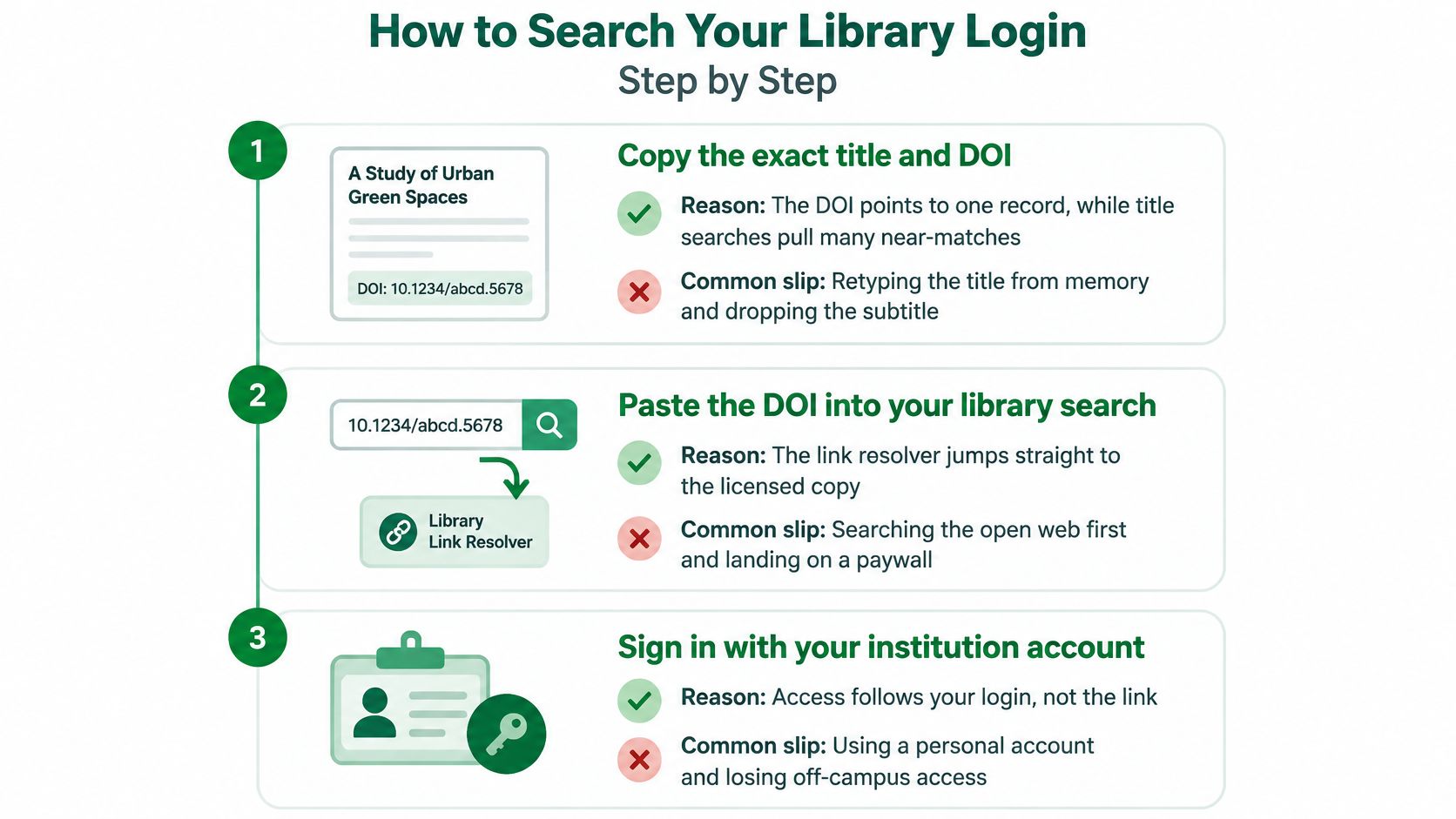
- Copy the exact title and the DOI from the citation or the page itself. The DOI points to exactly one record, while a title search returns near-duplicates, conference versions, and the same paper under a different subtitle. The common slip is retyping the title from memory and dropping the subtitle, which is where the match fails.
- Paste the DOI into your library's discovery system first. The link resolver jumps straight to the licensed copy, and you skip the publisher's marketing page entirely. Searching the open web first is the slip that lands you on a paywall and convinces you the library doesn't have it.
- Sign in through your institution's single sign-on. Off campus, use the library's remote-access option or VPN first, because an anonymous browser session will show you the paywall even when your institution holds the title. Using a personal account left over from a former university is the other frequent failure, since those credentials usually expire at the end of a term.
- Open the publisher link from the library record, not from Google. Access follows the referral, so entering through the library's link tells the publisher to apply your institution's entitlement. The slip here is copying the article URL into a fresh tab and losing the session.
- File an interlibrary loan request from the same catalog when the library doesn't hold the title. The request form already knows your account, and most systems let you track the article as it moves.
- Save the record with the DOI, version, and access route you used. Six weeks later you'll want to know whether you read the accepted manuscript or the version of record, and that note is the only thing that tells you.
That sequence matches the standard lawful workflow: identify the article by title, DOI, or authors, search the institution's portal, then check open repositories before falling back on document delivery or an email to the author, as this guide to open access research access sets out. Its practical warning is worth keeping: private browsing may reset a metered news counter, but it is unreliable against publisher-controlled access and should never be treated as a form of authorization.
Your checkpoint is visual. The full text opens with the publisher's header, and the page carries a small label naming your library or institution as the access source. No label means you're reading something else.
Find Open-Access Copies in Repositories and Preprints
A large share of paywalled papers have a free legal twin sitting somewhere, and the skill is knowing where the twin lives. The copy hunt below takes minutes and settles most requests before you touch a request form.
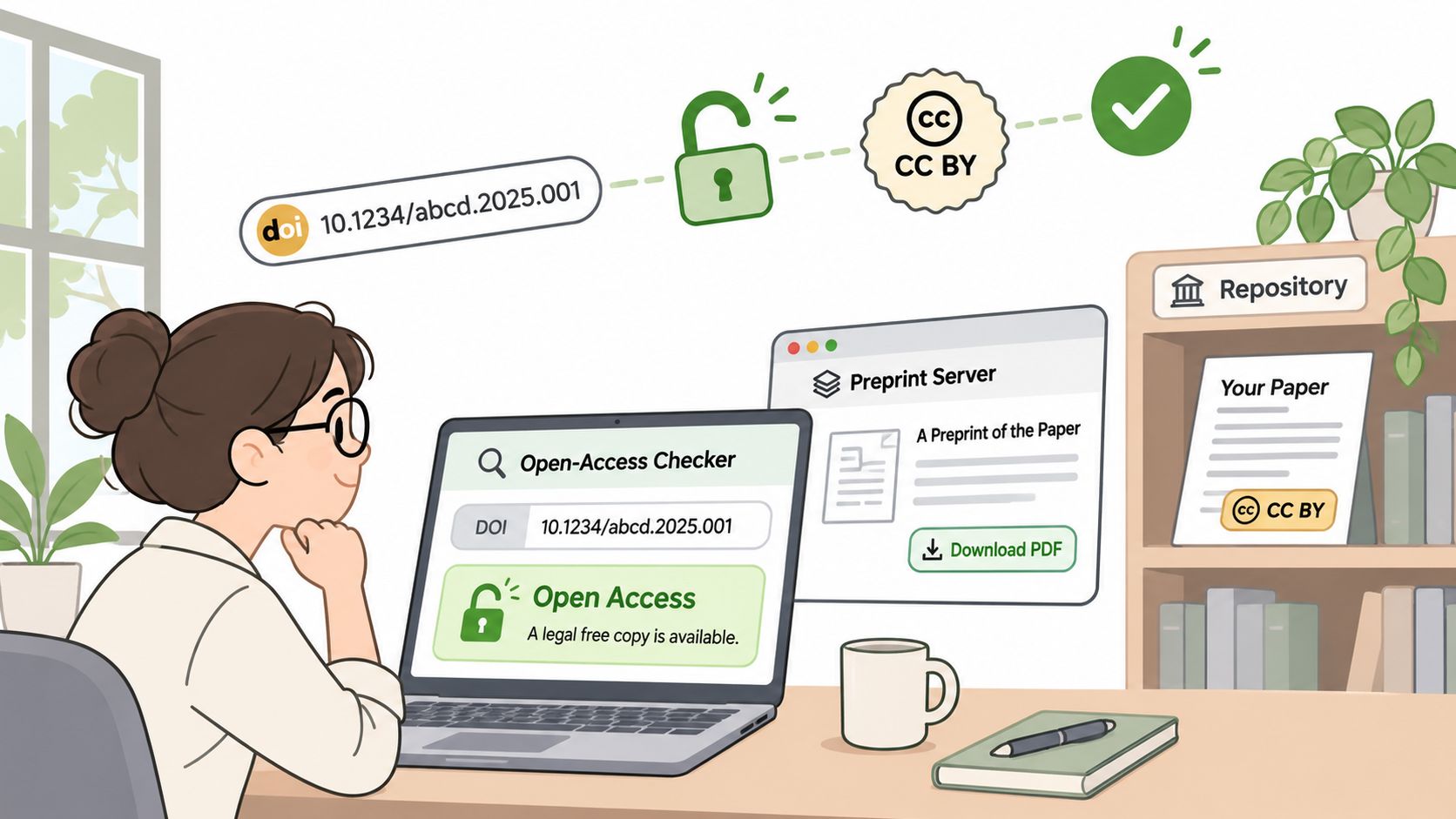
- Run the DOI through Unpaywall. It returns a free legal version when one exists, and it tells you the host and the license, which you'll need for the citation.
- Check the preprint server that matches the field. arXiv for physics, mathematics, and computer science; bioRxiv and medRxiv for biology and health; SSRN for social science and economics. Don't search all four; go to the one your field uses.
- Look at the author's institutional repository or personal page. Plenty of authors post the accepted manuscript because their funder or publisher allows it, and those pages survive long after a departmental site redesign.
- Use the All versions link in Google Scholar. It lists every indexed copy and shows which one carries the publisher's version of record.
- Email the corresponding author if nothing turns up. Two sentences: who you are, what you're working on, and a request for a copy for research use. Skip the apology and skip the long preamble.
Check Which Version You Landed On
Most mistakes happen here, and they're quiet ones. A preprint is a draft posted before peer review and can differ from the published article in results, sample size, or interpretation. An accepted manuscript has the final text but not the publisher's layout, so page numbers won't match a citation from someone else's bibliography. The published version carries the final pagination and any corrections issued later.
| Version | What it is | Where you find it | How to cite |
|---|---|---|---|
| Preprint | Draft posted before peer review | arXiv, bioRxiv, medRxiv or SSRN | Only with a version note |
| Accepted manuscript | Final text without the publisher layout | Author page or institutional repository | Cite with DOI and version statement |
| Published version | Final pages, layout and corrections | Publisher site through the library | Cite the DOI directly |
Check the date, the DOI, the version statement, and the license before you quote a single figure. A CC BY license allows reuse with credit. No license usually means you may read the copy for personal study and nothing more, which matters the moment a draft turns into a report, a slide deck, or a published piece.
Here's the practical walkthrough of the same hunt if you'd rather watch it than read it.
Watch the video on YouTubeThe whole route avoids shared passwords, downloads bundled with things you didn't ask for, and reuploads with no license attached. That's not a moral bonus. It's the difference between a copy you can defend in a corrections email and one you can't.
Free Articles, Trials and Metered Limits
Metered sites give you a fixed number of free articles in a window, counted against an account or a browser. Stop guessing at the count. Open your account page, find the number you have left and the date it resets, and spend what's left on the pieces that matter to the work.
Most sites that meter also offer a free registration tier, and registering usually lifts the allowance at no cost. Take it. A free account with a real address is the publisher's own mechanism, and it costs you an inbox filter.
For a burst of reading, a trial makes sense when you need several articles across a week or a month. Trials commonly require a card, so set a reminder for two days before the first charge and read the renewal terms before you enter anything. For a single article, a day pass or one-off purchase is usually far cheaper than a month you'll forget to cancel.
The scale here is worth keeping in view. The Reuters Institute's 2025 Digital News Report found that 18% of people across 20 relatively wealthy countries had paid for online news in the previous year through a subscription, membership, donation, or one-off payment, a share broadly unchanged for the third consecutive year. Norway reached 42% and the United States 20%, while Greece and Serbia sat at 7%. Most readers are living on free tiers and other routes, and the report's wider survey covered nearly 95,000 respondents across 47 countries.
Say a freelancer needs three paywalled articles in one week. She spends her free allowance first, on the piece most likely to be quoted. Then she buys a single-article pass for the second. Only the third goes to a trial, and only because she has two more pieces coming next month.
Clearing cookies, switching browsers, or opening a private window to reset a meter is unreliable and breaks the site's terms. Plan around the allowance you can actually see.
Ask for Gift Links and Shared Access
Publisher-approved sharing is the route almost nobody asks about, and it's the cheapest one on this list. Many news sites let a subscriber generate a gift link that opens one article for a limited period. Look for a gift or share control on the page before you pay for a pass; it's often next to the byline or in the toolbar.
- Ask a subscriber you know to generate the gift link and tell you how long it stays live. Confirm the window, because these links expire.
- Ask library staff about guest or walk-in access. Many institutions let visitors use licensed databases on site, and a day at a reading room beats a week of waiting.
- Use the publisher's own free-to-read or sponsored link when one exists, rather than a URL copied from a screenshot or a forum post.
Gift links and guest access cost nothing, and they work because the publisher is the one granting permission. That's the whole point. A gift link carries no malware, no account ban, and no awkward conversation with your IT department about why your login showed up in three countries overnight.
Ask for a link, never a password. Shared credentials are the one thing on this list I won't help with: they break the publisher's terms, they expose the account holder, and when the session is killed you're back at the paywall with nothing.
Keep Research Quality When You Switch Sources
The uncomfortable part of this topic is that the substitute you find after hitting a wall is often weaker than the article you couldn't open. Readers do switch, and quickly. A 2025 summary of research from Georgia Tech and Notre Dame reported that 57% of readers leave a site after encountering a paywall, 12% probe it, and 11% try to evade it. The same summary cites a June 2025 Pew survey reported by eMarketer finding that 53% of U.S. readers look for the same information elsewhere.
That substitution is rational, and it's also where citations go wrong. A syndicated copy drops the correction that ran three days later. An aggregator rewrites the numbers. A summary written by a model cites nothing you can check. Use the checklist below before you trust any replacement copy.
| Substitute source | What to verify | Red flag |
|---|---|---|
| Syndicated republication | Original byline, date and publisher credit | No original credit or date |
| Content aggregator | Link to the original article | Rewritten text with no source link |
| AI-generated summary | Named author and cited primary sources | No primary links to check |
| Preprint | Version status and whether peer review is complete | Treated as the final published version |
| Archived snapshot | Capture date and any later corrections | Outdated figures presented as current |
Three habits do the rest. Compare before you commit: check publication dates, bylines, correction notices, and links to the primary source before you accept any figure. Capture narrow: save the two sentences and the one table the task needs, not the whole page, so you can trace exactly what you took. Label uncertainty: mark any claim from a substitute as unverified until you've seen it in the original, then remove the flag.
For teams building a pipeline rather than reading one article, web scraping for research covers how to structure that fallback so a blocked fetch returns provenance instead of a silent downgrade. The same discipline applies to how you consume research at speed: a tool that summarizes across sources, such as a 1chat research overview, is only as good as the version and license of each page behind it.
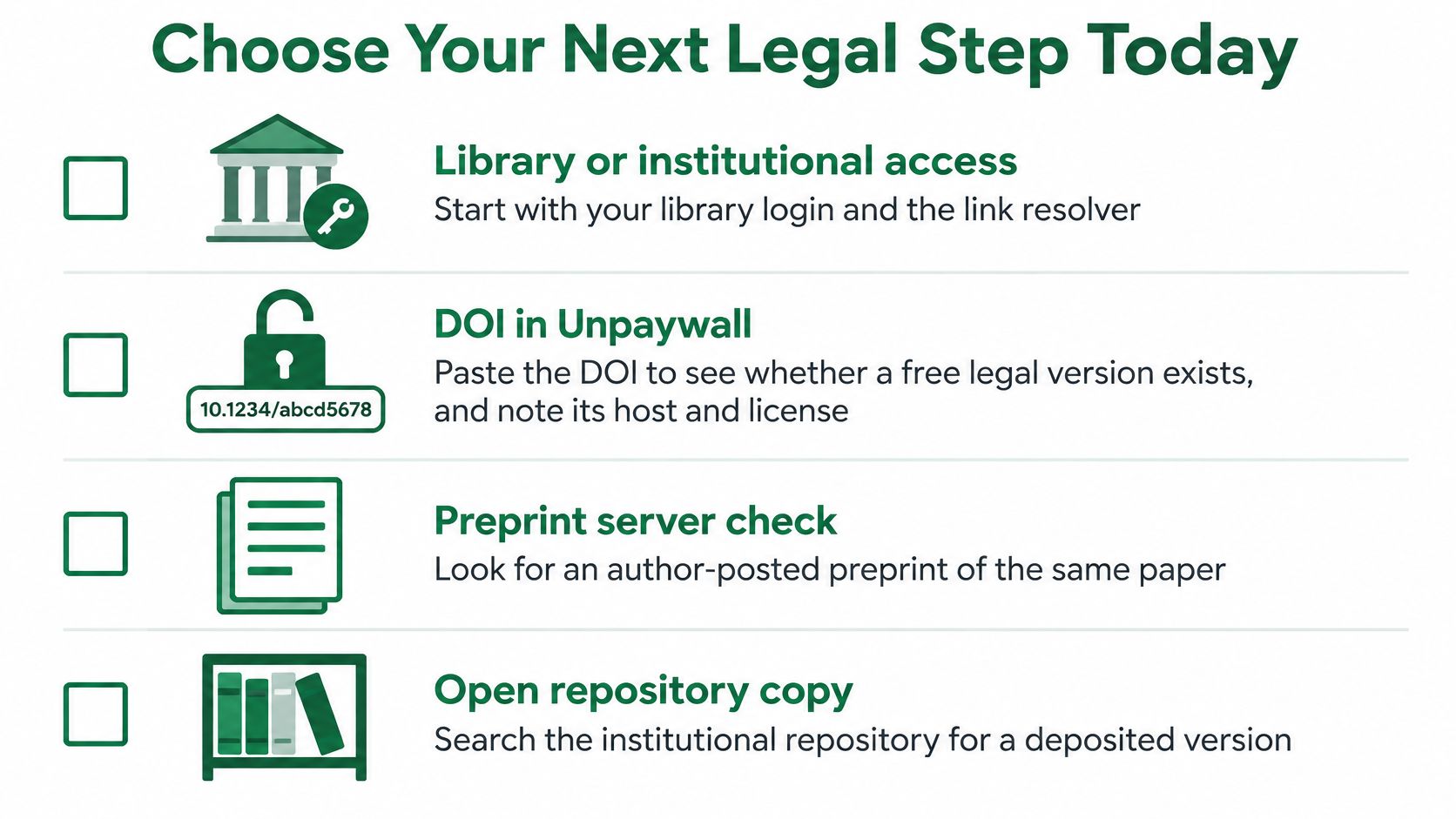
Choose Your Next Legal Step Today
Run these checks in order, and stop as soon as one works. Library or institutional login, with the DOI pasted into the resolver. Unpaywall lookup on that same DOI. The matching preprint server. Your free allowance or a free account on the news site. A gift link from a subscriber you know. Then interlibrary loan or a short email to the author. That's the whole ladder, and none of it requires a password you weren't given.
Record a provenance line for every source you use: where it came from, the date you accessed it, the version, the license, and whether redistribution is allowed. A CC BY license lets you reuse with credit; no license usually means personal study only. That single line saves you when an editor asks where a number came from eight weeks later. Teams that need to keep the page itself for reference can follow a practical guide to archiving web pages, which pairs naturally with a provenance note.
The distinction that matters, and the one most guides blur, is between licensed routes and workarounds. Informal methods expose users to malware, credential theft, account bans, and policy violations, while institutionally licensed access generally aligns with publisher agreements, as this breakdown of legal versus workaround access points out. Researchers, journalists, and analysts need access they can defend in a fact-check, not a trick that works until it doesn't.
If the route depends on a password you were not given or a tool that defeats a login, it is not a route.
One action for today: take the next DOI on your list, paste it into your library portal, and see what opens before you open anything else.
Scrappey gives developers a way to fetch publicly accessible pages, metadata, and open-access copies at scale without building browser infrastructure from scratch, and it doesn't circumvent authentication walls, so it fits the lawful half of this workflow rather than the tricks. Send one request and get back status, full HTML, cookies, and LLM-ready Markdown, with 150 free scrapes to start and no card required. Visit Scrappey to test it on the open-access sources you're already using.