
The popular advice to “just add --json” fixes fewer failed requests than you might expect. It sets useful headers and sends a body, but it won't validate JSON, repair shell quoting, or confirm that your fields match the API contract. A dependable curl JSON POST workflow separates those jobs, so you can identify whether the failure comes from your shell, payload, credentials, or server instead of changing flags at random.
Send Your First JSON POST in One Command
curl -X POST https://your-api.example.com/items -H 'Content-Type: application/json' -d '{"name":"widget","qty":3}'
Replace the example endpoint with your API's actual address before running this command. The inline quoting shown here is for Bash or zsh.
The command has three important parts. -X POST selects the HTTP method, telling the endpoint you're submitting content for processing. You can omit it when using -d, because that option already selects POST, but keeping it explicit can make a test command easier to read.
Content-Type: application/json describes the request body. It tells the server to interpret the bytes as JSON rather than form data. Without that header, the request can still reach the server, but the API might reject it or choose the wrong parser.
Finally, -d carries the body. The surrounding single quotes belong to the shell, not JSON; they protect the double quotes around name and widget.
Core curl flags for a JSON POST
| Flag | What It Does | When to Use It |
|---|---|---|
-X POST or --request POST |
Sets the HTTP method | Optional with -d, but explicit in scripts |
-H 'Content-Type: application/json' |
Tells the server the body is JSON | Always when manually constructing JSON API requests |
-d or --data |
Sends the body and strips newlines from @file input |
Short inline bodies |
--data-binary |
Sends the body byte for byte | Payload files and bodies where exact whitespace matters |
--json |
Combines binary-preserving data with JSON Content-Type and Accept headers | Installations supporting the JSON shortcut |
-i |
Prints response headers with the body | Checking the status line and headers |
-sS |
Hides the progress meter while retaining errors | Scripts and CI logs |
JSON is a practical starting point for API work: F5's 2024 State of Application Strategy report stated that 52% of APIs used JSON for data exchange. That doesn't mean every endpoint accepts the same fields or authentication scheme.
If you're unsure which address should receive the request, start with how REST API endpoints work. For an application-focused explanation of exchanging records between systems, VolunteerBadge's guide to understanding APIs for volunteer screening provides useful integration context.
Add -i to inspect the result. 201 Created indicates resource creation, while 400 Bad Request means the server rejected the request as invalid; inspect the body for a field-level explanation rather than assuming the shell command itself failed.
Run curl --version before choosing a newer shortcut. Distribution packages and container images don't necessarily contain the same curl capabilities as your laptop.
Inline JSON or a Payload File Compared
Inline JSON is convenient until the values stop being simple. An apostrophe in a customer's name can end a Bash single-quoted string, while a dollar sign inside a double-quoted shell string can trigger variable expansion before curl starts.
A file removes that extra interpretation layer. You can inspect the body independently, review changes in Git, and reuse exactly the same input in a terminal and CI.
Ways to supply the JSON body
| Method | Example Syntax | Best For | Main Risk |
|---|---|---|---|
| Inline single quotes | -d '{...}' |
One-off terminal requests | Apostrophes end shell quoting; embedded JSON quotes still need valid escaping |
Payload file with --data-binary |
--data-binary @payload.json |
Reused or large bodies | Missing @ sends literal filename text |
Payload file with --json |
--json @payload.json |
Compatible curl installations and reproducible calls | Invalid JSON is still sent unchanged |
| Standard input | --data-binary @- |
Piping output from jq or a script | Empty input can send an empty body |
Shell variable in -d |
-d "$payload" |
Scripts building values at runtime | Unsafe construction can mishandle quotes and newlines |
-d @payload.json isn't equivalent to --data-binary @payload.json. When reading a file, -d removes carriage returns, newlines, and null bytes. Removing formatting newlines from valid JSON usually doesn't change its meaning, but it changes the bytes, which matters for request signatures, checksums, and exact reproduction.
Missing @ is a different failure. --data-binary payload.json sends the text payload.json, not the file's contents.
Generate values with a serializer
Don't concatenate user-controlled values into a JSON template. Let jq escape them:
jq -n --arg name "$ITEM_NAME" '{name: $name}' > payload.json
curl -H 'Content-Type: application/json' --data-binary @payload.json https://api.example.com/items
The --arg option supplies a string value to jq. Quotes, backslashes, and line breaks inside ITEM_NAME become valid JSON escapes rather than shell syntax.
Keep the generated file out of version control when it contains personal information or secrets. Commit a sanitized fixture or template instead, alongside the script that builds the request.
Piping jq directly into curl is shorter, but introduces a failure-handling trade-off: without careful pipeline handling, curl can run even when the producer fails. Generating and validating a file first makes that boundary easier to control.
Practical rule: Use inline JSON for a one-off terminal call. Use a file for anything you'll run twice.
Setting Headers and Authentication Safely
-d alone defaults to application/x-www-form-urlencoded, not JSON. The everything curl content-type guide explains why manually constructed JSON requests need an explicit media-type header; curl 7.82.0 introduced --json as the shortcut combining --data-binary, Content-Type: application/json, and Accept: application/json.
These headers answer different questions. Content-Type describes what you're sending; Accept describes the response format you'd prefer. Neither authenticates you, and Accept doesn't guarantee that a gateway error will arrive as JSON.
Authentication methods for JSON POST
| Method | curl Option or Header | Typical Use |
|---|---|---|
| Bearer token | -H 'Authorization: Bearer TOKEN' |
OAuth access tokens and token-authenticated REST APIs |
| API key header | -H 'X-API-Key: KEY' |
Vendor APIs issuing account keys |
| Basic auth | -u user:password |
Older services and internal endpoints |
| Key inside JSON body | Field within the payload | Scraping and task APIs accepting credentials with the request |
| Headers from file | -H @headers.txt |
Keeping credential values out of shell history and command arguments |
For a bearer token held in the environment, use double quotes so the shell expands the variable:
curl --json @payload.json -H "Authorization: Bearer $API_TOKEN" https://api.example.com/items
For an API key header, follow the vendor's exact header name:
curl --json @payload.json -H "X-API-Key: $API_KEY" https://api.example.com/items
Basic authentication accepts a username and password through -u:
curl --json @payload.json -u "$API_USER:$API_PASSWORD" https://api.example.com/items
The practical guide to curl basic authentication covers that mechanism in more detail. Use HTTPS, and don't type real passwords directly into a reusable command.
For APIs that require a credential inside JSON, serialize it using the documented field name. This illustrative command assumes that field is key:
jq -n --arg key "$API_KEY" '{key: $key}' > private-payload.json
At Scrappey, we accept a standard HTTP POST with a key and JSON payload describing the scraping task, then return JSON. Credential placement remains part of the endpoint contract, not something curl can infer.
Keep secrets out of command arguments
Environment variables avoid literal secrets in shell history, but expanded values can still appear in process inspection. A protected headers file avoids placing the token directly in curl's arguments:
curl --json @payload.json -H @headers.txt https://api.example.com/items
Populate that file through your secret store, restrict its permissions, and delete temporary copies after use. Multiple -H options can coexist, so an authentication header, documented API-version header, and request correlation ID can accompany the same body.
Common JSON POST Errors and Their Fixes
A valid-looking curl command can still send invalid JSON. The everything curl JSON guide makes the boundary explicit: --json doesn't parse, validate, or repair the document.
Start by separating shell syntax from JSON syntax. Your shell may successfully launch curl with a body containing a trailing comma, an unquoted property name, or single-quoted JSON strings. Conversely, perfectly valid JSON in an editor can become a broken shell argument when pasted inline.
JSON POST symptoms, causes and fixes
| Symptom | Likely Cause | Fix |
|---|---|---|
400 Bad Request with a command that looks right |
Invalid JSON, such as a trailing comma or unquoted key | Run jq empty payload.json before sending |
415 Unsupported Media Type |
Content-Type missing or form-encoded | Add the JSON Content-Type header or use --json |
| Server receives literal filename text | Missing @ before the filename |
Use --data-binary @file.json |
401 or 403 despite an apparently valid key |
Header typo, expired token, wrong placement, or insufficient permissions | Compare credential placement and permissions with the API docs |
Exit code 0 while the API reports failure |
Transfer completion isn't application success | Add --fail-with-body and inspect the HTTP status |
| Command breaks at an apostrophe | Single quote inside an inline shell-quoted value | Move the payload into a file |
| Garbled non-ASCII characters | Terminal encoding or file encoding mismatch | Send a UTF-8 payload file |
Validate and send as a single conditional operation:
jq empty payload.json && curl --fail-with-body --json @payload.json https://api.example.com/items
The && prevents transmission if jq rejects the file. However, jq empty checks parsing, not your API's required fields, and an empty input can pass without producing a document. Inspect generated files for unexpectedly empty input, then check the endpoint's schema for field names, types, and required values.
Fix the mismatch, not an unrelated flag
For a media-type rejection, the smallest useful change is:
curl -H 'Content-Type: application/json' --data-binary @payload.json https://api.example.com/items
The guide to fixing the 415 status code explains how to distinguish a missing header from an endpoint that doesn't accept the format at all. Adding JSON headers won't make a multipart-only upload endpoint accept JSON.
For filename text in the response, inspect the body argument rather than changing authentication. Also, -d @file does read a file; its problem is byte stripping, not automatically sending the filename.
Authentication failures need equally targeted checks. Confirm the credential's environment, expiry, permissions, header spelling, and placement without printing the secret.
A syntactically valid document can still violate business rules or trigger a server bug. Not every failed POST is a caller fault, and repeated flag changes won't fix a server-side defect. If the same command behaves differently on Windows, inspect shell argument handling before changing the payload's meaning.
How to Debug and Retry a JSON POST Step by Step
Debug the request before teaching a script to repeat it. Retrying malformed input just sends the same mistake again, while retrying a successful-but-unacknowledged POST can create duplicate work.
Use this flow to separate inspection, validation, and a corrected resend.
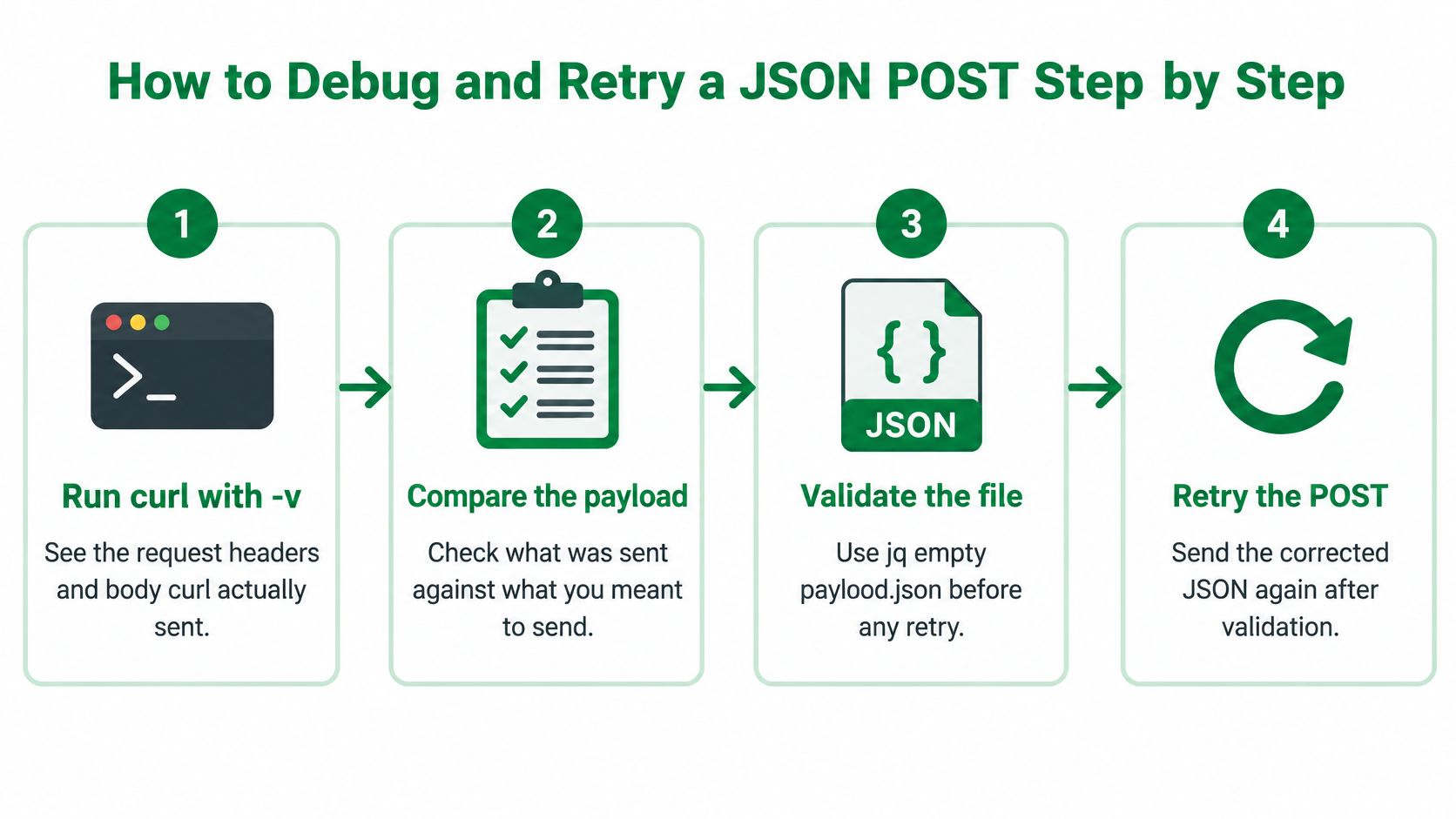
Inspect the connection and headers. Run
curl -v --json @payload.json https://api.example.com/items. Verbose output exposes request and response headers, but doesn't dump the complete request body. Compare the source file directly; use--trace-asciionly with sanitized test data when you need a body trace.Validate before another network call. Run
jq empty payload.json, then compare the document with the endpoint's required fields. Parsing success doesn't establish schema correctness.Make the status visible. Add
--write-out '\nHTTP=%{http_code}\n'or use-iinteractively. Keep headers separate from the response body if a downstream program expects JSON.Make HTTP errors fail the command. Add
--fail-with-bodyso scripts can detect HTTP failures while retaining diagnostic response content. Check the process exit status before consuming the response.Bound retries deliberately. According to the curl manual, retries default to zero, and transient retry conditions include timeouts and HTTP 408, 429, 500, 502, 503, 504, 522, and 524, not ordinary 404 responses. A bounded example is
--retry 4 --retry-delay 2 --retry-max-time 30; the explicit delay selects a fixed wait rather than exponential backoff.Protect application effects. Enable automatic POST retries only when the endpoint supports an idempotency key or the application provides reliable deduplication. Reuse the same key for retries of the same logical operation, not for unrelated requests.
Record useful, sanitized diagnostics. Log HTTP status, elapsed time, retry count where supported, and a request correlation ID. Never log authorization headers or sensitive JSON fields.
A diagnostic command worth keeping
curl --fail-with-body --silent --show-error --header 'Content-Type: application/json' --data-binary @payload.json --write-out '\nHTTP=%{http_code} time=%{time_total}\n' https://api.example.com/items
This separates a visible HTTP result from curl's own transfer outcome. Add retries only after you've established the endpoint's duplicate-prevention behavior, and remember that a retry-window limit isn't a substitute for per-transfer timeout controls.
A lost response doesn't prove the server rejected the request. Treat the result as unknown until an idempotency mechanism or a status lookup resolves it.
For a terminal-oriented walkthrough, use the video alongside your own sanitized test request.
Watch the video on YouTubePlatform Tips for Windows, PowerShell and CI
A request body shouldn't depend on which shell launches curl. In practice, inline commands do: Bash, CMD, and Windows PowerShell process quoting differently before curl receives its arguments.
A UTF-8 payload file gives each environment the same input. Keep the file free of an unexpected byte-order mark when an API's parser or signature scheme requires exact bytes.
This illustration summarizes the file-based approach.
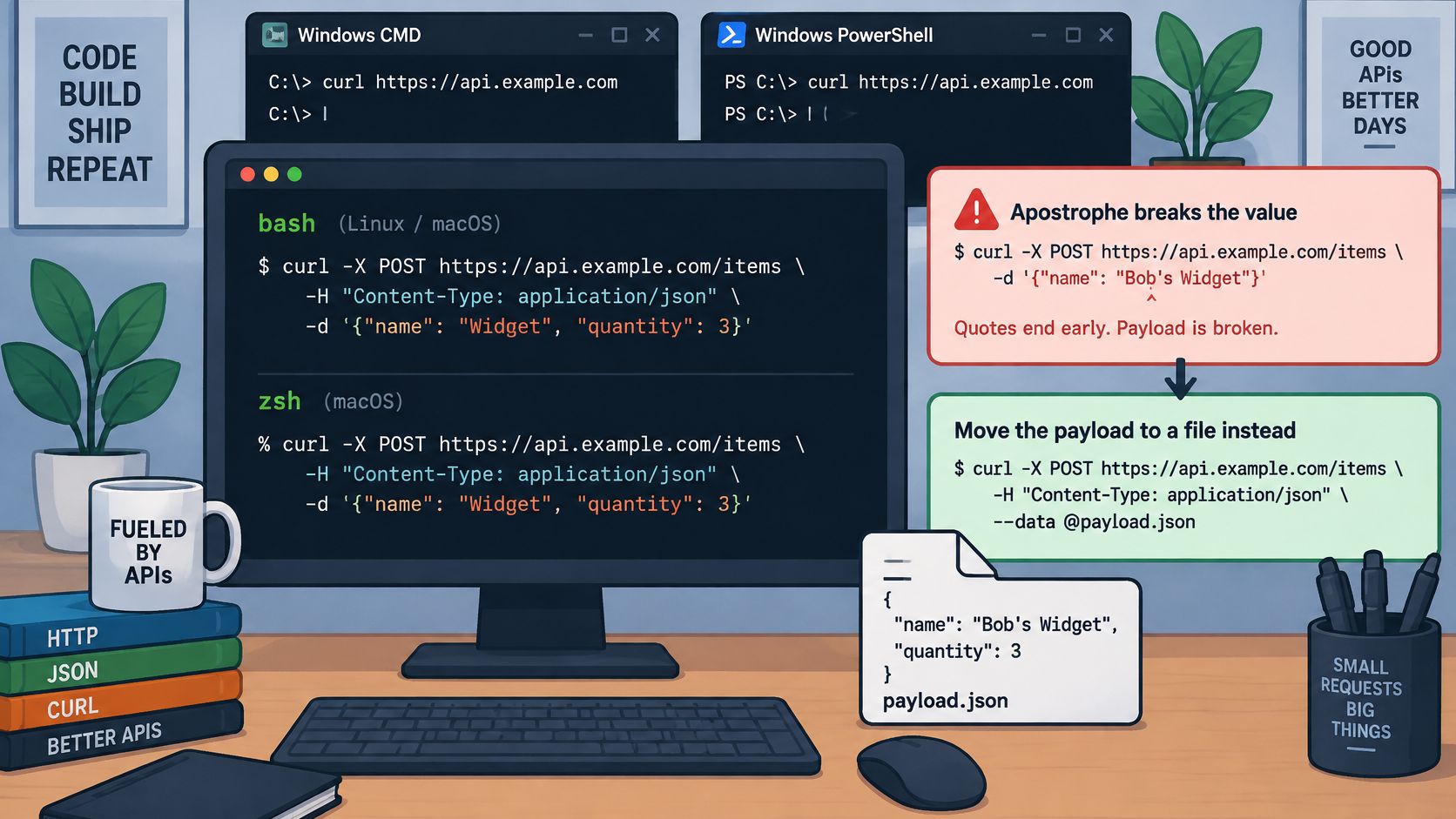
Quoting and setup differences by platform
| Platform | Quoting Rule | Safe Pattern | Watch Out For |
|---|---|---|---|
| Linux or macOS Bash and zsh | Single quotes preserve literal shell text | Single-quoted inline data or --data-binary @file |
An apostrophe ends the quoted string |
| Windows CMD | Double quotes group arguments; inner quotes need escaping | Payload file with @file |
Backslashes and caret escaping complicate inline JSON |
| Windows PowerShell | Native argument handling differs from Bash | Call curl.exe explicitly and use a file |
Legacy aliases and embedded quote handling |
| GitHub Actions or GitLab CI | Shell depends on runner and job configuration | Select Bash explicitly, build with jq, inject secrets | Verbose output can expose headers |
| Docker or Alpine containers | Many minimal images use sh |
POSIX-compatible shell syntax | Missing CA certificates can break HTTPS |
For Bash or zsh, use:
curl -H 'Content-Type: application/json' --data-binary @payload.json https://api.example.com/items
For Windows CMD, avoid inline JSON escaping:
curl.exe -X POST https://api.example.com/items -H "Content-Type: application/json" --data-binary @payload.json
For Windows PowerShell, explicitly selecting the executable also avoids environments where curl resolves to Invoke-WebRequest:
curl.exe -H "Content-Type: application/json" --data-binary "@payload.json" https://api.example.com/items
Don't assume writing a text file from any PowerShell environment produces the encoding your API expects. Verify UTF-8 output when names, currencies, or other non-ASCII characters matter.
A realistic CI step
On a GitHub Actions Linux runner with jq and curl available, select the shell and inject the token from a repository secret:
- name: POST item
  shell: bash
  env:
    API_TOKEN: ${{ secrets.API_TOKEN }}
    ITEM_NAME: widget
  run: |
    set -eu
    jq -n --arg name "$ITEM_NAME" '{name: $name}' > payload.json
    jq empty payload.json
    curl --fail-with-body --silent --show-error \
      -H "Authorization: Bearer $API_TOKEN" \
      -H 'Content-Type: application/json' \
      --data-binary @payload.json \
      --output response.json \
      --write-out 'HTTP=%{http_code}\n' \
      https://api.example.com/items
Avoid shell tracing around credentials, even when CI masking is enabled. Masking isn't a guarantee against every transformed or encoded secret appearing in logs.
In containers, install curl and the appropriate CA certificate package rather than disabling certificate verification. Keep scripts compatible with sh unless you explicitly install and invoke Bash. A file-based body avoids shell quoting changes across these environments, provided you preserve its encoding and bytes.
Pick Your JSON POST Pattern and Run It
Choose the pattern by how the request will be used, not by which command is shortest. A terminal experiment and a production collection job need different safeguards.
- For a one-off check, use a short single-quoted inline body in Bash or zsh, add
-i, and inspect both the status line and response. - For a repeatable request, keep a sanitized payload file beside the test. Send it with
--data-binaryand explicit headers, or use--jsonwhen your installed curl supports it. - For a script or pipeline, serialize generated values with jq, validate before transmission, retain the error body, and check the HTTP outcome. Add bounded retries only after duplicate prevention is established.
- For recurring data collection, separate credentials from the reusable payload and read them from the environment or a protected secret file. Keep response processing separate from transport handling.
For our web-data workflow, send a request containing a URL to a single endpoint. We run a real browser through a residential IP and return a JSON response containing status, full HTML, cookies, and LLM-ready Markdown. The caller can then handle that result using the same status checks and response parsing as any other HTTP integration.
The rule to remember: With binary-preserving input, curl sends the bytes you supply. It doesn't validate their JSON syntax or their meaning, so validate before sending.
Scrappey provides a JSON-based API for collecting publicly available web content without managing the browser and proxy workflow yourself. Visit Scrappey to build a file-based POST request for your target URL, then integrate the returned JSON into your data pipeline.