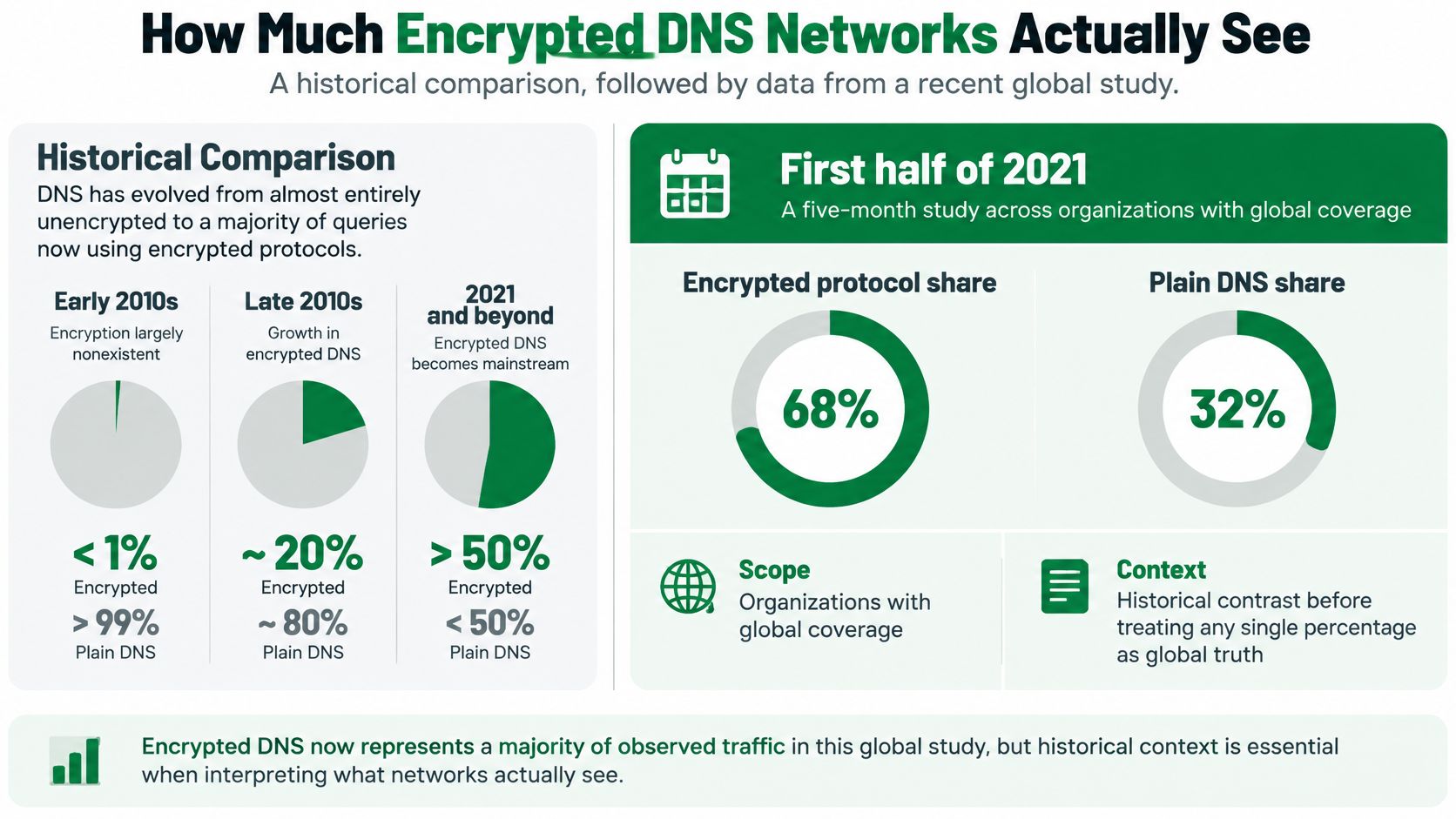
Encrypted protocols accounted for only 0.01% of total DNS traffic in one organization in a globally scoped measurement published in the early encrypted DNS adoption study. That historical baseline isn't a description of today's internet. It's a reminder that the traffic you can measure depends on where you stand, which protocols you recognize, and whose network you're watching.
Encrypted DNS traffic protects the lookup payload, not the entire connection history. For network operators and developers running scrapers, the practical questions are which resolver receives the query, which metadata remains visible, and whether a failed lookup can be separated from a failed proxy or website.
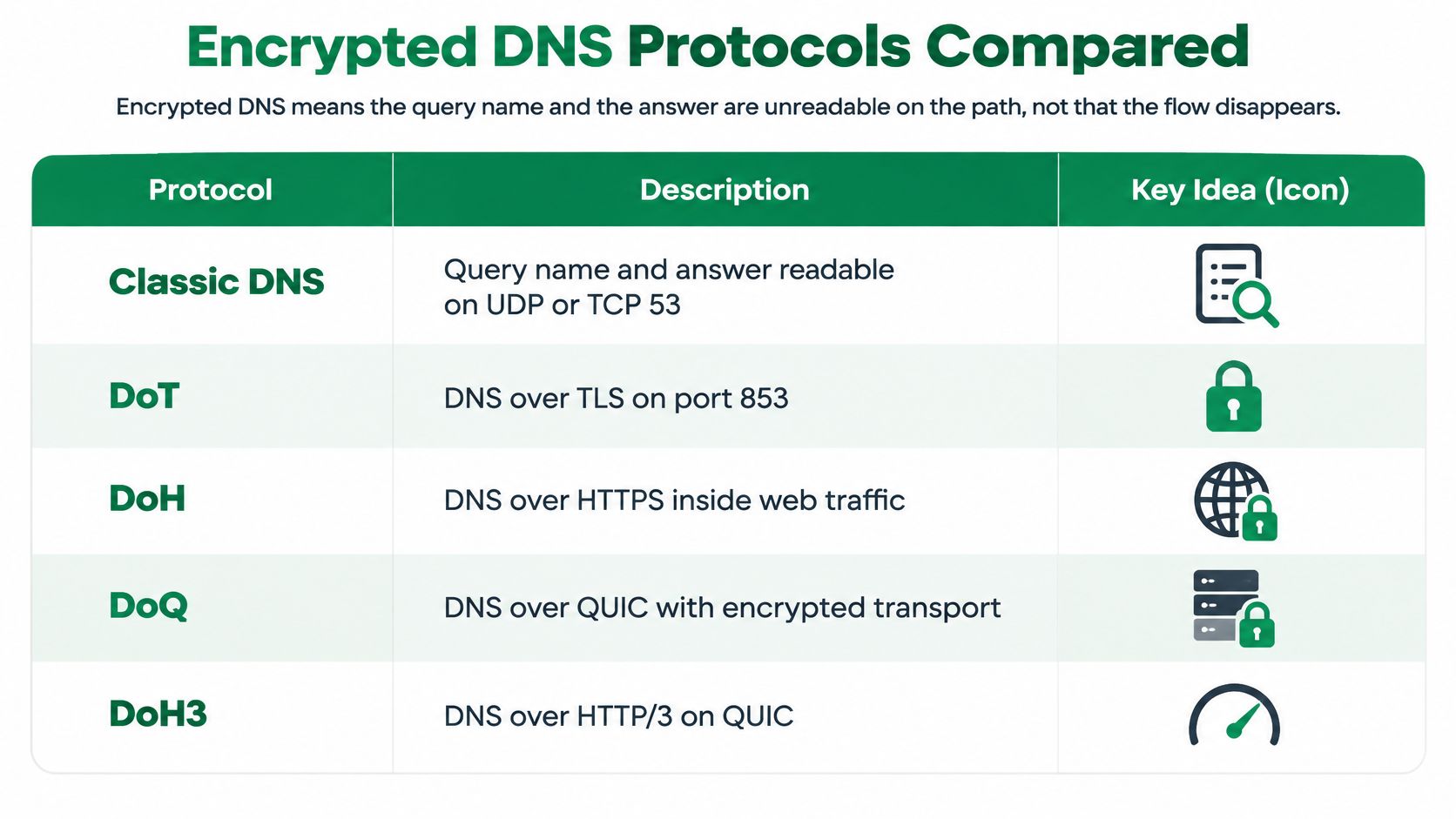
Encrypted DNS Protocols Compared
Encrypted DNS makes the query name and answer unreadable to a passive observer on the protected path. It doesn't make the flow disappear. Choose the transport around your policy boundary and network reachability, then benchmark the resolver from the actual worker egress.
Encrypted DNS protocols operators deploy
| Protocol | Transport and port | Blends with web traffic | Handshake | Median latency signal | How operators see it |
|---|---|---|---|---|---|
| Cleartext DNS | UDP or TCP 53 | No | None for UDP; TCP setup otherwise | No comparable median cited | Full query name and answer visible |
| DoT | TLS over TCP 853 | No | TCP plus TLS | See measured comparison below | Identifiable dedicated service |
| DoH | HTTPS, usually HTTP/2 over TCP 443; HTTP/3 uses UDP 443 | Yes | TLS plus HTTP; QUIC for HTTP/3 | See measured comparison below | Hard to separate from other HTTPS |
| DoQ | QUIC on UDP 853 | Partially, but not ordinary HTTPS | QUIC setup, with resumption where supported | Not measured in the home-network comparison | Dedicated UDP flows; check middlebox compatibility |
| DNSCrypt | Its own encrypted protocol over UDP or TCP, often 443 | Partially, by port only | Certificate retrieval and authenticated encryption | No comparable median cited | Recognizable protocol format, not standard TLS |
The visual distinguishes the main transport families, including HTTP/3-based DoH.
Resolver choice changes the result
In a study of U.S. home networks, the encrypted DNS performance comparison measured median response times of 20.9, 32.2, and 45.3 ms for DoT, versus 37.7, 46.6, and 60.7 ms for DoH, across the same evaluated resolvers. The study also found that DoT could outperform conventional DNS for some resolvers.
That doesn't establish a universal protocol ranking. A nearby, well-provisioned resolver with reusable connections can beat a theoretically lighter transport on a poor network path. Cold connection establishment and an established-session lookup are different measurements.
Use these selection rules:
- Choose DoT for explicit policy control. Its dedicated service is straightforward to permit, monitor, or reject.
- Choose DoH for application integration. It fits HTTPS-capable clients, but complicates network-only identification.
- Test DoQ for connection-sensitive workloads. Confirm UDP reachability and reconnection behavior before deploying it across a fleet.
- Keep DNSCrypt intentional. Use it when your client and resolver support that ecosystem, not as an interchangeable name for TLS-based DNS.
Measure lookup latency, connection establishment, timeouts, and cache behavior separately. Don't benchmark from a laptop and apply the result to workers behind different proxies.
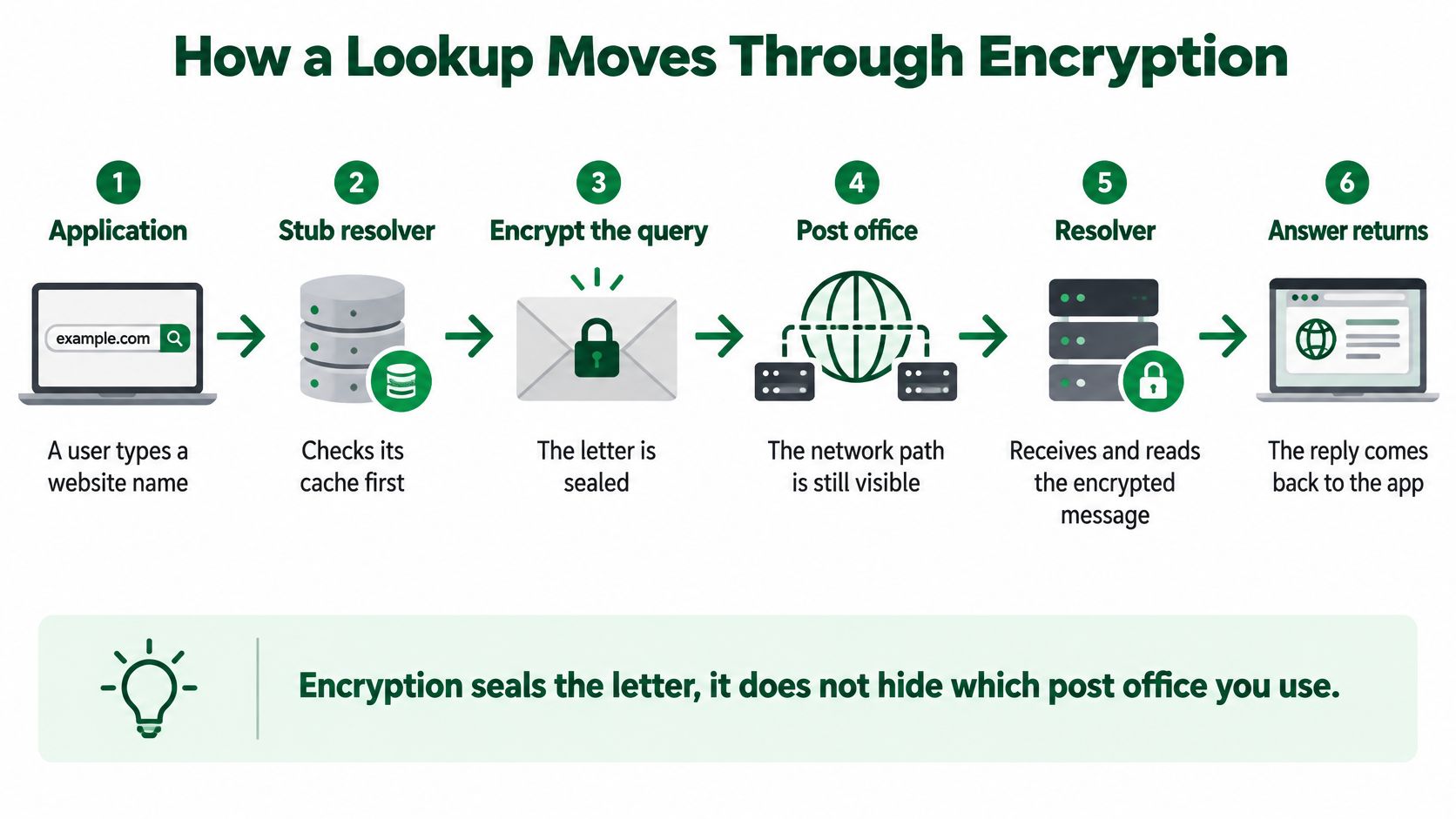
How a Lookup Moves Through Encryption
Encryption seals the letter; it doesn't hide which post office you use. The application chooses a name, but the stub resolver, browser settings, recursive resolver, and cache determine what crosses the network.
Follow the client-to-resolver boundary in this diagram.
From a cache miss to an answer
The application first consults its available cache and resolution mechanism. A browser may use its own resolver rather than the operating system's, so changing host settings doesn't necessarily change browser behavior.
On a cache miss, the client opens or reuses an authenticated connection to its selected recursive resolver. With DoT, the DNS message travels directly inside TLS. With DoH, the client packages the message in an HTTP request; the standardized wire-format interface uses the application/dns-message media type.
DoQ carries DNS messages on QUIC streams. Connection reuse avoids establishing a fresh secure session for every lookup, and QUIC can support continuity across some network-address changes. Neither feature excuses skipping certificate validation or testing reconnection behavior.
The recursive resolver decrypts the request and reads the question. It answers from cache when possible; otherwise, it performs the upstream resolution work. The returned record has a time to live, which informs caching before another lookup becomes necessary.
Boundaries that change troubleshooting
Three distinctions matter operationally:
- Client encryption isn't end-to-end DNS encryption. Protecting the client-to-recursive hop doesn't automatically protect the recursive resolver's exchanges with authoritative servers.
- DoH over HTTP/3 isn't DoQ. Both use QUIC, but one carries HTTP requests and the other carries DNS directly.
- A successful answer isn't a successful page load. The application still needs to establish the subsequent connection, negotiate TLS, and receive a usable response.
A normal navigation needs usable addressing information before opening its destination connection, although browsers can prefetch names or reuse existing connections. That makes a page-load stopwatch a poor substitute for DNS instrumentation.
This video provides another way to follow the encrypted lookup path.
Watch the video on YouTubeLogging boundary: Record the selected resolver, transport, session reuse, cache outcome, response code, and lookup duration. Don't create a permanent query-name archive merely because the encrypted transport made your old packet inspection unavailable.
For debugging, distinguish a local cache hit from a resolver cache hit. The former may produce no network request at all; the latter still includes transport and resolver processing time. Without that distinction, connection reuse and caching can look like unexplained performance changes.
What Encrypted DNS Still Reveals
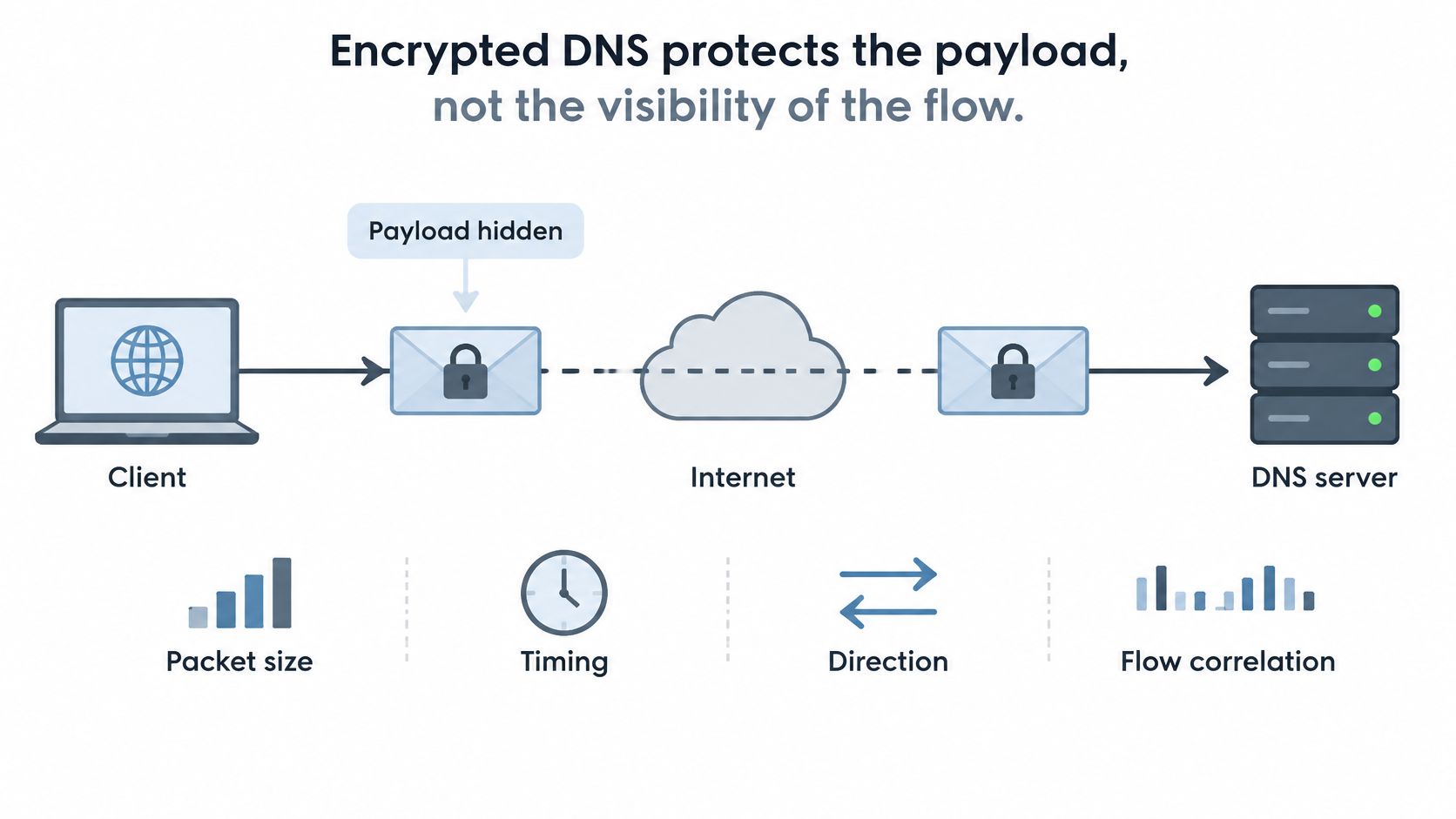
DoH and DoT aren't invisibility mechanisms. RFC 9076 describes residual exposure through packet sizes, timing, directionality, transport correlations, and resolver relationships, even when query names and answers are encrypted.
A passive observer can see a client contact a resolver, exchange encrypted packets, and then connect to destination infrastructure. Those observations don't guarantee an exact domain identification, especially when services share infrastructure. They can still support profiling and probabilistic inference.
The difference between content protection and flow visibility is the important boundary.
Censorship doesn't require plaintext names
A global measurement cited in the encrypted DNS traffic-analysis paper found 5.92% of 10 million encrypted-DNS queries censored worldwide, rising to 36.11% for queries sent from China. The cited measurement also found lower censorship rates for DoQ than for DoH.
Those results don't make DoQ universally censorship-resistant. An operator can block a resolver endpoint or transport without decoding a single lookup. Reachability must be tested from the country and network where the application runs.
The recursive resolver also remains a privileged observer. It must read the question to answer it, and its operator may be able to associate queries with client connections. Moving queries from an ISP resolver to a public resolver changes the trust relationship; it doesn't remove it.
Reduce exposure without promising anonymity
Treat the remaining risks separately:
- On-path observation: Monitor unusual flow timing and volume, but don't assume these signals reveal exact names.
- Resolver concentration: Choose a controlled set of suitable resolvers rather than sending every workload to an arbitrary public endpoint.
- Resolver logs: Restrict access, limit retention, and separate operational metrics from sensitive query history.
- Regional interference: Test endpoint availability from deployment egress and maintain an approved alternative.
Padding and other traffic-shaping measures can complicate analysis, but they shouldn't be treated as a complete defense. Likewise, distributing queries across more operators can reduce concentration while expanding the number of parties you must trust.
Encryption changes who can read the question. It doesn't eliminate the need to choose whom you trust.
Keep the audiences separate. The on-path network loses direct access to the DNS payload, the recursive resolver reads it, and the subsequent application connection exposes its own metadata. A defensible privacy claim names the audience and the protected hop.
How Much Encrypted DNS Networks Actually See
The early adoption baseline describes a small encrypted slice in the measured organizations, not a permanent property of DNS. Later measurements need equally careful labels. Transport adoption, resource-record usage, and provider traffic share are different quantities.
An HTTPS resource record is particularly easy to confuse with DNS over HTTPS. The record describes service connection information; DoH describes how a DNS message travels. An HTTPS-record query can travel over cleartext DNS, while an ordinary address-record query can travel over DoH.
The historical visual needs that distinction, and its displayed percentage split should not be used as an adoption estimate.
Count record types separately from transports
In a month-long operational-network dataset, the passive HTTPS-record measurement found that HTTPS DNS queries accounted for approximately 7.89% of observed DNS traffic, while 3.8% of those queries received an HTTPS-type response. Those figures describe record-related behavior in that network, not a global DoH transport-adoption rate.
A client can ask for an HTTPS record, receive no corresponding record, and still obtain usable address records. Counting the first request as a failed encrypted connection would misclassify normal DNS behavior. Counting it as proof of DoH would misclassify the transport.
Attach a denominator to every dashboard
| Observation point | What you can count reliably | What you shouldn't infer automatically |
|---|---|---|
| Application | Requested names, local cache outcomes, chosen resolver | All host-wide DNS activity |
| Network edge | Visible destinations, transports, flow volume | Names inside encrypted payloads |
| Recursive resolver | Received questions, answers, upstream work | Requests satisfied in client caches |
| Authoritative server | Queries that reach the zone | Every end-user lookup |
Record protocol, resolver, organization, observation point, and measurement window alongside any traffic share. Also specify whether you're counting messages, queries, responses, connections, or bytes.
For scraping infrastructure, the guide to firewalls and proxies provides useful context for locating that observation point. A firewall beside the worker and a resolver behind the proxy don't necessarily observe the same path.
The useful historical conclusion is limited but practical: DNS behavior has changed, while measurement categories remain easy to mix up. Build dashboards that preserve those categories instead of compressing them into a single encrypted percentage.
Configuration Examples for Encrypted DNS
Configure one authoritative resolution policy per workload before changing every client. The examples below describe settings and verification procedures without supplying deployable domain configurations or assuming that every resolver supports the same interface.
Host and forwarder settings
For systemd-resolved, use strict DNS over TLS rather than opportunistic encryption. Supply the approved resolver's reachable address and authentication identity through your managed configuration, then restart the service. Inspect the effective resolver state and capture a fresh, uncached lookup to confirm that the expected encrypted connection carries it.
A hostname alone isn't a bootstrap plan. The machine needs a way to reach and authenticate the resolver before it can rely on that resolver for other names.
For Unbound, configure an authenticated TLS forwarder. Enable TLS for the forwarding zone and verify that the upstream certificate identity matches the approved resolver. Check service status, then test an uncached lookup and inspect upstream connection telemetry.
Browser and endpoint checks
- Test the endpoint before the browser. Confirm its certificate, HTTP status, and supported DNS response format. A resolver-specific JSON interface isn't automatically compatible with the standardized DNS wire-format interface.
- Make Firefox policy explicit. Select strict DoH behavior and the approved endpoint through managed settings. Confirm that browser-level resolution hasn't bypassed enterprise policy.
- Manage Chrome centrally. Use its secure DoH policy and resolver-template policy, then inspect the effective browser policy rather than trusting a successful page load.
- Validate negative cases. Make the primary resolver unavailable in a controlled test and observe the actual failover path.
A valid HTTPS response from a resolver doesn't prove that the browser used it. Cached answers, an operating-system resolver, or a proxy-side lookup can all make a page load successfully while your intended configuration remains unused.
Verification rule: Test both successful resolution and deliberate resolver failure. The failure test exposes hidden fallbacks that the happy path won't reveal.
Keep endpoint bootstrap information, certificate trust, and fallback selection under configuration management. An encrypted path that only works until the next worker rebuild isn't a reliable deployment.
Detecting Unmanaged DNS and Attributing Failures
Browsers and applications can bypass internal blocklists, split-horizon resolution, and troubleshooting logs when they select external resolvers. The Gcore guide to DoH explains the identification problem: DoH travels inside ordinary HTTPS, while DoT uses a more readily identifiable dedicated service.
Don't respond by decrypting every user's web traffic. Establish approved resolver paths and correlate client configuration with flow telemetry.
Detection without blanket interception
- Inventory approved destinations. Include resolver addresses, DoH endpoint identities, managed browser policy, and proxy-side resolution.
- Flag unexpected resolver traffic. Treat connections to known public resolver infrastructure as candidates, not proof. Shared hosting and address changes can cause false positives.
- Offer encrypted policy resolution. Give managed applications an approved DoH or DoT path so confidentiality doesn't require abandoning organizational controls.
- Collect minimal diagnostics. Keep transport, selected resolver, response code, and latency available without retaining every queried name.
- Compare resolution paths. Test the policy resolver, an authorized independent resolver, and the browser or proxy egress before blaming the origin.
Encrypted DNS symptoms and the layer that failed
| Symptom | Likely cause | Check that isolates it |
|---|---|---|
| Timeouts only when DoT is forced | Dedicated transport blocked on the path | Compare the same lookup over approved DoH |
| Internal hostname fails through public resolution | App bypassed split-horizon DNS | Query the policy resolver and compare |
| HTTPS query, no HTTPS answer, site still loads | No usable HTTPS record; address lookup succeeds | Confirm the following A or AAAA lookup |
| SERVFAIL or long tail on one resolver, site TCP is fine | Resolver path, processing, or filtering issue | Repeat through another resolver in the same region |
| Blocklist never fires | Browser or scraper may use unmanaged DoH | Compare client policy and resolver destination telemetry |
| Works in one country, times out in another | Regional routing or local interference | Test from the affected country's egress |
A matching destination address isn't enough to convict an application of bypassing policy. Combine that signal with effective browser settings, resolver logs, and a controlled test. Similarly, a SERVFAIL response identifies a DNS-stage failure but doesn't by itself identify capacity as the cause.
The transparent proxy explanation helps separate intermediary behavior from explicit client configuration. If an intermediary changes routing or connection handling, testing only the local resolver can miss the failing path.
Preserve timestamps across DNS, proxy connection, TLS, and HTTP events. That sequence lets an engineer identify the failed layer without reconstructing a user's complete browsing history.
Resolver Placement for Scrapers and Proxies
A scraper can resolve a hostname locally and then connect through a proxy elsewhere, or ask the proxy to resolve it remotely. Those paths aren't equivalent. The first can select an address based on the worker's resolver location rather than the proxy's exit region.
That mismatch can produce unsuitable CDN routing or inconsistent regional behavior. Don't assume a proxy automatically moves DNS resolution with HTTP traffic; check the client library's proxy mode and the browser's effective configuration.
Keep resolution aligned with the session
| Pipeline decision | Practical choice |
|---|---|
| Where resolution happens | Near the egress that will open the destination connection |
| How long state persists | Keep resolver and browser settings stable for the session |
| What to measure | Lookup duration separately from connection and rendering time |
| How to recover | Use an approved alternative reachable from that egress |
When building the worker network itself, Splash Access's explanation of how DNS and DHCP work together is useful context for understanding how hosts receive resolver settings. Browser overrides and proxy-side resolution still need separate inspection.
For rotating infrastructure, the backconnect residential proxy guide helps frame the distinction between choosing an exit and keeping a session stable. Align resolver selection with that session rather than independently rotating every component.
Diagnose from the exit
Say a job succeeds through one regional exit but fails through another. Run the resolver reachability check from the failing exit, then compare the returned addresses and subsequent connection results. A healthy lookup from the orchestration host doesn't clear the remote path.
Use DoQ only where its UDP path works reliably, and prefer a reachable approved alternative where it doesn't. Track resolver destinations and failure codes on workers you control instead of trying to infer their queried names from encrypted packet patterns.
Choose a Resolver and a Fallback
Choose an approved resolver per egress region, reuse connections, and make fallback behavior explicit. The fallback should be another authenticated encrypted resolver, not an unnoticed downgrade to cleartext. If a legacy application can't use encrypted DNS, isolate that exception and document its local forwarding boundary.
Make the decision measurable
Compare median and tail lookup latency, timeout rate, cache outcomes, and connection-establishment cost under representative concurrency. Include worker restarts and resolver unavailability in the test. A warm-cache benchmark won't tell you how a newly provisioned fleet behaves.
Keep enterprise visibility at a policy-aware resolver rather than breaking TLS across every client. Then stop changing DNS once the lookup is healthy. A valid answer followed by a browser verification failure or incomplete JavaScript rendering calls for application-layer work.
Move beyond DNS when the evidence does
For publicly accessible, JavaScript-heavy pages, our Scrappey workflow accepts a URL at a single endpoint, runs a real browser through a residential IP, and returns a JSON response containing status, full HTML, cookies, and LLM-ready Markdown. Direct HTTP requests cost €0.10 per 1,000 requests, while full-browser requests cost €1.00 per 1,000, with residential proxies included.
Use direct HTTP when you don't need JavaScript execution and a browser when rendering or session behavior requires it. Neither is a substitute for fixing an unreachable resolver. We fetch publicly accessible content and don't circumvent authentication walls, so private or locked-down targets fall outside that boundary.
If DNS checks pass but your public-page workflow still fails on rendering or browser session handling, Scrappey offers managed browser access with residential proxies and structured output. Visit Scrappey to test a representative public URL, then compare the returned status and content with your existing pipeline.