
Your scraper worked in the browser, but the script returns 403 Forbidden. You've checked the URL, swapped a header, and considered changing proxies. Before you change anything else, save the response. The useful clue is often in the body you haven't read yet.
A forbidden access denied 403 response means an HTTP server received your request and refused it. Your job is to identify which component made that decision, then isolate the input that triggered it. Treating every denial as a proxy problem wastes requests and can make a legitimate integration harder to restore.
Which Cause Produces Your 403
| Response signal | Likely cause | First test |
|---|---|---|
| Body names a missing role, scope, or permission | Authorization rule on the resource | Retry with an account you're authorized to use that has the required role |
| HTML challenge page displaying Just a moment or Attention Required | Bot protection at the CDN or WAF | Load the same URL in a real browser and check for a challenge |
| Works in browser, 403 in script | TLS, header, session, or fingerprint mismatch | Copy the browser request as cURL and compare it incrementally |
| 403 only from a cloud or datacenter connection | IP reputation, ASN, or geographic rule | Repeat the request from an authorized home or mobile connection |
| Works initially, then returns 403 | Rate limit or abuse rule | Inspect Retry-After and X-RateLimit headers, then reduce traffic |
| 403 only on POST or form submission | Missing CSRF token or lost session | Compare hidden inputs, token headers, and cookies with the browser |
| Default server page for one directory | File permissions, missing index, or origin deny rule | Inspect origin logs, file ownership, and access rules |
These are diagnostic signals, not verdicts. A browser-versus-script difference could come from an authenticated browser session rather than its TLS fingerprint. A network comparison is only useful if the account, cookies, method, and request body remain unchanged.
Read the body before changing the client
Suppose an API returns {"error":"forbidden","message":"Role admin required for this resource"}. That's an illustrative authorization failure. Adding browser headers won't grant the account an administrative role.
An HTML challenge shell is a different branch. Check response headers for evidence of an intermediary, then compare its request identifier with edge security logs if you control the site. Scrappey's explanation of anti-bot protection helps distinguish browser verification from application permissions.
403 isn't interchangeable with 401. Mozilla's HTTP documentation explains that authenticating again normally won't resolve a 403 because the refusal is tied to application logic or inadequate permissions. A server can also conceal a protected resource with a not-found response, so status alone doesn't establish whether a resource exists.
Practical rule: Change the permission context when the response names a permission. Investigate the client environment when it names a challenge.
For POST-only failures, inspect session and CSRF handling before investigating network reputation. For a single directory on your own server, start with the origin rather than the scraper.
Before changing anything, save the status, response headers, body, exact URL, method, and timestamp. Preserve the original request securely, with credentials redacted from shared logs.
Run a curl Test Sequence and Fix Headers Cookies and Tokens
Use a controlled sequence, not a collection of unrelated experiments. RFC 9110 advises against automatically repeating a forbidden request with the same credentials, while allowing a retry with different credentials when appropriate.
Set TARGET_URL and LANDING_URL locally to the authorized endpoints you're testing. Keep secrets out of shell history and shared command output.
The workflow below separates request construction from session state.
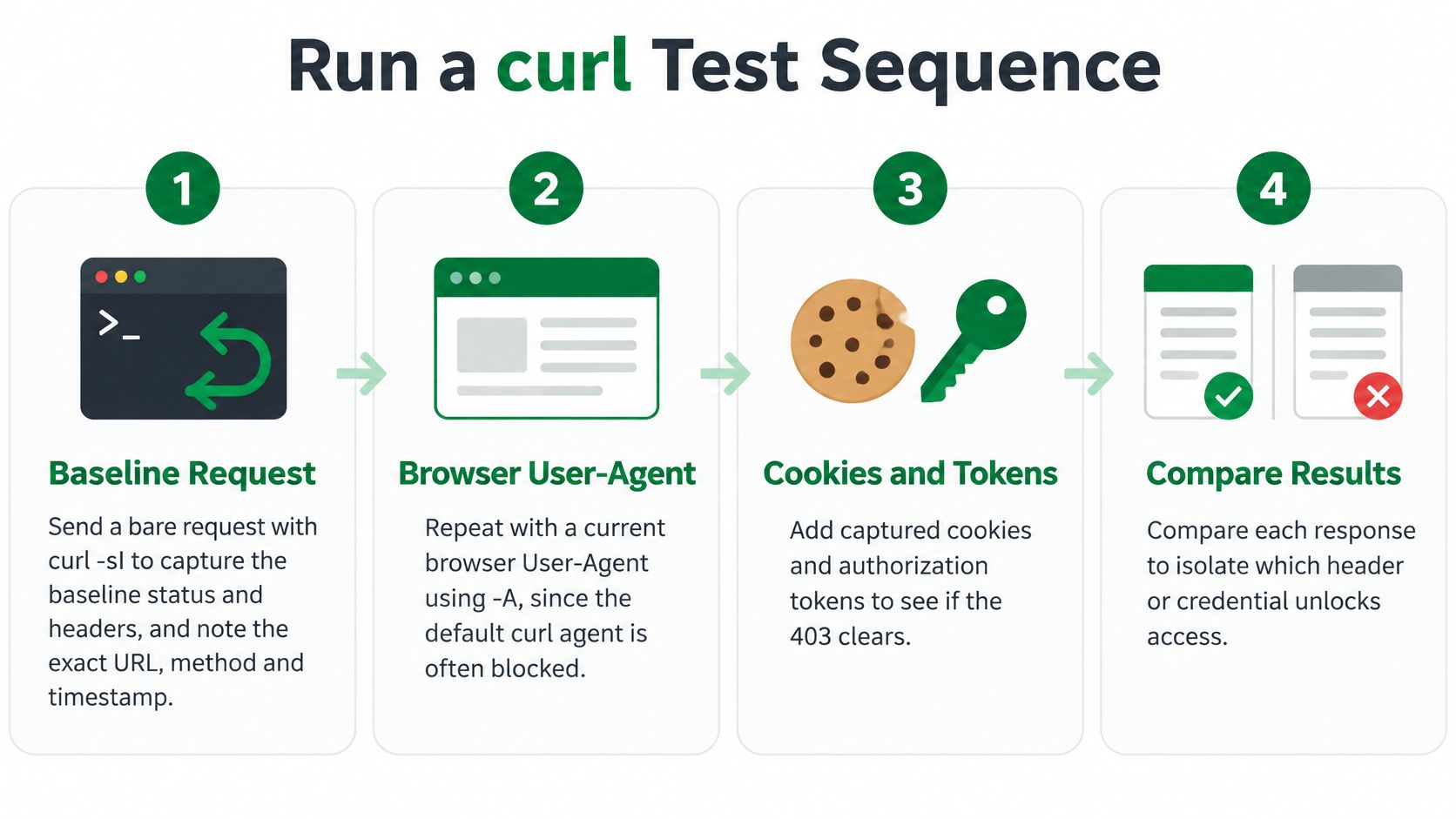
Isolate the request inputs
Capture the baseline. Run
curl -sI "$TARGET_URL"and record the timestamp. Remember that-Isends HEAD, not GET. Follow withcurl -sS -D baseline.headers -o baseline.body "$TARGET_URL"to capture the actual GET response; a method-specific policy can produce different results.Change only the User-Agent. Set
BROWSER_UAto your current browser's actual string, then runcurl -sS -A "$BROWSER_UA" -D agent.headers -o agent.body "$TARGET_URL". Keep that value stable throughout the session. Success suggests an agent-dependent rule, not proof that the request now behaves like a browser.Compare navigation headers individually. Add the browser's actual
AcceptandAccept-Languagevalues, followed by a legitimate same-siteRefererwhere appropriate. Use--compressedfor supported content negotiation rather than advertising encodings your client can't decode. CopySec-Fetchvalues only when they accurately describe the request context.Establish a session with
curl -sS -A "$BROWSER_UA" -c jar.txt -o landing.body "$LANDING_URL", then request the target using-b jar.txt -c jar.txt. The variable is session continuity. Protect the cookie jar like a credential.Check POST tokens. Extract the current CSRF token from the authorized form or page metadata and send it in the field or header the application expects. Keep it paired with its session cookie. For payload construction, use the cURL JSON POST guide, but don't assume every form accepts JSON.
Replay the application's legitimate sequence: landing or list page, detail page, then the documented endpoint. This tests whether the application requires prior state rather than a direct request.
Change the network only. Repeat the saved request from a permitted second connection. Keep the client and session fixed, and note that some services deliberately bind sessions to network identity.
Use DevTools Copy as cURL as a comparison fixture. Remove unnecessary fields incrementally. This copies application-level request details, not the browser's TLS implementation, HTTP/2 behavior, or JavaScript execution.
Interpret a changed result cautiously
| Test | Variable changed | What a flip tells you |
|---|---|---|
Bare curl -I on target |
Default curl request using HEAD | Baseline status and headers for HEAD |
Add browser agent with -A |
User-Agent string | Possible agent-based filter |
| Add Accept, Accept-Language, and Referer individually | Header set | Header filter or missing navigation context |
Landing page with -c, target with -b |
Cookies and session | Session continuity or cookie requirement |
| Same request from another network | Client network identity | Possible reputation or geographic policy |
| Browser request copied as cURL | Captured headers, cookies, and payload | Application-state difference; not a full fingerprint test |
For an official integration, consult its own documentation before reconstructing browser traffic. PropLab's underwriting API documentation is an example of the resource to consult for a documented integration rather than guessing an application's request contract.
A successful test narrows the cause. It doesn't grant permission or justify continuing after a deliberate denial.
Fix IP, Proxy and Rate Limit Blocks
Start with where and when the block appears. A request rejected only from a hosting provider's network suggests a network policy. A session rejected after sustained traffic suggests a rate or abuse rule, but confirm it through headers or security logs before selecting a remedy.
This diagram illustrates why the same resource can behave differently across connections.
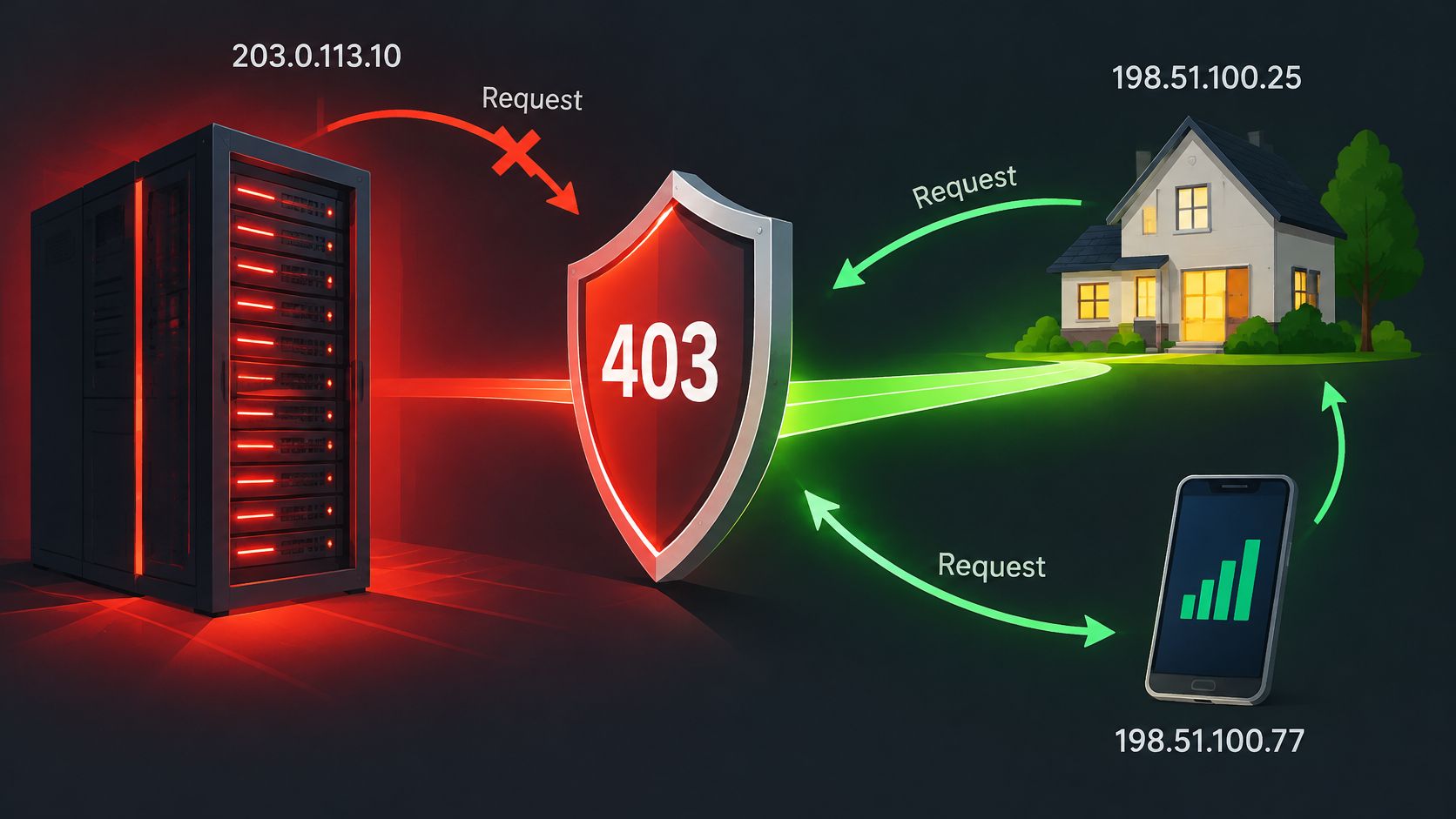
The OWASP bot-management guidance identifies IP reputation, ASN, TLS fingerprints, HTTP/2 fingerprints, and request behavior as useful detection signals. Consequently, rotating addresses alone isn't a reliable fix. The service may still correlate an unchanged client environment across connections.
Separate network policy from traffic pressure
- Network restriction: Use an approved egress route or request allow-listing. A residential or mobile connection may change the outcome, but it doesn't override geographic restrictions or grant authorization. Evaluate IPv6 proxy service considerations against the actual network requirement, not the available address count.
- Rate pressure: Honor
Retry-Afterwhen present, inspect any documented rate-limit headers, and reduce per-domain concurrency. Use bounded backoff with jitter for recoverable rate-related denials, not endless retries for every 403. - Session integrity: Avoid moving an established session between networks unnecessarily. If an authorized test also involves phone verification, the distinction matters when pairing proxies with disposable virtual numbers: neither resource establishes permission to create accounts or access content.
Don't invent a universal safe request rate. Set a deliberately conservative test pace, observe the result, and negotiate capacity when the workload needs sustained access.
The accompanying video offers another visual reference for troubleshooting denied requests.
Watch the video on YouTubeTarget websites can restrict access regardless of the tooling involved. Scrappey.com isn't responsible if target websites rate limit, block, restrict, or deny access to scraping requests.
A successful HTTP status isn't enough. Confirm that the response contains the expected product, document, or API schema rather than a challenge, empty shell, or stale substitute.
Get Past Bot Protection With a Real Browser
Confirm that JavaScript is required. Inspect the saved response body for a challenge shell rather than the requested content. Compare it with an ordinary browser visit using authorized access. Don't classify every HTML error page as a JavaScript challenge.
Load the page through Playwright or Puppeteer with a coherent viewport, language, and timezone. Use settings appropriate to your actual testing environment rather than combining unrelated browser attributes. A browser engine executes page scripts; changing a curl header doesn't.
Wait for a meaningful completion condition. In Playwright, wait for the expected content locator rather than assuming
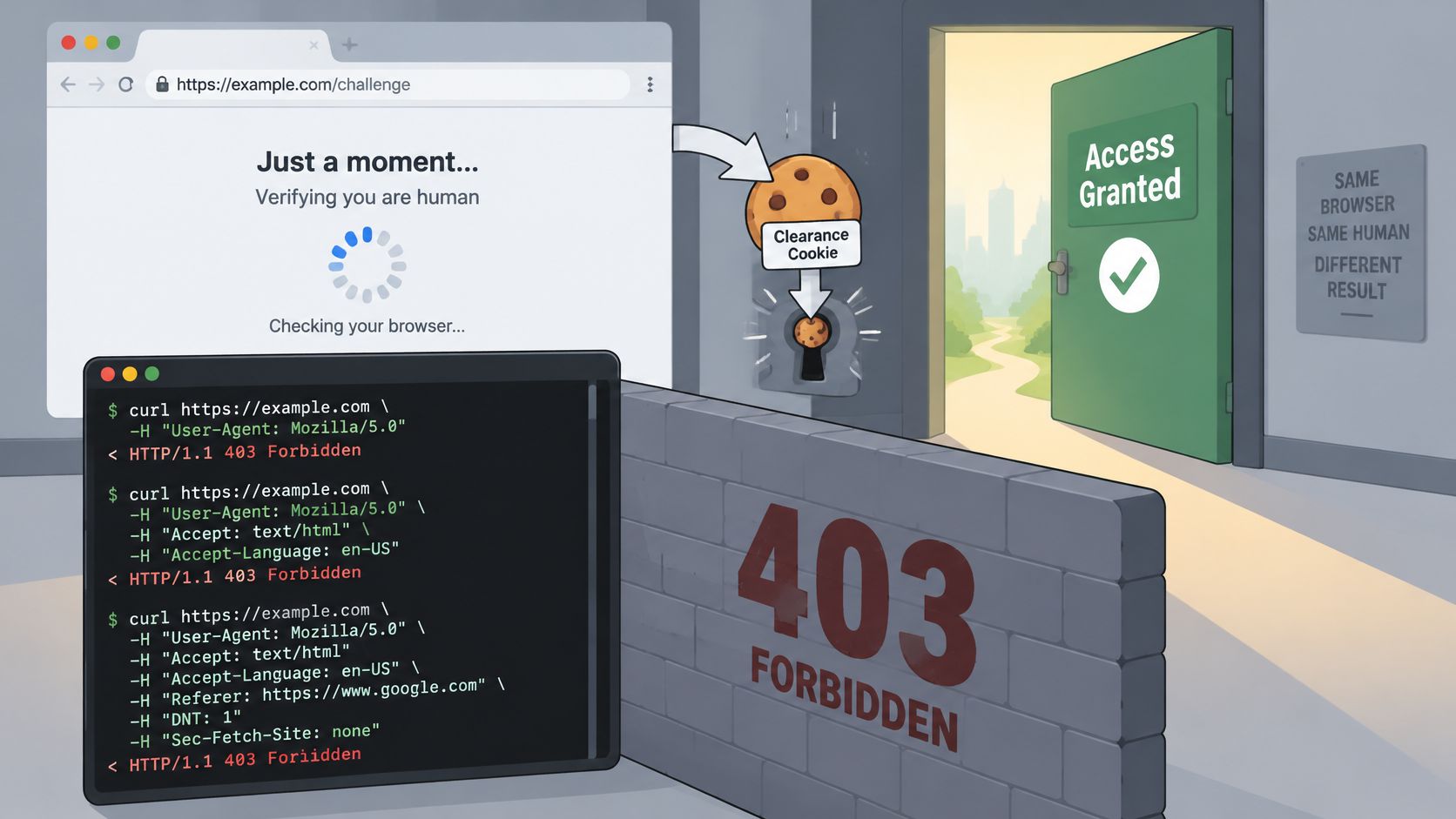
page.goto()means the challenge has finished. Inspectcontext.cookies()for any clearance or session state the site issues. Not every protection system uses a clearance cookie, and not every challenge permits unattended completion.Persist the approved session with a browser profile, such as Playwright's
launchPersistentContext, and protect its directory. Alternatively, save supported cookies and storage withstorageState. Reuse that state only within its intended lifetime and identity.
The browser-versus-terminal distinction is easier to recognize when both responses are visible.
Choose a browser for execution, not camouflage
Stealth patches are fragile dependencies. Altering navigator.webdriver doesn't reconcile contradictory locales, missing session state, unsupported browser behavior, or an explicit access rule. A patch that changes a visible property can also introduce another inconsistency.
Keep the browser workflow observable. Save the final page title, navigation outcome, expected element, and a redacted failure screenshot when permitted. Separate a timeout waiting for content from a confirmed access denial so the scheduler doesn't classify every browser failure as the same problem.
A managed service is an optional alternative to maintaining browser infrastructure. At Scrappey, we offer full-browser requests with challenge handling and persistent browser profiles for publicly accessible content. That can reduce browser-stack maintenance, but it doesn't eliminate the target's policy decisions.
Scrappey doesn't circumvent authentication walls. An account-only page still requires authorized access, and a challenge that won't complete legitimately is a reason to contact the site or use an approved endpoint, not to keep escalating automation.
Check Server-Side Permissions on Your Own Origin
If you own the target, inspect the server before rebuilding the client. A default nginx or Apache error page can result from filesystem permissions, access rules, or a directory without an index when listing is disabled.
Inspect evidence before changing permissions
Read the error log. Run
tail /var/log/nginx/error.logortail /var/log/apache2/error.logwhile reproducing the request. Correlate the path and timestamp with permission-denied messages, access-rule failures, or directory-index errors.Check the path with
ls -ld /var/www/html/privateandls -l /var/www/html/private/. Usenamei -lon the affected file to inspect parent directories. The worker user, oftenwww-dataornginx, needs permission to traverse each parent and read the requested file.Repair narrowly. For ordinary public static content,
chmod 755on directories andchmod 644on files can be appropriate. Don't apply those modes indiscriminately to private documents, secrets, uploads, or executable application files. Correct the intended ownership and group access instead of making the entire tree broadly accessible.Search nginx access rules with
grep -rn 'deny' /etc/nginx/, then inspect the matching location and inherited rules. On Apache, inspect the applicable directory block and.htaccessforRequire all deniedor legacy access directives. Preserve deliberate restrictions.
Validate the smallest safe fix
Test configuration before reloading. Use
nginx -tfor nginx orapachectl configtestfor Apache. Reload only after a successful check, using the service manager appropriate to your installation.Request the intended file using
curl -sS -D origin.headers -o origin.body "$TARGET_URL". Confirm both the status and the document contents. If only particular clients fail, correlate the request with CDN, WAF, and allow-list events.
Owner's caution: A browser and script failing from the same network doesn't prove an origin configuration error. Both may match the same edge policy.
Don't enable directory listing just to remove a denial. Restore the intended index or request the actual file, and keep directories private when that's their purpose.
Decide Whether to Fix, Slow Down or Stop
Request access when permission is missing
If the response names a missing role, resolve it with the resource owner. For account-only material, use an approved integration, official API, or licensed feed rather than treating authentication as a technical obstacle.
Users are solely responsible for obtaining proper authorization before scraping any URL. Scrappey provides a technical service only and doesn't grant permission to scrape a particular website.
Repair permitted public collection carefully
A robots.txt allowance and technical access are separate. A firewall or application policy can still reject the crawler, so adjust the confirmed cause, reduce pressure where appropriate, and contact the operator when permitted access remains blocked.
In its 2026 crawler analysis, Seomator's crawl-waste report found that 45.9% of crawler requests returned usable 200 responses, while 403 was the largest non-200 category at 20.6%. Those findings describe that analysis, not your pipeline's expected failure rate.
Track your own outcomes by domain, endpoint, region, client identity, and response fingerprint. Measure missing records and unusable content alongside status codes so analysts can distinguish a genuine inventory change from collection failure.
Stop when the remaining obstacle is policy
Set a bounded troubleshooting budget before another engineer inherits the incident. I'd require each proposed retry to name the variable being changed and the evidence that supports it.
Scrappey only supports scraping publicly available data, and users must comply with applicable laws and website terms. If the remaining denial requires permission you don't have, switch to an authorized source or stop collecting.
Adopt a concrete team rule: pause the domain when controlled tests no longer produce new evidence. Assign an owner, record the denial category and next permitted action, and require review before the scheduler resumes.
Scrappey offers a Web Access API for fetching publicly accessible content, including browser-based workflows for JavaScript-heavy pages. Visit Scrappey to evaluate an authorized request after you've identified whether its 403 comes from session state, browser execution, or a policy that requires the site owner's approval.