
The most popular fix for a urllib error HTTPError HTTP Error 403 Forbidden crash is also the one that wastes the most engineering time. Search any Q&A thread and you'll find the same reflexive advice: slap a Chrome User-Agent string onto your request and move on. Sometimes that works for ten minutes. Far more often, it hides the underlying cause, triggers stricter bot filters, or keeps a script hammering a server that explicitly told it to stay out.
A 403 isn't a broken socket or a typo in your Python syntax. As the Python urllib.error documentation explains, urllib.error.HTTPError is a subclass of URLError raised when urlopen() receives a valid HTTP error response from the remote server, and it also behaves like a file-like response object carrying url, code, reason, headers, and fp. Your script reached the server cleanly. The server understood what you asked for, evaluated your request against its rules, and actively said no.
Treating that refusal as a header bug skips the diagnostic step that solves production outages. Reading the server's response signals first, capturing the right evidence in Python, matching your code fix to the block, and knowing when to walk away will save hours of blind header tweaking.
Diagnose Which 403 You Are Looking At
Before touching a single line of request code, classify the refusal in front of you. When Python prints urllib.error.HTTPError: HTTP Error 403: Forbidden, the exception object already holds the clues you need in its status code, headers, URL, and response body.
Match what the server sent back to the table below to find your starting point.
| Signal in the response | Likely cause | First move |
|---|---|---|
| JSON or plain-text body that names a permission, scope or missing key | Application-level authorization or missing API key | Check the token or key the API documents |
| HTML page titled Just a moment or mentioning a challenge | Bot protection challenge | Stop scripted retries and read the challenge section |
| Same URL loads in a browser but fails in the script | Header, cookie or fingerprint difference | Compare headers and cookies with the browser request |
| Fails only after a burst of fast requests | Rate-based blocking | Add delays and reduce request volume |
| Redirect to a login page before the 403 | Content behind authentication | Stop; you need authorization you may not have |
| Empty body and no useful headers | Generic refusal, IP reputation or policy | Log the response and test only through an authorized route |
Why 403 Is a Decision Instead of a Network Failure
The difference between a connection error and a 403 changes how your code should react. A URLError covers transport problems such as DNS lookup failures, refused sockets, or connection timeouts where no HTTP response came back. An HTTPError with error.code == 403 means the HTTP exchange succeeded at the network layer and failed at the policy layer.
Under section 15.5.4 of RFC 9110, HTTP status 403 Forbidden means "the server understood the request but refuses to fulfill it," and a client shouldn't automatically repeat the same request with the same credentials. That standard also draws a sharp boundary between neighboring 4xx codes. A 401 Unauthorized response indicates missing or invalid authentication credentials and normally includes a WWW-Authenticate challenge telling you how to sign in. A 429 Too Many Requests response signals temporary throttling, though some firewalls and APIs still return 403 when a burst trips a rate rule.
Diagnostic rule: Never edit headers until you've read the response headers and body from the caught exception. Guessing a fix before reading the server's refusal is debugging blind.
Reproduce the 403 and Capture the Evidence in Code
Guessing what a remote firewall disliked rarely pays off when Python can hand you the raw response in ten lines of code. Because HTTPError inherits from URLError, your except block order decides whether you capture the response or lose it to a generic network handler.
The diagram below walks through the six-step capture sequence from catching the exception to archiving the response before changing your request logic.
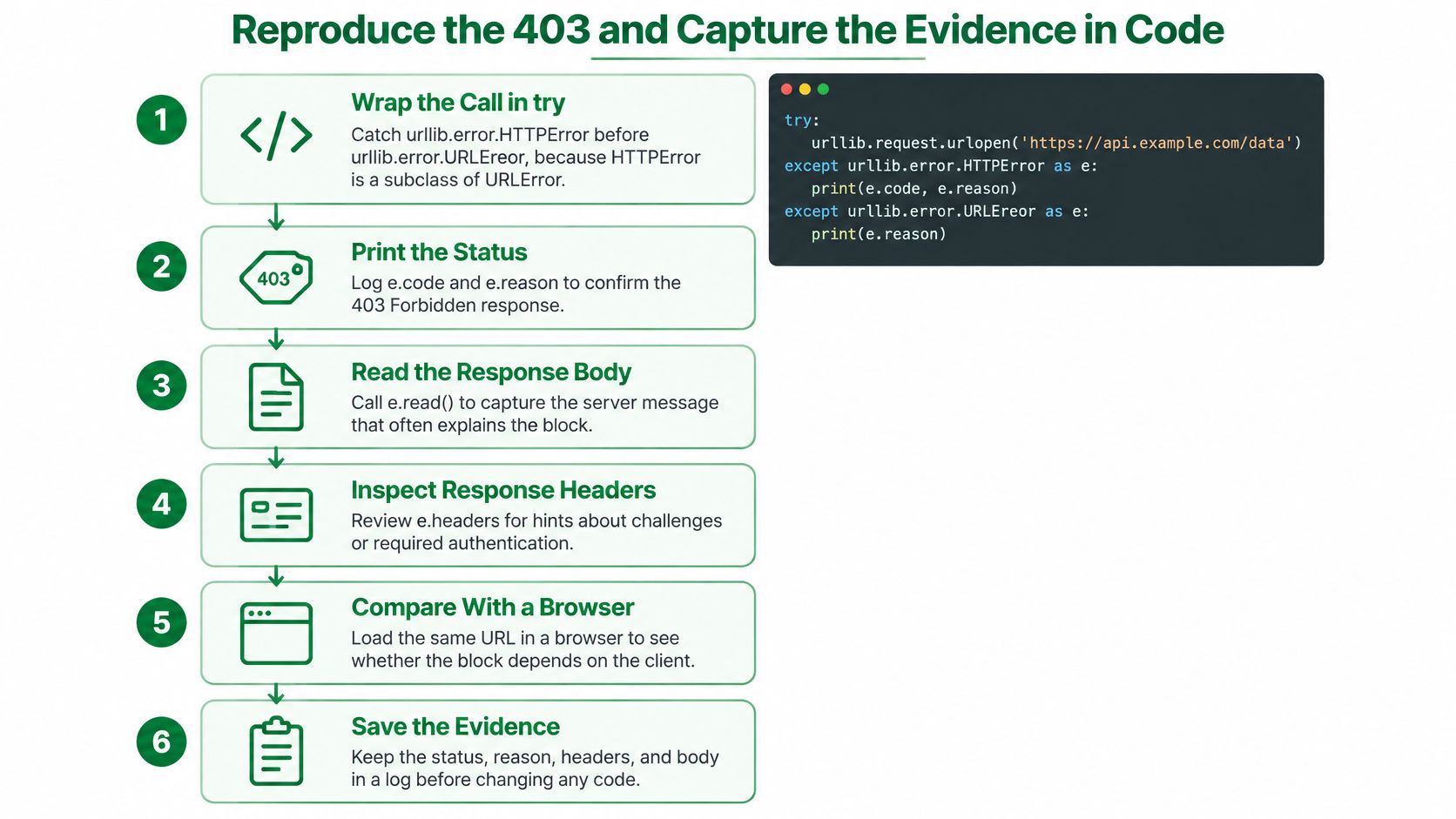
Start with a minimal capture harness that isolates the failure and writes out every diagnostic field without retrying in a loop.
import urllib.error
import urllib.request

url = "https://api.example.com/data"
req = urllib.request.Request(url, method="GET")

try:
    with urllib.request.urlopen(req, timeout=15) as resp:
        print(resp.status, resp.geturl())
except urllib.error.HTTPError as e:
    body_snippet = e.read(500).decode("utf-8", errors="replace")
    print("Status:", e.code, e.reason)
    print("Final URL:", e.url)
    print("Headers:", dict(e.headers.items()))
    print("Body preview:", body_snippet)
except urllib.error.URLError as e:
    print("Network error:", e.reason)
Every attribute pulled in that except block answers a specific question about who blocked you and at which layer.
| Attribute | What it holds | Why it matters for a 403 |
|---|---|---|
e.code |
Integer HTTP status | Confirms 403 rather than 401 or 429 |
e.reason |
Reason phrase, e.g. Forbidden | Confirms the server understood the request |
e.headers |
Response headers | Shows server, challenge or rate-limit markers |
e.url |
The URL actually requested | Reveals redirects to a login or challenge page |
e.read() |
Response body via the file-like object | Often names the permission, challenge or required cookie |
Six Steps to Isolate the Cause
- Catch
HTTPErrorahead ofURLError. If you listURLErrorfirst, Python catches the 403 there and strips away the convenient error-body workflow, masking whether the failure was a DNS drop or an explicit server refusal. - Record status, reason, final URL, and headers. Printing
e.code,e.reason,e.url, ande.headersshows whether a web application firewall, reverse proxy, or application server issued the block, and whether rate-limit headers likex-ratelimit-remainingappeared. - Read the response body immediately. Calling
e.read()on the file-like exception object pulls the server's actual payload. Save the first few hundred characters so you can tell a JSON permission error apart from a Django CSRF refusal or a CDN challenge page. - Rebuild the call with an explicit
Requestobject. As detailed in the Python urllib.request documentation,urllib.request.Requestlets you control the HTTP method and request headers explicitly, since some servers block default script-like user agents. Cross-check your Python call against a working browser session or a command-line test built for cURL website scraping to compare method, URL normalization, cookies,Accept,Accept-Language,Referer, andUser-Agent. - Change one variable per test. Swapping only the
User-Agentstring is a diagnostic experiment, not proof that your authorization problem is solved. Changing five headers and a proxy at once leaves you unable to tell which change mattered. - Inspect redirects manually before letting
urlopenfollow them. By default,urllibfollows 3xx responses automatically. Checking theLocationheader manually (or inspectinge.urlagainst your starting URL) tells you whether the original endpoint refused you or redirected you to a login or verification URL that returned 403.
Separating Code Bugs From Redirects and Network Blocks
For production logs, store the status code, selected response headers, redirect history, request policy, and a redacted body fingerprint. Never write API tokens, Authorization headers, or session cookies into log files.
Once you have that log line, run this quick split: a code-level 403 keeps e.url identical to your request URL and returns an application message about a missing header, method, or key; a redirect 403 shows e.url pointing to a different path such as a login or challenge route; an IP or reputation block returns a generic CDN or empty refusal across multiple public URLs on the same host, even when your headers match a normal browser.
Apply the urllib Fix That Matches Your 403
Every code change here corresponds to a specific cause from your diagnostic capture. Adding random headers until a request turns green is fragile, because mismatched headers often look more automated to modern firewalls than Python's default client string.
The illustration below highlights the job of a client fix: bringing the exact key the server expects rather than rattling the door with extra headers.

Work through these urllib adjustments in order, stopping as soon as you address the signal your capture revealed.
Ordered urllib Adjustments
Send a complete, internally consistent header set. When a public page works in your browser but fails under
Python-urllib, copy the working request'sUser-Agent,Accept,Accept-Language, andReferervalues together into aurllib.request.Request. Pairing a modern browser User-Agent header with contradictoryAcceptvalues or missing language headers creates an obvious mismatch that security rules flag faster than an honest script header.Attach a
CookieJarfor multi-step flows. Sites frequently set a consent, routing, or CSRF cookie on the landing page and return 403 on the next request if that cookie disappears. Build an opener withhttp.cookiejar.CookieJar()andurllib.request.HTTPCookieProcessor(jar)so cookies received on the first response automatically ride along on subsequent calls.import http.cookiejar import urllib.request
jar = http.cookiejar.CookieJar() opener = urllib.request.build_opener(urllib.request.HTTPCookieProcessor(jar))
Reuse one opener for the entire run. Creating a fresh opener or calling bare
urlopen()for every page drops accumulated state and makes each URL look like a cold hit. Pass everyRequestin a workflow through the sameopener.open(req)instance so your sequence resembles a single coherent visit.Route through an authorized proxy only when the network path is the cause. If the refusal is tied to your network route and you hold permission to use a specific proxy, pass
urllib.request.ProxyHandler({"https": proxy_url})intobuild_opener(). Load proxy credentials from environment variables or a secrets manager so they never appear in source control or error logs.Pass the official API key or
Authorizationheader. Say an API endpoint returns a JSON body naming a missing scope or token. Don't emulate a browser. Read the provider's API documentation and attach the exactAuthorizationheader or API key parameter they specify.
For a quick visual walkthrough of setting request headers and handling HTTP 403 responses in Python's urllib, watch the demonstration below.
Knowing Where urllib Stops
urllib is strictly an HTTP client. It parses headers and streams bytes, and it doesn't execute JavaScript, evaluate DOM APIs, or compute browser-side verification tokens. When a server returns an HTML shell whose content or verification flow runs in client-side scripts, no combination of urllib.request.Request headers will render the page.
At that point, you have to move to a browser automation engine like Playwright or Selenium if you're authorized to fetch the page, or switch to an official data endpoint. Match your diagnosed signal against the summary below before writing more wrapper code.
| Fix | urllib implementation | Use when |
|---|---|---|
| Browser-like headers | urllib.request.Request with User-Agent, Accept, Accept-Language and Referer copied from a working session |
The default Python user agent is refused and the rest of the request matches a browser |
| Cookie persistence | http.cookiejar.CookieJar with build_opener and HTTPCookieProcessor |
The site sets a session or consent cookie on the first page |
| Session reuse | One opener object shared across every request in the workflow | Later pages expect the visit flow of the first page |
| Authorized proxy routing | urllib.request.ProxyHandler with a proxy you are permitted to use |
The refusal is tied to network route and you hold permission for that route |
| Documented API key | Authorization header or key exactly as the API documents it |
The site offers an official API and the 403 is about access rights |
| JavaScript-rendered challenge | Playwright or Selenium instead of urllib | Page content or the challenge is built by scripts after load |
Spotting Bot Challenges and CAPTCHAs
Many Python developers assume that once their HTTP headers look like Chrome, every remaining 403 must be a subtle typo in their dictionary. Modern edge firewalls don't work that way. They evaluate TLS fingerprints, timing cadence, JavaScript execution, browser environment traits, and network reputation alongside your headers.
You can recognize a challenge response quickly from the body you captured earlier. Look for an HTML page showing a waiting or verification message (such as "Just a moment"), an embedded script that computes a token before reloading, a visible CAPTCHA widget, or a 403 that disappears on one network route and reappears immediately on another.
The decisive clue is behavioral. A firewall that issues challenges is grading how the client acts, not what it claims to be in a User-Agent string. Even a real headless browser engine can be turned away on a meaningful share of sites, because headless environments carry detectable tells: missing browser features, unnatural event timing, automation flags in the JavaScript runtime. If a full browser engine still gets refused, adding header keys to urllib will not get past active anti-bot protection, since urllib executes no JavaScript at all.
When a server answers with a verification challenge, the problem isn't a missing dictionary key in your headers. It's an access-route problem.
The Stop-and-Reroute Response
When your capture confirms a challenge page or CAPTCHA, change your engineering playbook immediately instead of layering on workarounds:
- Halt scripted retries against the challenge. Re-sending the same
urllibrequest into a bot gate only adds load to the target server and rarely flips a 403 into a 200. Each repeated hit also reinforces the behavioral pattern the firewall already flagged. - Skip CAPTCHA bypass attempts. Trying to defeat a verification gate turns routine troubleshooting into an adversarial arms race that breaks whenever the firewall updates its rules.
- Move to a sanctioned data source first. Check whether the publisher already exposes an official API, RSS feed, sitemap export, or bulk download designed for automated clients. A documented feed beats a fragile workaround every time.
- Use managed rendering only within clear authorization boundaries. For publicly accessible, JavaScript-heavy pages that you're permitted to read, a managed browser service like Scrappey handles real-browser rendering without forcing you to maintain headless infrastructure yourself. The service is a technical tool only and does not grant permission to scrape any particular website. Scraping content that requires login credentials or accesses post-login protected content is prohibited; only publicly available, pre-login content may be fetched, and your use has to comply with applicable laws and the target site's terms of service.
A persistent challenge on a route with no sanctioned alternative is a definitive answer. The server has made an authorization decision, and the right response is a different access path, not a sixth header.
Preventing 403s in Production Code
Fixing a single 403 in a terminal session is easy. Keeping a scheduled Python job from triggering fresh blocks three weeks later takes disciplined defaults in your HTTP client layer.
Build these seven habits into every production script that talks to external servers:
- Pace requests and spread bursts out. Fire requests sequentially or at low concurrency with deliberate pauses between pages so your job doesn't look like a sudden traffic spike.
- Reserve retry loops for temporary status codes. Never wrap a 403 in an automatic retry loop with identical credentials. Limit automatic retries with backoff to 429 and 503 responses, honoring any
Retry-Afterheader the server sends. - Send a stable, honest
User-Agentwhere accepted. For APIs and sites that welcome documented bots, identify your application name and a contact email or URL rather than rotating fake browser strings. - Externalize and rotate session credentials. Keep API tokens and session cookies in environment variables or a secret store outside your codebase, and refresh them cleanly before expiration causes sudden permission failures.
- Record structured refusal telemetry on every failure. Keep consistent redacted error logs across every client wrapper so a sudden jump in 403 responses immediately reveals whether the block comes from an expired key, a new firewall rule, or a moved endpoint.
- Enforce exception ordering inside shared helpers. Put
except urllib.error.HTTPErrorahead ofexcept urllib.error.URLErrorin every reusable fetch function so no downstream caller accidentally turns an HTTP refusal into a generic connection error. - Run a daily canary against a permitted URL. Schedule a lightweight check against one page you're authorized to read and alert on any status change. Catching a new 403 on the day a site changes its policy beats discovering a week of empty rows in a Monday report.
Ownership of Access Rules
Technical hygiene reduces accidental blocks, though code alone never grants legal or contractual permission. Users are solely responsible for obtaining proper authorization before scraping any URL or website. We only support collecting publicly available data, and every team running automated collection needs to verify compliance with applicable laws and each website's terms of service before putting a job on a cron schedule.
Decide Whether to Keep Going or Stop
Technical debugging has a clear boundary. Just because a Python script can eventually coerce a 200 OK out of a server doesn't mean the request is authorized. A 403 is often an intentional access-control signal, and treating every refusal as a puzzle to outsmart creates real operational and legal risk.
Use the visual decision checklist below to separate fixable script mistakes from hard stopping points.
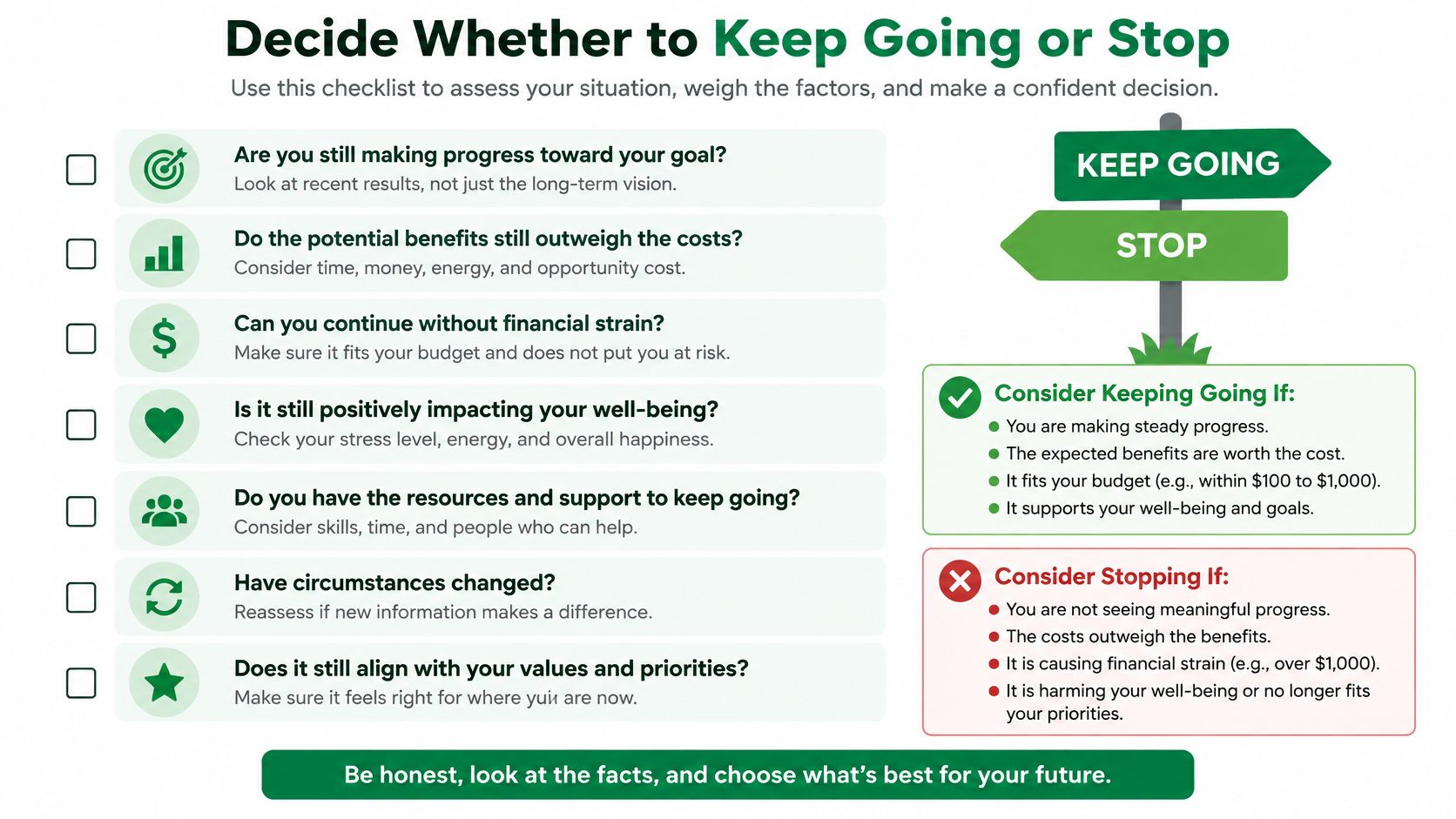
The Four-Step Escalation Order
Run through these checks in sequence before spending another hour rewriting Python requests:
- Verify your own request first. Confirm the URL spelling, HTTP method, active credentials, and request rate. Most unexpected 403s in internal tools trace back to an expired token, a
POSTsent without a required header, or a tight loop with no sleep interval. - Review the site's published rules. Read the terms of service, licensing or data-use statements, and
robots.txt. As explained in the ProxyMint robots.txt web scraping guide,robots.txtdirectives are scoped by protocol, host, and sometimes port, and automated collection can create contractual or copyright exposure when site terms or directives clearly prohibit it, even though research or study exceptions may apply in certain jurisdictions. - Check for a sanctioned data channel. Look for a documented REST API, syndication feed, open dataset, or formal data-sharing agreement. An official feed is almost always cheaper to maintain than brittle HTML parsing.
- Ask the site owner or walk away. If the resource still returns 403 and no public API exists, contact the site owner with your tool name, target paths, and planned request rate. If they decline or don't respond, stop targeting that URL.
What Never Belongs on Your Escalation List
Three tactics sit outside responsible engineering: attempting to defeat a security challenge, cycling through identities to evade an explicit block, and scraping content behind a login screen. None of those moves fix an authorization refusal. They only escalate a routine HTTP error into unauthorized access.
If a 403 still returns a permission denial or security challenge after you verify your URL, method, credentials, rate, and the site's published terms, stop editing Python code. Your next move is an authorized route, not another header tweak.
When your diagnostics confirm that a public, pre-login page you're authorized to collect relies on JavaScript rendering or strict network filtering that plain urllib can't handle, our managed web data API takes the browser and proxy maintenance off your plate. We offer both direct HTTP and full-browser endpoints returning clean HTML, headers, cookies, or Markdown from a single API call, with built-in proxies and no browser farm to run. Explore the documentation and try a request at Scrappey.