

Your cron job ran at 2 a.m. and the log is all green. Two hundred lines of 200, no errors, four thousand files on disk. You open one, and it's a consent banner and a paragraph of legal text. Nothing to parse. The status code said the request worked, and it did. It just never said the page arrived.
That distinction between a successful transfer and a successful fetch is where most curl website scraping projects break. A 200 OK means the server accepted your request and sent a response body. It tells you nothing about whether that body is the document you asked for, and modern sites are very good at returning something that looks like success to a script: a JavaScript shell with empty divs, a challenge interstitial, a cookie wall, or a localized version of the page in a language your parser doesn't handle.
Volume explains why. The F5 Labs 2025 Advanced Persistent Bot Report attributes 53.23% of traffic in the fashion industry to scrapers, based on observed traffic data. When half the traffic on a site is automated, the defenses get specific, and the ones that trip curl first aren't about your User-Agent string. This piece sorts every common failure into one of two buckets: problems curl can fix, and problems that need a real browser.
Essential cURL Flags and Headers for Scraping
Keep this table open while you write the first command for a new target. It covers the dozen options that decide whether a scrape works, not the 250 in the manual.
| Flag or header | Purpose | Example |
|---|---|---|
-L or --location |
Follow redirects to the final page | `curl -L |
-A or --user-agent |
Set a User-Agent that matches the browser family you claim | -A 'Mozilla/5.0 (Windows NT 10.0; Win64; x64) AppleWebKit/537.36 (KHTML, like Gecko) Chrome/124.0.0.0 Safari/537.36' |
-H Accept |
Ask for HTML so the response matches your parser | -H 'Accept: text/html' |
-H Accept-Language |
Request the language you expect to parse | -H 'Accept-Language: en-US,en;q=0.9' |
-c or --cookie-jar |
Save cookies the site sets | -c cookies.txt |
-b or --cookie |
Send saved cookies on the next request | -b cookies.txt |
--connect-timeout |
Cap the time spent opening the connection | --connect-timeout 10 |
-m or --max-time |
Cap total transfer time for one request | -m 30 |
--retry |
Retry transient failures a set number of times | --retry 3 --retry-delay 2 |
-o |
Write the response body to a named file | -o page.html |
-w |
Print the status code and total time for logging | -w '%{http_code} %{time_total}' |
-I or --head |
Fetch headers only before downloading a large page | `curl -I |
Redirects and identity cause the most lost afternoons. curl doesn't follow 3xx responses unless you pass -L, so a site that redirects http to https, or a bare domain to www, hands you a redirect stub and nothing else. -A sets the User-Agent, and the value should agree with the rest of the request: if the string says Chrome but the request sends no Accept-Language and no cookies, the story doesn't hold together.
curl's defaults come from its origin, and that origin is a download tool. The curl project's own history traces it back to HttpGet version 0.1, released by Rafael Sagula on November 11, 1996, and records curl 7.7 adding HTTP/1.1 and persistent connections to libcurl on March 22, 2001. Reliability in moving bytes was the goal, not impersonating a browser, which is why a bare curl sends almost none of the headers a page expects.
Cookies, timeouts and logging do the rest. -c writes cookies the server sets to a file and -b sends them back, so a session survives from the landing page to the page that holds the data. --connect-timeout bounds the TCP and TLS handshake while -m bounds the whole transfer, and a socket with neither can hold an entire loop hostage. --retry 3 --retry-delay 2 covers the transient class (timeouts, 408, 429, 500, 502, 503, 504) without a wrapper script, -o gives every page a predictable home, -w prints the fields your log needs, and -I is the cheap check on content type and size before you pull a 40MB page.
Here's the assembled version for a first real scrape:
`curl -L --connect-timeout 10 -m 30 --retry 3 --retry-delay 2 -A 'Mozilla/5.0 (Windows NT 10.0; Win64; x64) Chrome/124.0 Safari/537.36' -H 'Accept: text/html' -H 'Accept-Language: en-US,en;q=0.9' -b cookies.txt -c cookies.txt -o page.html -w '%{http_code} %{time_total}'
-L handles redirects, --connect-timeout and -m cap the two clocks, --retry and --retry-delay handle transient failures, -A plus the two -H headers set identity and language, -b and -c carry session state both ways, -o stores the body, and -w prints what your log needs.
One flag at a time: when a new target fails, change a single thing, rerun, and read the
-woutput. Most empty-page and truncated-file problems show up in the first two fields.
How to Build a Scraping Request Step by Step
A single working command is not a pipeline. The difference is the order of operations: check permission, decide what to fetch, fetch it once, then prove you got it.
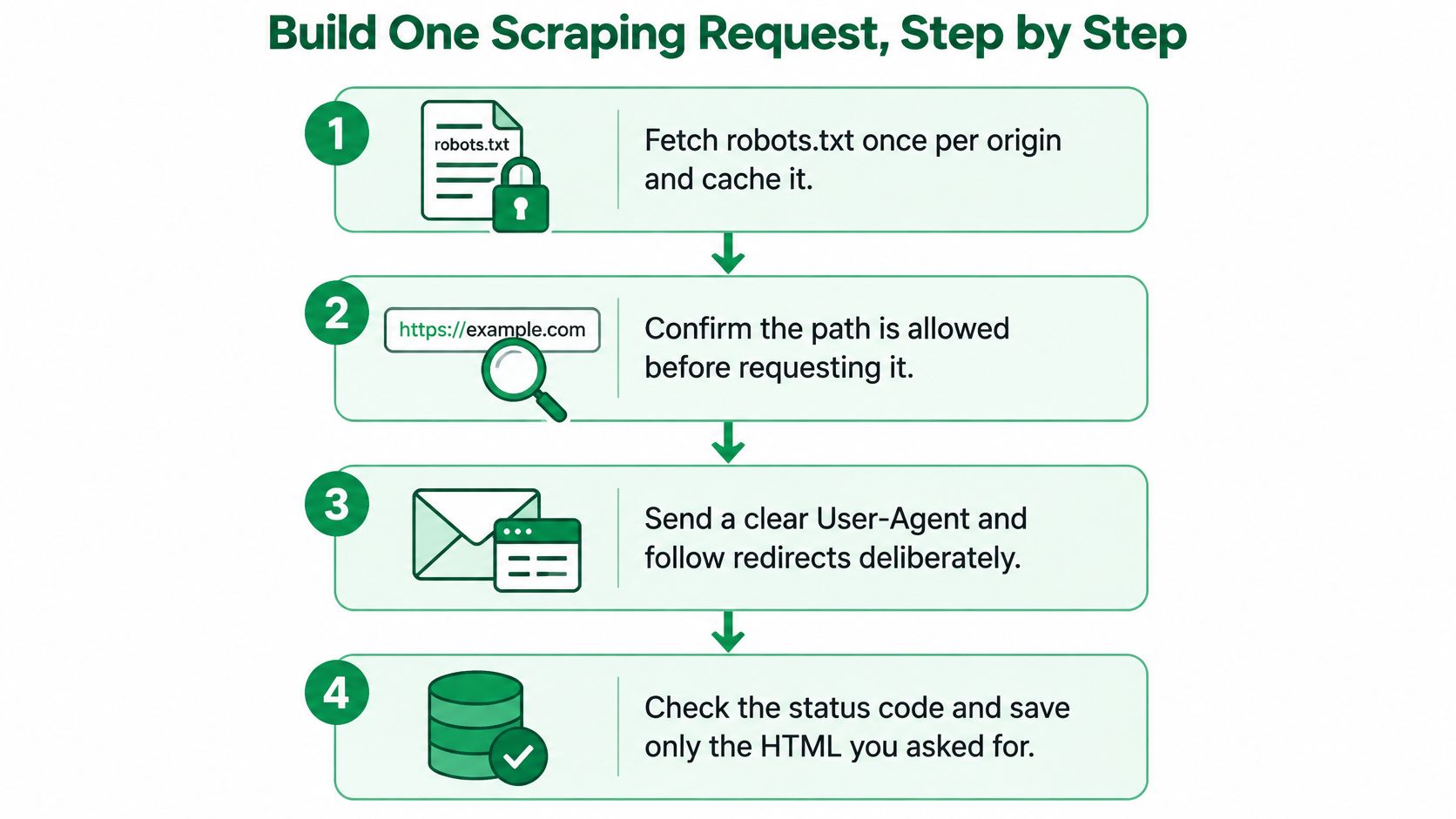
1. Fetch robots.txt once per origin and cache it. Pull the file for the host you're about to hit and store it alongside the crawl. RFC 9309 asks crawlers to match URI paths against the allow and disallow directives, recommends caching rather than downloading the file for every page, and states that cached copies shouldn't normally be used for more than 24 hours (RFC 9309). The slip is skipping the file entirely, which leaves no record of what you were permitted to fetch.
2. Normalize and deduplicate the URL list. Lowercase the host, strip tracking parameters and fragments, sort query parameters, then dedupe before anything enters the queue. The slip is a faceted filter or calendar that generates thousands of equivalent URLs, turning a 500-page crawl into a 40,000-request accident.
3. Fix identity for the whole run. One user-agent string, one Accept, one Accept-Language, applied to every request in that session. Mixing two user agents inside one cookie jar produces a combination no real browser would ever send.
4. Enforce a per-host rate limit. Start with a fixed gap of a few seconds between requests to the same host and tighten it only after you see clean responses. If the robots file sets a crawl-delay value, treat it as site policy, but don't assume it's standardized: crawl-delay is widely used and isn't part of the RFC 9309 protocol.
5. Send the request with both clocks set. --connect-timeout 10 -m 30 -o page.html -w '%{http_code} %{size_download}' gives you a file, a status and a byte count for every URL.
6. Validate the response. Check the status code, the Content-Type, and the presence of the element you intend to parse. A 200 with text/html and no product cards in it is a failed fetch regardless of the code.
7. Log one line per URL and split the failures. Record the effective robots rule, timestamp, URL fingerprint, status, response size and parser outcome, and route retryable failures to a separate queue instead of retrying in place. The slip here is retrying a 404 until the job hits its time limit.
What a clean run looks like
Two log lines tell you the crawl is compliant, the parser is finding its target, and the only failures are ones a later attempt can repair.
2025-03-04T09:12:41Z rule=allow:/products status=200 type=text/html bytes=184320 parser=ok items=42
2025-03-04T09:12:44Z rule=allow:/products status=429 retry_after=30 attempt=2 queue=backoff
If your output has no rule= field, you can't audit the crawl later. If it has no parser= field, you can't tell a blocked page from a changed template.
Reading Responses Without Trusting a Bare 200
The most expensive failure in cURL scraping throws nothing. The request completes, the file is 12KB, the body is a challenge page with a title like "Just a moment" or a consent modal with an accept button. Your parser finds zero records and writes zero rows, and the run reports success.
curl reports what the socket did, not what the document contains. %{http_code} will return 200 for a bot check, a cookie wall and a real product grid alike, so the content check belongs in your code, not in the transport.
The test is cheap. Grep the saved file for a marker you know appears on a good page, and compare %{size_download} against a known-good sample. A listing that normally lands at 180KB and arrives at 9KB failed, whatever the status line says.
curl -sL -o page.html -w '%{http_code} %{size_download}\n' "$URL" && grep -q 'data-product-id' page.html || echo "FAIL $URL" >> failures.log
| Status | Meaning | Action |
|---|---|---|
| 200 with real content | Page received | Parse and validate the expected element |
| 200 with a challenge or consent page | Bot check served as success | Stop and move the target to a browser approach |
| 301 or 302 | Redirect | Follow with -L and log the final URL |
| 403 | Forbidden or blocked | Check robots rules and rate, then consider a browser |
| 404 | Page removed | Mark as permanent and skip |
| 429 | Rate limited | Back off and honor Retry-After |
| 503 | Temporary overload | Retry with increasing delay |
The split that keeps your queue sane
Sort every non-200 into retryable or permanent before the queue sees it. Timeouts, 408, 429 and 503 belong in a backoff queue with the delay taken from Retry-After when the header is present. Missing pages and hard blocks belong in a dead-letter file that a human reviews once a day.
A 403 is the one that gets misread constantly. It's a signal to slow down, re-check the applicable robots rule, and confirm the request shape, not a reason to retry faster or rotate headers harder. A persistent 403 after those fixes usually means detection at a layer headers can't reach, which is covered in this walkthrough of why sites return forbidden access denied.
304 deserves the opposite treatment: it's a success that saved you bandwidth. Reuse the cached copy, skip the parser, and log it as unchanged so your dashboard doesn't show a hole in the data.
The check that pays for itself is one line in the parser: if the expected element count is zero, mark the URL failed and keep the body. Bodies of failed pages are the only evidence you'll have when a site changes its template or adds a wall.
Batch Scrapes With Connection Reuse and Conditional Requests
Two scripts can fetch the same 5,000 pages and finish hours apart, and the gap is almost always connection setup rather than parsing.
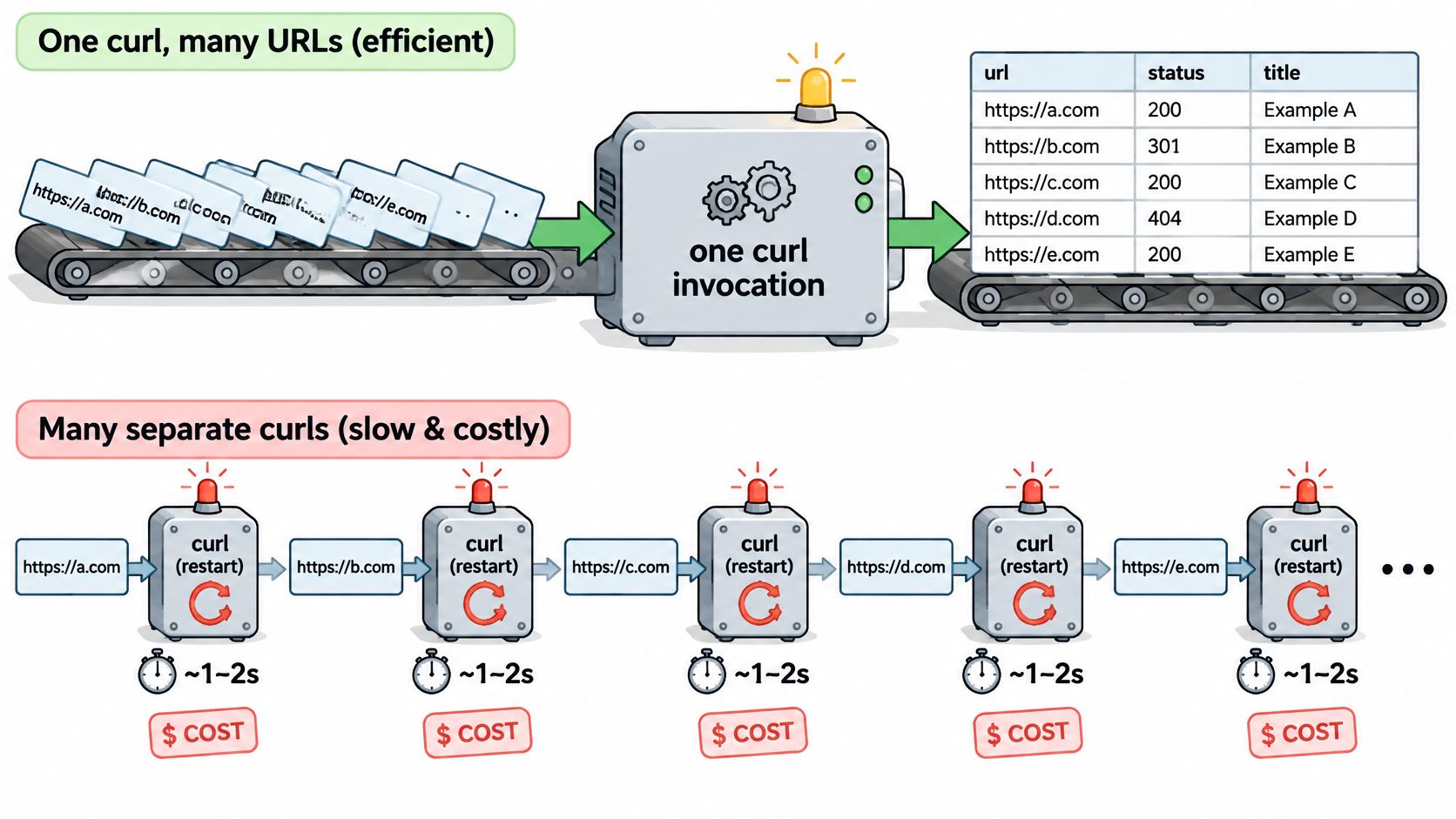
A loop that spawns a fresh curl process per URL pays for DNS lookup, TCP handshake and TLS negotiation on every single page. The libcurl performance guidance names handle reuse as the primary optimization because a reused handle keeps the TCP connection, the TLS session and the DNS cache entry alive. It also makes a point that trips up shell scripts: command-line connection reuse applies to multiple transfers inside one invocation, not across separate runs.
That single sentence changes your architecture. Either build the batch as one curl invocation with several transfers and -o targets, or drop to libcurl in code with one long-lived easy handle per worker. Both keep URLs on the same scheme, host and compatible settings, which is the condition reuse depends on.
Benchmark it on your own sample rather than trusting a rule of thumb. Take 200 URLs from one origin, run them cold, then run the same list with reuse at the same concurrency. Capture pages per minute, p50 and p95 latency, bytes per page, HTTP error rate and parse-success rate, and time DNS, connect, TLS and time-to-first-byte separately so you aren't comparing setup costs against transfers.
Timing the pieces apart is the discipline that makes the comparison mean anything:
Watch the video on YouTubeRecurring datasets have a second lever. Store the ETag and Last-Modified values from each response and send If-None-Match or If-Modified-Since on the next run. Unchanged pages come back as 304 with no body, which cuts bandwidth and saves the parsing work entirely.
Three habits keep batch runs honest:
- Never share a mutable handle across threads. One handle per worker, always.
- Reset cookies between unrelated targets. A jar that leaks between hosts creates sessions no real visitor would have.
- Start from a URL sample you can rerun. Comparisons only mean something when the input list is identical.
Watch for saturation before you add concurrency. When latency climbs while throughput stays flat, the origin is throttling you, and more workers will only make the 429s arrive sooner.
Choosing Between cURL and a Browser API
Short answer: use curl when the data is in the HTML the server sends and the site answers without a challenge. Move to a browser when content appears only after JavaScript runs, when cookies or a challenge gate the page, or when 403s persist after headers and rate limits are fixed.
The uncomfortable part is that headers alone rarely solve blocking. The analysis of bot protection fingerprints describes JA4 and related application fingerprints that combine TLS client-hello characteristics with HTTP header order and values. Standard curl remains identifiable even when it claims to be Chrome, and protocol-level studies find automated scripts using standard curl produce fingerprints significantly different from Chrome, Firefox and Safari. Adding flags improves request compatibility; it doesn't improve resistance to detection.
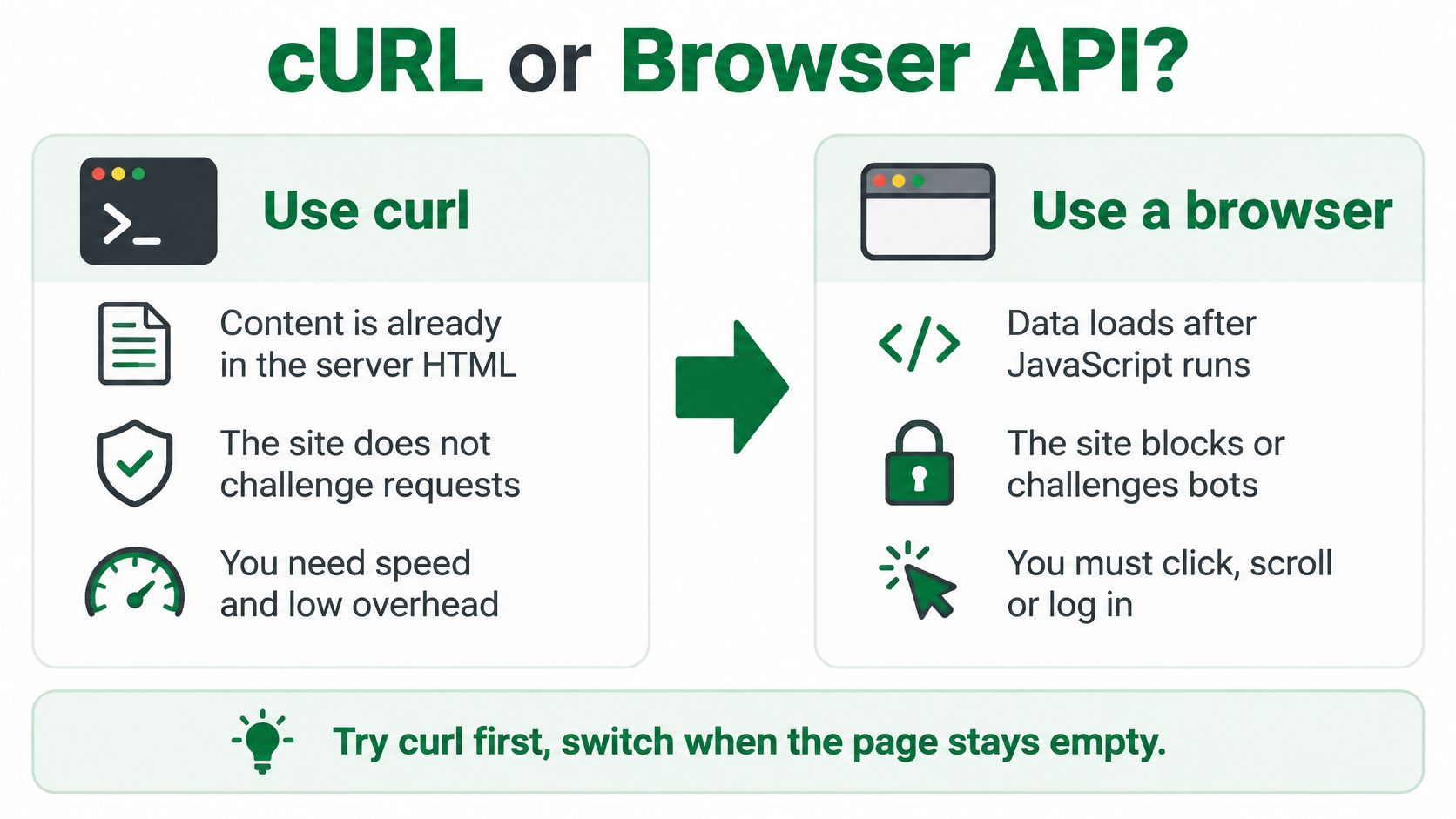
| Situation | cURL | Real browser |
|---|---|---|
| Static HTML in the response | Works well and is cheapest | Works but costs more per page |
| Content rendered by JavaScript | Often returns an empty shell | Renders the page and waits for content |
| Bot check or JavaScript challenge | Usually blocked | Can pass where the site allows automation |
| Fingerprint-based detection | Standard curl is identifiable | Presents a real browser session |
| Speed per page | Fastest | Slower and heavier on resources |
| Cost per page | Lowest, bandwidth and compute only | Higher, each page loads a full browser |
| Scaling | Scales with connection reuse | Scales with browser sessions and concurrency |
The decision is per target, not per project. A retailer might serve its catalog JSON from an open endpoint that curl reads in milliseconds, while its search page needs a browser to survive the same crawl. Treating the whole domain as one problem means paying browser costs for pages that never needed them.
This is the gap a scraping API is built for: you send a request with a URL and receive page content back, so the script keeps its shape while the rendering and challenge handling happen on someone else's infrastructure. Scrappey's API works that way, with direct HTTP requests for static targets and a full browser tier for pages that need one.
If you do drive the browser yourself, browser automation with Python covers the session, waiting and extraction mechanics that curl scripts don't have to think about.
The one-page rule: fetch a single URL with curl, grep for the field you need, then run view-source on that same URL in a browser. Present in curl too means the target is yours. Present in the browser source but not in curl means detection. Absent from both means JavaScript renders it.
Scraping Responsibly With Robots, Terms and Audit Logs
The decision to crawl belongs in a document, not in someone's memory. Write it before the first request, and it becomes the thing you point at when a site, a lawyer or a new teammate asks what you were doing.
Robots rules are the technical layer, not the whole answer. Legal analysis notes that a robots.txt directive can function as notice and contribute to claims such as unilateral contract, trespass to chattels or negligence, even though the file is a technical standard, as this review of scraping without getting blocked sets out. So log which rule applied to each path. An ignored directive with no record looks like indifference; a logged allow is a decision you can defend.
Then read the terms of service for scraping clauses. A site can prohibit collection on a path its robots file permits, so a clean check settles mechanics, not permission.
Set limits you can verify:
- A fixed per-host rate, chosen before load and held during it.
- A user-agent string that carries a contact address so an operator can reach a human.
- A removal process that stops collection for a source after it asks, with the date recorded.
- Data minimization, fetching only the fields the purpose requires and excluding personal data without a lawful basis.
Risk depends on purpose, and the same command carries different exposure for public-interest research, commercial price monitoring, personal-data collection and AI dataset creation. Run the higher-risk purposes past someone qualified before the crawl starts.
Audit entry, one row per crawl: access time, purpose, robots rule applied, terms basis, rate used, and any removal request received with the date collection stopped.
We treat our service as a technical tool and nothing more: Scrappey doesn't grant permission to scrape any particular site, and we only support collection of publicly available data where users comply with applicable laws and each site's terms. For research-oriented work, this guide to web scraping for research covers scoping and documentation.
Run a 20-URL Test Before You Scale
Twenty pages will tell you which tool this target needs, faster than a design document. Pick URLs that cover every page type you plan to collect: a listing, a detail page, a paginated view, a page you know is slow.
Check robots.txt first, send each request with the headers from the reference table, then validate every response and count the status codes. The pass rule: at least 18 of 20 pages return real content containing the expected element, with no challenge pages and no repeated 403 or 429 responses.
Pass and the target stays on curl. Schedule it with conditional requests, a fixed per-host rate, and the audit entry from the policy section. A scheduled scrape is a release artifact like any other, so the habits that keep releases stable apply: a known input set, a pass rule, and logs you can diff between runs.
Fail and you separate causes before switching tools. Fix rate and header problems first, then rerun the same 20 URLs. Empty shells where JavaScript loads the data, cookies set on the first response that a second request needs, and challenge pages that survive the rerun all point to a browser. Our full-browser mode runs a real Chromium session with JavaScript execution, waiting and challenge handling, and it's the fallback for targets that fail this test, not the default.
Run the test today on the site you're stuck on. Twenty URLs and one log will decide more than another hour of flag tuning.
Scrappey gives you an API you can call from the same curl habits you already trust, returning rendered HTML, structured data or clean Markdown without you managing browsers or proxies. Send a direct request for static targets or a full-browser request when the 20-URL test says the page needs JavaScript, and let the response land in the parser you've already written. Visit Scrappey to run your first request and see what the same URL returns when a real browser fetches it.