The strongest early measurement of browser automation with an LLM is still the one that looks worst. On WebArena, introduced in 2023–2024, the strongest GPT-4 agent finished 14.41% of 812 long-horizon tasks end to end. Human annotators finished 78.24%. That is a gap of 63.83 percentage points, and it is the number I still use when someone treats a fluent plan as a finished job.
A prompt can name the goal. A finished task is a chain of page states that all have to be right. The design that holds up is a short loop you can check, with expensive browser actions kept off the model whenever HTTP or a script can finish the step.
The Gap Between a Prompt and a Finished Task
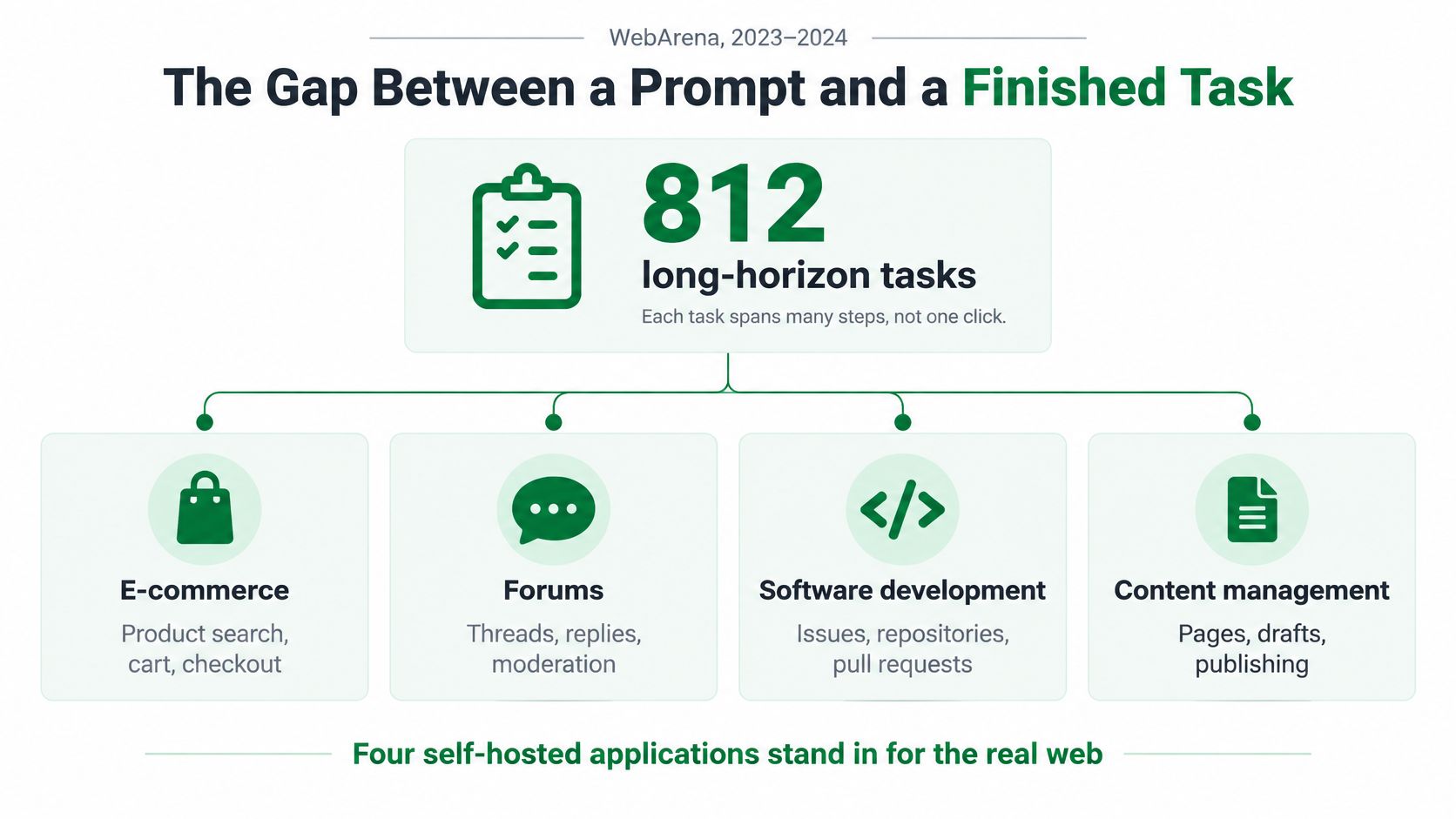
Those 812 tasks sit on four self-hosted applications that stand in for shopping, forums, software development, and content management. Each one spans many steps, not one click. The model usually restates the objective. It then loses the workflow on a stale page, a wrong click, a dialog, or a form that never submits.
That is what the gap is made of. Page understanding fails when the observation no longer matches the DOM. State tracking fails when the agent treats an old snapshot as current. Clicking and typing fail when the target moved, hid behind a banner, or never became enabled. Navigation fails when a redirect lands somewhere the plan did not name. Error recovery fails when the next turn stacks a new plan on top of a broken one.
What a higher score does not buy you
Later papers report much higher scores for newer systems. Those results are not interchangeable with the original baseline, because the sites, tools, and judges changed. Question-answering accuracy does not predict a finished workflow. Neither does a single tool call that looks correct in isolation.
Practical rule: Grade the run only when the last predicate is true, not when the model says it is done.
I would not ship a general agent and hope the score catches up. I would lock four controls before the first production URL.
- Observation: The model sees a trimmed tree, a screenshot, or both, plus the URL and the last action result. It does not see the whole history.
- Action schema: It may emit one typed action. It may not emit free JavaScript you did not write.
- Steps that never enter the loop: Known HTML, JSON, and any click you can script stay outside the model.
- Untrusted page content: Text on the page is data. It is not a command, and it is not a place to paste secrets.
If you want a tighter sense of which browser behaviors belong in your own harness, customize your web browser workflow before you let a model drive a live session. The rest of this piece is those four controls, applied where agents usually die, on the third click.
Architectures That Pair a Model with a Browser
| Architecture | Model sees | Action owner | Best when | Usual failure |
|---|---|---|---|---|
| DOM tool calling | Accessibility tree or trimmed HTML | Playwright or CDP typed actions | Stable markup and short tasks | Stale or hidden state |
| Screenshot agent | Pixels plus a short action history | Browser actions chosen from the image | Icon, canvas, or menu-heavy UI | Misread coordinates and token cost |
| Hybrid DOM plus vision | Tree and screenshot together | Constrained action schema | Most production agents | The two observations disagree |
| Planner plus scripts | Goal only; steps are prewritten | Deterministic code for known clicks | Repeated workflows | Site change breaks the script |
| Direct HTTP or API | No live page, or one rendered fetch | No agent loop | Public data with a stable response | Cannot finish a multi-step UI |
DOM tool calling is the cheapest loop when the markup is stable. You feed an accessibility tree or a trimmed HTML snapshot and restrict the model to click, type, select, and move through Playwright or Chrome DevTools Protocol. It is also the first design to break when the meaningful state is an icon, a canvas, or a node that vanished between observation and action. A ref that existed in the snapshot is not a promise that the click will land.
Screenshot agents add pixels. In the 2024 WebVoyager study, a multimodal agent reached 59.1% task success. A text-only configuration of the same setup reached 40.1%. GPT-4 with every tool enabled reached 30.8%. The 19.0-point lift over the text-only setup is the practical case for vision: layout, icons, menus, and rendered state that raw text hides. Treat 59.1% as a 2024 milestone, not a production rate. The site mix is narrow, search shortcuts can solve up to 51% of the tasks, and an LLM judge can disagree with a human.
When both views are present
Hybrid DOM plus vision keeps the tree and the screenshot. You must say which observation wins when they conflict. I would trust the tree for a labeled control with a stable ref, and the screenshot when the control is an icon or a canvas the tree flattens into nothing. If you don't write that rule, the model will alternate and burn tokens arguing with itself.
Planner plus scripts lets the model name the goal while prewritten code performs the known clicks. That is the right split for a workflow you run every day. The usual failure is a site change that breaks the script, which you can see in a log, rather than a model that improvises a new path through checkout.
Direct HTTP or API skips the browser when the response is already data. No session, no observation, no loop. It cannot finish a multi-step UI, and it should not be asked to. If you are still choosing a driver, a Python browser automation setup is enough to prototype the typed-action row. Start on the cheapest row that can see the state the task depends on. Vision is justified when the pixels carry information the tree does not. It is not a default.
One Loop from Observation to the Next Action
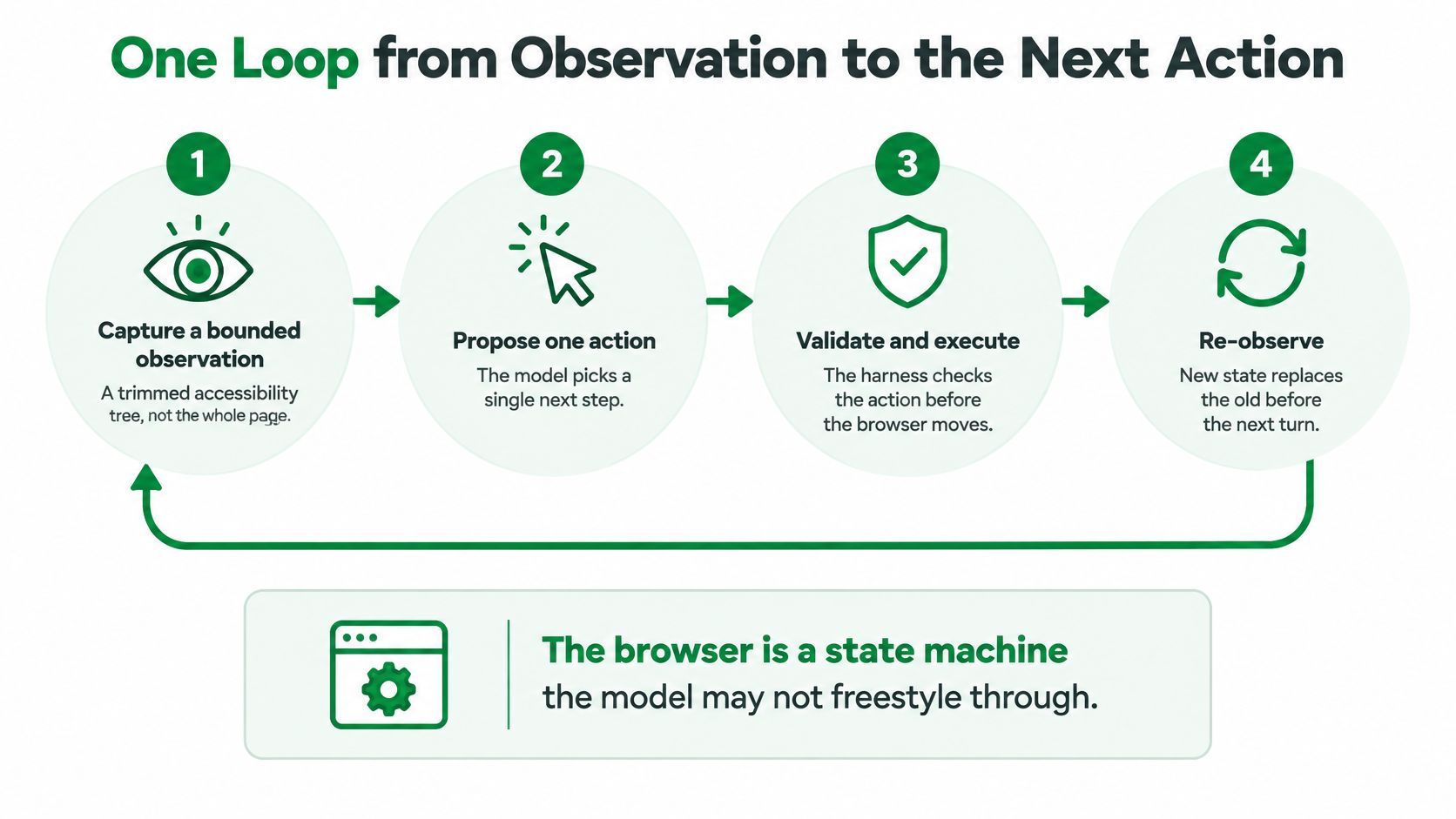
Treat the browser as a state machine the model is not allowed to freestyle through. The model may choose the next checklist item. It does not hold the stick between items. One cycle has five beats.
- Capture a bounded observation. Take a trimmed accessibility tree, a screenshot, or both, plus the URL and the last action result. Never send the whole history. Old turns drown the current DOM and make a stale click look fresh.
- Ask for one typed action. The closed schema is click a ref, type into a ref, select, scroll, move to a page, or stop. Refuse free JavaScript unless a human wrote that snippet and checked it in. Unrestricted script is how a confused turn becomes a broken page.
- Execute and wait for settle. Run that one action in the browser. Wait for a network idle, a selector, or a URL change. A fixed sleep hides the failure until the next observation is already wrong.
- Check a predicate the task owner defined. A selector appearing, a URL change, or a field value has to be true before the next plan. The model's narration is not the check.
- On failure, retry that step or abort. Do not let the model invent a new plan on top of a stale DOM. A second guess stacked on a bad click is how a three-step form becomes a twelve-step wander.
Two clocks, and when to stop
Wall time is the page. Tokens are the observation. A screenshot of a dense dashboard can cost more than the click it justifies, especially if you attach one after every navigation. Turn screenshots on for icon-heavy steps. Leave them off when the tree already names the control.
The model picks the next checklist item. The harness owns the stick between items.
Stop the run when the step budget is hit, the predicate is met, or the same action repeats twice. A repeated click is not persistence. It is a loop with no new information, and it should end the turn rather than open another planning call.
Scores That Do Not Predict Which Step the Model Should Take
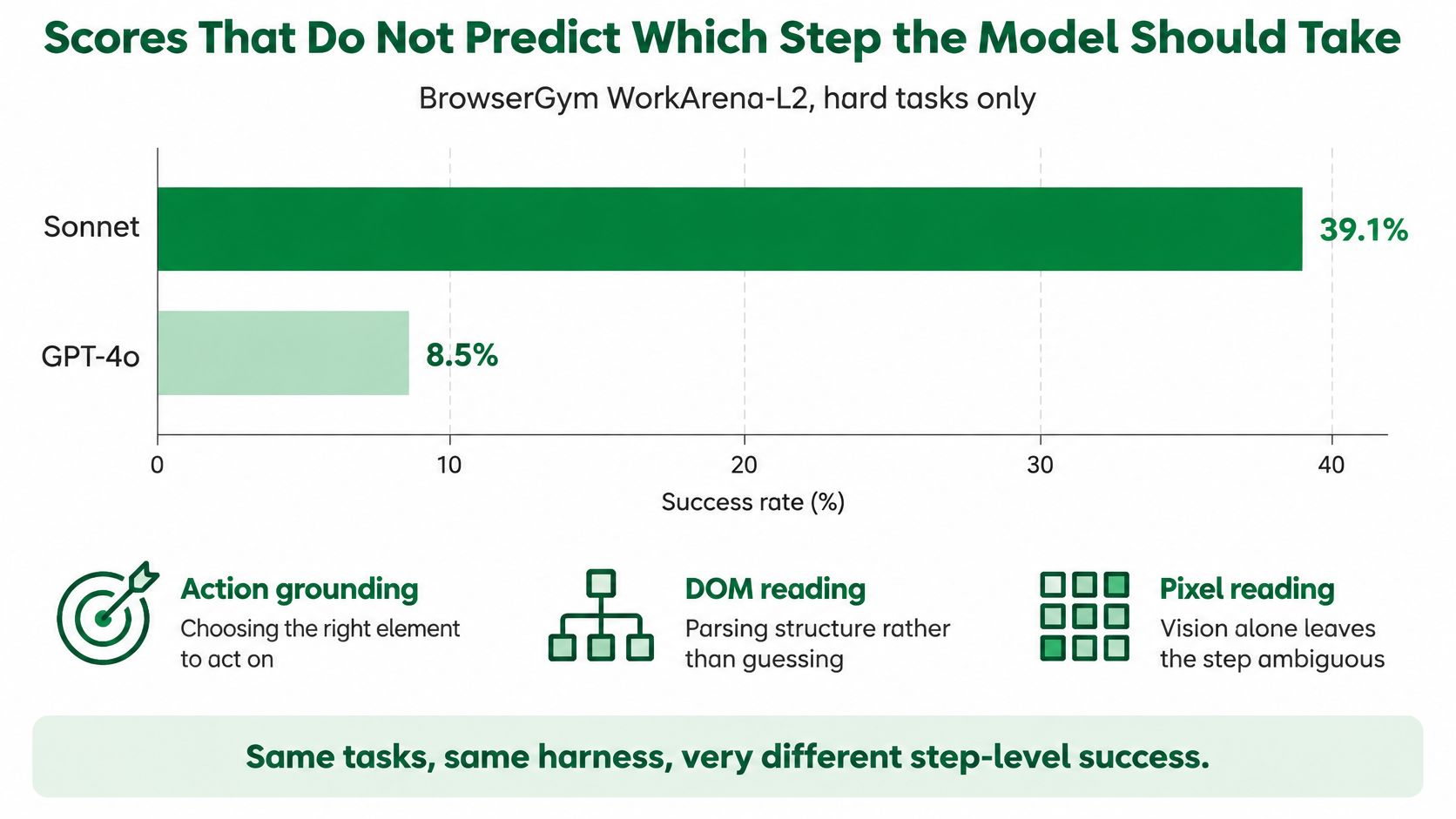
On the hard WorkArena-L2 tasks inside the BrowserGym evaluation, Claude 3.5 Sonnet averaged 39.1% success and GPT-4o averaged 8.5%. Same class of work, very different step-level results. Read that split as a warning about action grounding, DOM or pixel reading, and how much context the model still holds. It is not a shopping list. A model that writes well can still click the wrong node.
Before you deploy, run the same five or ten pages and the same actions through two or three models. Record completion separately from recovery. Recovery means returning to a known URL or selector after a failed click. It does not mean the model wrote a paragraph about the error.
A benchmark of 720 browser tasks found an execution tax from 0.0% to 22.9%, and reliability-adjusted accuracy diverged from raw success. Overhead changes the ranking. A smaller model that emits only typed actions, retries once, then hands off can finish more tasks per dollar than a larger model that keeps planning. I would take that trade on any workflow you run on a schedule.
Six counters, then a route
Log these on every run. A single task-success number will not tell you which step to take off the model.
- Step success: Did this action's predicate pass, yes or no.
- Retries: How many times that same step was attempted.
- Latency: Wall time from observation to settle.
- Token cost: Observation plus the action call, not the whole day rolled into one figure.
- Extraction correctness: Fields matched the schema, including empty when the page was empty.
- Human escalation: A person was asked, and the run did not pretend to finish.
Do not use a WebArena or Mind2Web score as a release gate. Those environments are frozen or scripted. Your pages move, set cookies, and throw dialogs those harnesses do not. If you need a method for comparing runs on your own pages, use performance benchmarking on the counters above, not on a leaderboard from another site.
| Situation | Route | Why |
|---|---|---|
| Known URL, static HTML or JSON | Direct HTTP | No browser time and no tokens |
| Rendered public page, fields only | One browser load, then schema extraction | A single observation is enough |
| Consent, scroll, login, then extract | Scripted actions; model maps fields after | Fewer model decisions |
| Unknown site, multi-step goal | Agent with typed actions and a step budget | The path is not known in advance |
| Purchase, send, download, account change | Human confirmation | The action is hard to undo |
| Stale DOM, dialog, rate limit, partial form | Retry that step or fall back to HTTP | Continuing the plan compounds the error |
The rule under the table is simple. The model sees a browser only for a step a request cannot express. Known HTML or JSON is a GET. A public page that only needs fields is one load and a schema parse. Cookie banners, infinite scroll, login, and lazy images are scripted click, scroll, type, and wait. The model names fields afterward. An unknown multi-step site gets typed actions and a budget. Purchases, messages, downloads, and account changes stop for a person. After a stale DOM, a consent dialog, a rate limit, or a half-finished form, retry that step or fall back to HTTP.
If you can write the selector today, don't ask the model to find it tomorrow.
Workflows That Survive Contact with Real Sites
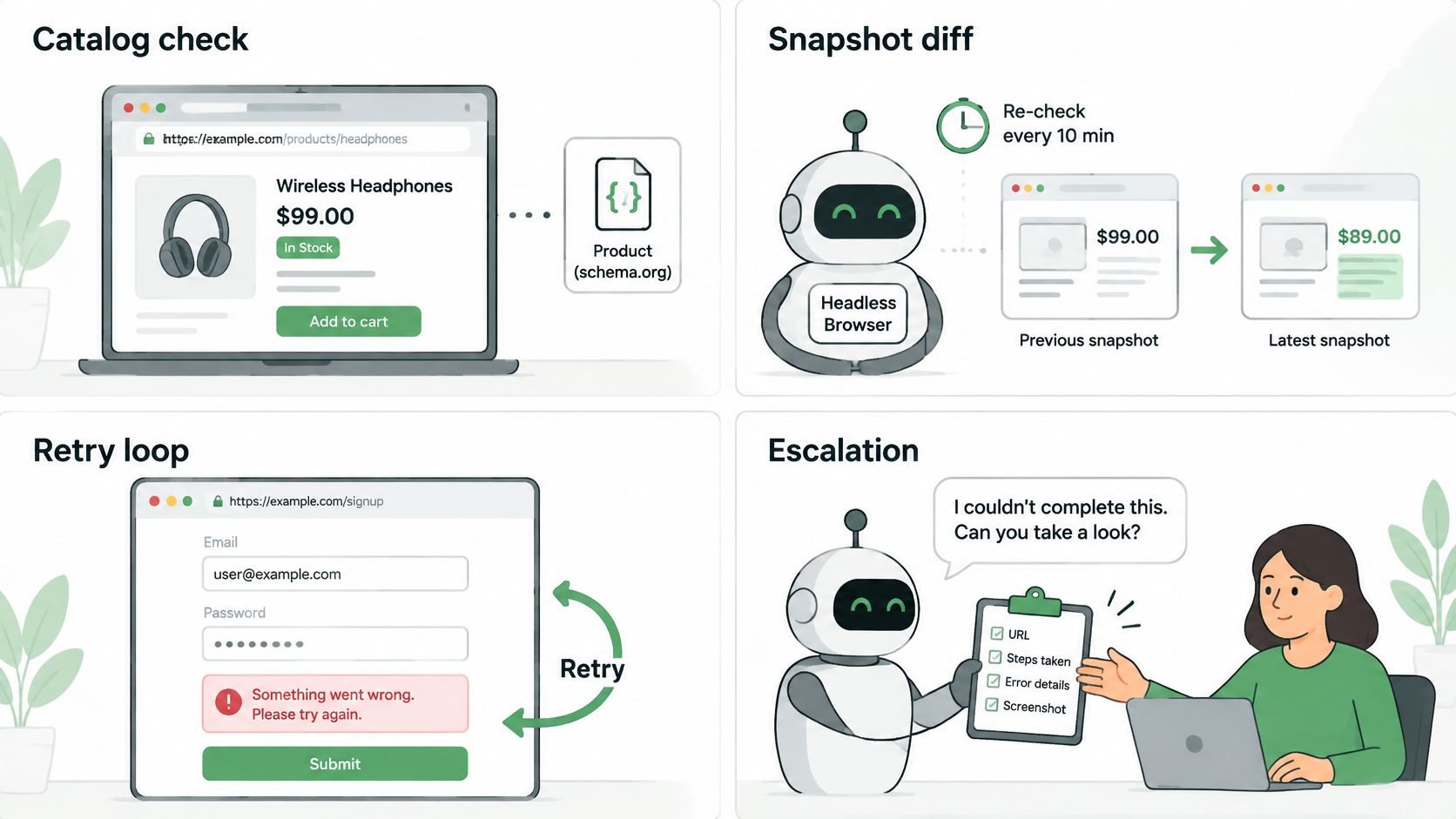
Short scripted demos hide the failures that show up on live sites. The 2025 Online-Mind2Web study, "An Illusion of Progress? Assessing the Current State of Web Agents," used 300 realistic tasks across 136 websites for that reason, as the paper records. Four jobs cover most of what teams ask for. Each one already has a route.
A catalog, a status page, a form, a doc
Say a merchandiser checks price and stock on a public catalog every morning. That is one browser load and a schema extraction. The model names title, price, and availability. It does not paginate by guessing the next button. A late-loading price is a scripted wait for the node, not a reason to hand the session over. Teams that want bot answers for product catalogue questions still need that extract to be a checked field, not a paragraph the model improvised.
A support agent reading a public status page is the same shape. Load once, map the incident fields, stop if the page asks for a login. Logging in "just to see" turns a read into an authenticated session you now have to isolate.
An internal QA pass that must open a menu, fill a form, and assert a confirmation is planner plus scripts. The clicks are code. The model only judges the final text against the sentence you expected. A cookie banner in the way is a scripted dismiss. It is not a new planning problem.
A research task on an unfamiliar documentation site is the genuine agent case. Find the setting, follow two links, copy the parameter. Cap it at a handful of typed actions. If a download or an account prompt appears, a person takes the click. Infinite scroll on that doc site is a scripted scroll-and-wait, then one more observation.
The handoff
Copy this pattern, not a longer agent. One observation, one check, one handoff, and a person on any action that leaves the building. Pages that block automated clients are a separate problem from model quality. Read how anti-bot protection changes the fetch before you blame the planner for a page that never rendered.
The short walkthrough below shows the same idea on a live page: observe, act once, check, and stop.
Watch the video on YouTubePages That Try to Steer the Agent
A page can steer the agent without looking dangerous. Read-only does not mean safe. Research that evaluated eight browser agents found 30 privacy vulnerabilities across 15 measurements, including disabled browser privacy features and agents that typed sensitive personal data into forms on their own, as summarized in this privacy study of browser agents. Separate security work showed that prompt injection on a page can push an agent to exfiltrate credentials stored in the profile or sitting in the context window.
Read-only browsing is not automatically safe. Page content can still talk the agent into disclosing context or taking an action you did not plan.
Solving a challenge, or looking like an ordinary browser, is not a security control. The agent can still be talked into revealing what it was given.
Boundaries you can actually enforce
- Public collection gets an empty profile. No accounts, no saved cards, no personal autofill. If the task is a public page, the profile should have nothing worth stealing.
- Authenticated work gets a different profile, one task at a time. Cookies from a support login do not ride along on a catalog scrape.
- Secrets stay out of the planning prompt. Cookies, passwords, and payment fields never enter the text the model reads. If the model cannot see it, a hostile review cannot ask for it.
- Bracket page text before it is quoted. An instruction hidden in a product review is data inside a fence, not a command beside your system prompt.
- A person confirms purchases, submissions, downloads, and account changes. The model may prepare the form. It does not press the final control.
- Log the tool call and the selector, not the raw value of a sensitive field. You can debug the click without keeping the secret.
The test is blunt. If the page can name an action the agent is allowed to take, the boundary is still too wide. Least privilege here means the action schema is smaller than the set of things the page might ask for.
Ship a Short Loop Before a Long Agent
Ship one public-page workflow this week. Don't ship a general web agent. Pick a page whose fields you can name. Cap the run at five typed actions. Require a predicate after each action: a selector appearing, a URL change, or a field value. Log step success, retries, latency, token cost, extraction correctness, and human escalation. Don't widen the task until step success is boring.
If the page is only being read, prefer one browser load and a schema parse over an open observe-act loop. That single fetch is where we fit. You send one request with a URL to one endpoint, we run a real browser through a residential IP, and you get one JSON response with status, full HTML, cookies, and LLM-ready Markdown. Our API reference is also available as a single LLM-ready file you can feed to Cursor, Claude Code, Copilot, or ChatGPT, and the same client plugs into Claude Code Skill, LangChain, LlamaIndex, Zapier, and Make. For a wider look at where agents earn their keep outside the browser, see how teams automate repetitive tasks with AI agents.
Keep purchases, submissions, downloads, and account changes in your own confirm-before-submit code. Leave cookies, passwords, and payment fields out of the planning prompt on either path. Stop when the step budget is hit, the predicate is met, or the same action repeats twice. Let the model choose among typed actions only after a script and a single fetch have both failed, and keep a person on any click you would not want replayed from a log.
Scrappey runs a real browser through a residential IP and returns status, HTML, cookies, and LLM-ready Markdown from one request, so a read-only step never needs an open agent loop. Use it when the hard part is loading the page, then keep typed actions and human confirmation for the clicks a script cannot express. Start with a public URL on Scrappey.